
  1. Home
  2. Computing
  3. Web
  4. Evergreens

How to turn off targeted ads in Google

Say 'see ya' to those pesky targeted ads from Google for good

Add as a preferred source on Google
Chrome OS
Image used with permission by copyright holder

Ever wonder what Google actually knows about you? Or why that ad pop-up is strangely semi-related to something you Googled yesterday? Google recently updated its “Ad Settings” feature, now letting you see why certain ads are targeted toward you and what information Google thinks it knows about you.

With the update, you can turn off certain interest signals that Google uses for targeting ads, giving you the freedom to manage your ad settings. If you don’t want Google to personalize your ads, it will now let you opt out entirely. The process is simple and easy, taking just one minute.

Recommended Videos

First, make sure you are logged into your Google account. Click the box in the upper right-hand corner and hit “My Account.”
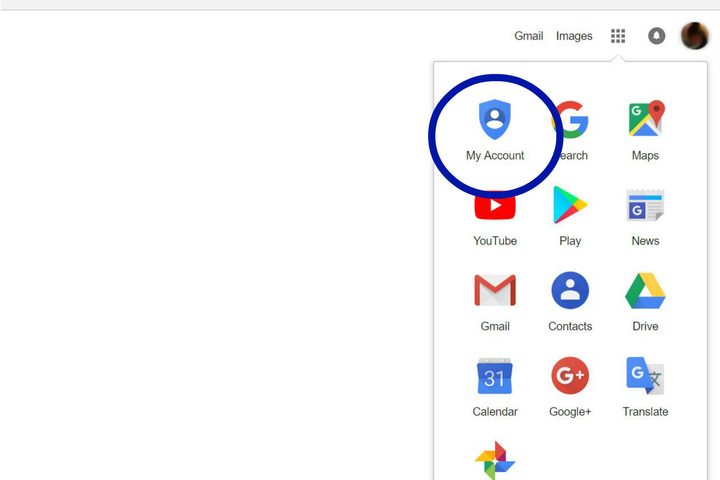
Image used with permission by copyright holder

You will be directed to your account, where you can access all of your information. Click on “Ad Settings,” underneath the “Personal info & privacy” column.
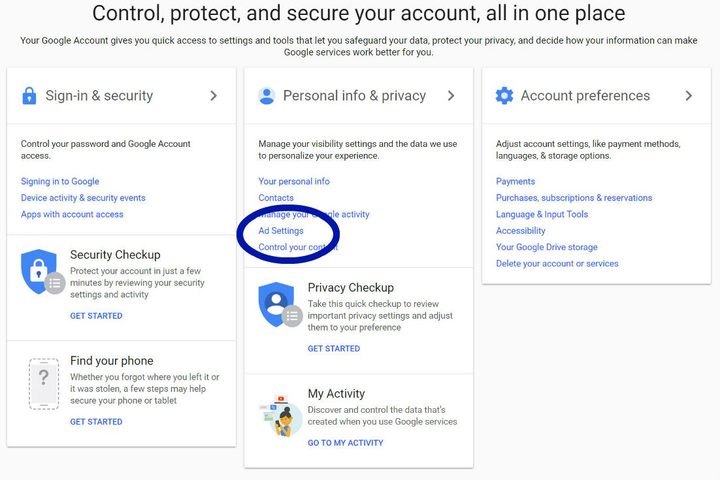
Image used with permission by copyright holder

Once at this window, click “Manage Ad Settings.”
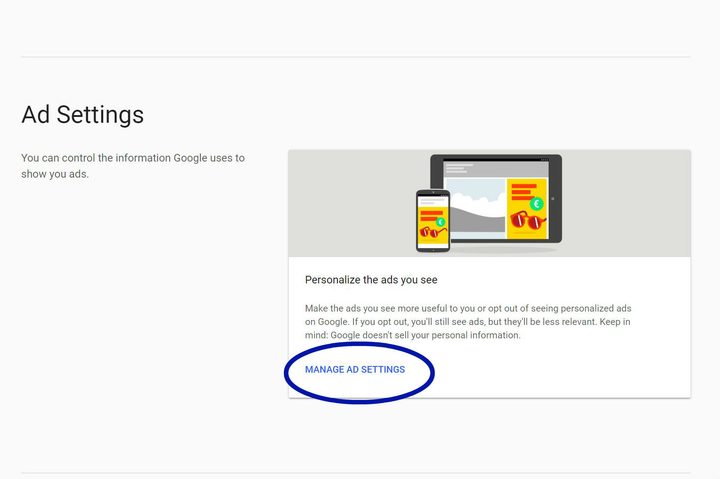
Image used with permission by copyright holder

You will be directed to a screen that shows you whether or not your ad personalization is on or off. Slide to the left and your ad personalization will be off.
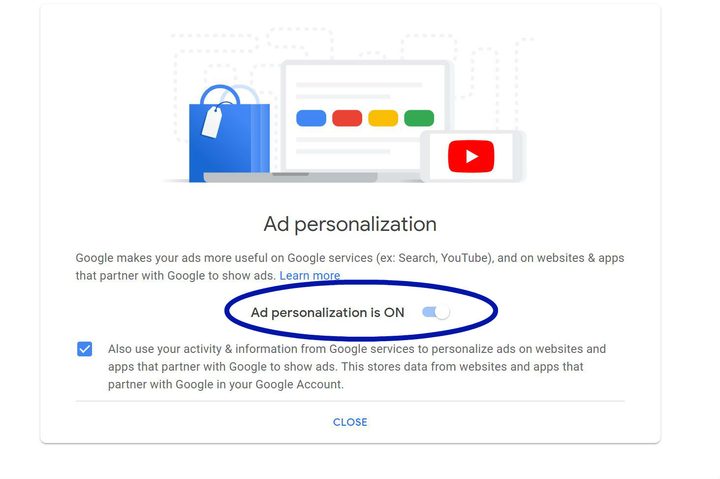
Image used with permission by copyright holder

Google will pop up, telling you what turning off personalization will do, stressing the fact that you will still receive ads, but they will no longer be tailored toward you.
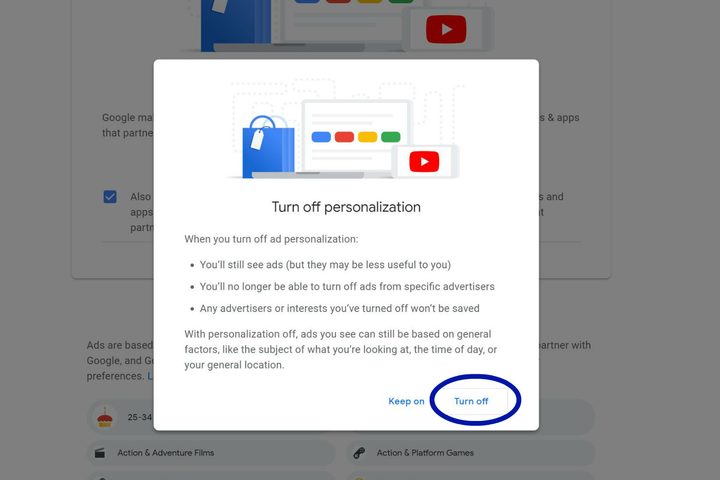
Image used with permission by copyright holder

If you are at all interested in what Google ads they thought you would like, scroll to the bottom of the screen before turning off personalization. Some may make sense, others may leave you entirely confused.
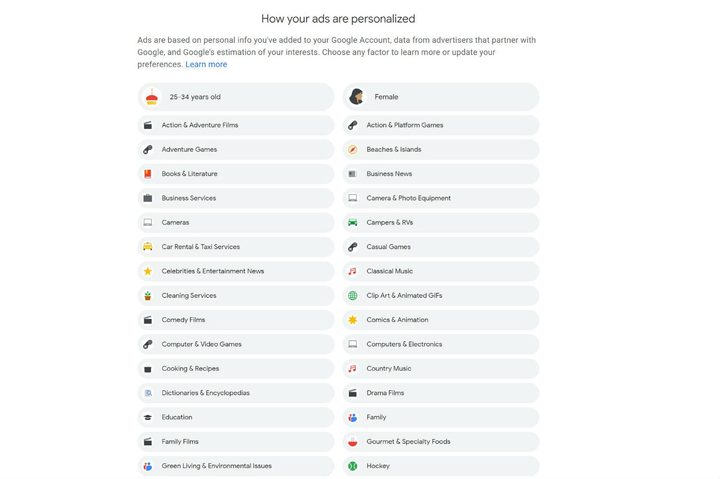
Image used with permission by copyright holder

If you don’t want to turn your personalization off, but want to get rid of ads that don’t have anything to do with you, click on the specific topic that you want to get rid of, and click “Turn off.”

Image used with permission by copyright holder

Google also updated its “Why this ad?” feature that appears next to ads, and lets you know why you are seeing this certain ad in your feed. They have expanded the coverage of the feature, you will now see “Why this ad?” notices on all services that show Google Ads, including YouTube, Google Play, Gmail, Maps, Search, and nearly all websites and apps that partner with Google to show ads.

If personalizing what ads you see is not enough, we rounded up the best ad blockers for Chrome, helping you hopefully get rid of ads once and for all.

Kailla Coomes
Former Staff Writer
Kailla is a staff writer from Portland, Ore. She studied Journalism at the University of Oregon and graduated in 2014. In her…
Excited for macOS Golden Gate? Check out all the supported Mac models
Apple's macOS 27 Golden Gate officially marks the end of Intel Mac support.
macos-27-golden-gate-compatible-models

Apple just unveiled macOS 27 Golden Gate at WWDC 2026, and there is one thing every Mac owner needs to know right away — Intel Macs are officially out. macOS 27 will only run on Apple silicon machines, which means the transition Apple started in 2020 has now fully closed the door on its older processors.

If you are still on an Intel Mac, you will receive Apple security updates through 2029, but the era of major software upgrades for those machines is over.

Read more
Apple unveils macOS 27 Golden Gate with standalone Siri AI app and smarter Apple Intelligence features
Spotlight search is apparently graduating into a full-time AI assistant now
macOS 27 Golden Gate

Apple has officially previewed macOS 27 Golden Gate at WWDC 2026, introducing one of the biggest AI-focused updates to the Mac in years. The upcoming operating system brings a dedicated Siri AI app, expanded Apple Intelligence features, redesigned Liquid Glass visuals, and deeper integration across apps like Spotlight, Mail, Photos, and Messages.

The company says macOS 27 Golden Gate will launch publicly later this fall, while the first developer beta is already available. A public beta is expected to roll out in July. One of the biggest additions is the new standalone Siri AI app for Mac. According to Apple, the upgraded Siri experience is designed for more conversational and open-ended interactions instead of simple voice commands. Users will be able to ask follow-up questions, reference personal information stored across apps, and interact with on-screen content more naturally.

Read more
iPadOS 27 brings a smarter Siri, permanent Menu Bar, and iPhone app resizing to your iPad
iPadOS 27 follows one of the most ambitious iPad updates in years with something quieter but arguably more useful.
Computer, Electronics, Tablet Computer

iPadOS 26 was Apple's most ambitious iPad update in years. It was a sweeping productivity overhaul that redesigned multitasking and made the iPad feel closer to a laptop replacement. 

iPadOS 27, announced at WWDC 2026, takes a different approach. This one is more about doing the existing things better and faster, along with a few notable upgrades. 

Read more