  1. Home
  2. Photography
  3. Mobile
  4. News

iPhone users can now shoot RAW DNG photos inside Lightroom

Add as a preferred source on Google

Earlier this week, we shared with you why the integrated RAW capabilities of iOS 10 are a big deal. While we’re going to see many of our insights come to life over the coming years, Adobe has already given us the first glimpse of the future in the form of a brand new Lightroom Mobile update that lets you shoot RAW DNG files with your iPhone’s camera.

For some time now, Adobe Lightroom Mobile has been able to edit RAW images. But never before has it been able to capture native RAW photos within the app itself.

Recommended Videos

Like RAW photos on DSLRs, the DNG files captured within Lightroom will be able to be adjusted without sacrificing on quality when it comes to color balance, minor exposure alterations and more. In addition to post-production adjustments, the RAW files will be able to capture more dynamic range and overall detail to work with.
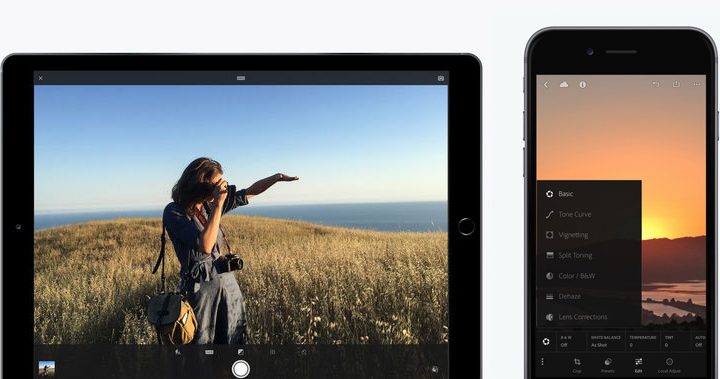
Lightroom Mobile
Image used with permission by copyright holder

One of the key components is the DNG file format that’s being used by Adobe. Now that Android and iOS are both capable of capturing and editing RAW DNG file formats, the workflow of photographers around the world can be a little more simplified through a unified file type and cloud-based platform.

Unfortunately, the RAW photo capture capabilities aren’t for all. Adobe says the DNG shooting will be limited to iPhone devices with Apple’s 12-megapixel cameras, which includes the iPhone 6s and 6s Plus, iPhone SE, iPad Pro (9.7 inch), and iPhone 7 and 7 Plus models. If you have anything before that, it looks like you’re out of luck.

The update should be available for free within the iOS App Store. To use Lightroom Mobile, you will need to have one of Adobe’s Creative Cloud subscriptions. To find out more about the latest update, you can head on over to Adobe’s website.

Gannon Burgett
Former Editor
Google releases big v4.0 update for its popular Snapseed editing app on Android
Electronics, Phone, Mobile Phone

After years of sitting on its hands, Google appears to have remembered it owns one of the best photo editing apps on mobile. Snapseed 4.0 is now rolling out to Android, bringing the platform up to speed after a stretch of iOS exclusivity that left Android users watching from the sidelines.

The story starts last June, when Google quietly broke Snapseed out of its long dormancy with a significant 3.0 update for iPhone. It was a surprise move that suggested the company was serious about the app again. Google then confirmed at the start of this year that Android wouldn't be left behind for long, and true to that word, the Play Store listing has now been updated to reflect version 4.0 — skipping straight past 3.0 for Android users and landing both platforms on the same version simultaneously.

Read more
Google Photos gets new editing tools that are all about subtle touch-ups
Google Photos just made your camera roll feel like it came with a makeup artist included, and the results are refreshingly understated.
Google Photos Touch Up feature in action.

Whether it is dark circles from a late night of work, a blemish that showed up uninvited, or something similar that could use additional brightness, Google Photos now has you covered.

Google has officially rolled out a new Touch Up suite inside its Photos app editor, integrating face retouching tools directly into the app for the first time. Previously, such adjustments were only available inside Google’s Camera app at the time of capture. 

Read more
Adobe Firefly AI will let you edit in creative software by just talking your way through it
Adobe's new AI Assistant can now run your entire creative workflow. Yes, all of it.
Adobe Firefly logo on dark background

Adobe has quietly been building something big inside Firefly, its all-in-one creative AI studio. And today, the company is ready to show it off.

Meet Firefly AI Assistant, a conversational tool that lets you describe what you want to create and then handles the execution across Adobe's entire app ecosystem, including Photoshop, Premiere, Lightroom, Express, and Illustrator. 

Read more