  1. Home
  2. Photography
  3. Apple
  4. News

Ditch the studio lights — Apple’s new camera feature uses AI to light your face

Add as a preferred source on Google

Of all the announcements at Apple’s event today, one stands out as the most interesting for photographers: Portrait Lighting. This new photography feature, designed to emulate studio photography lighting on a smartphone, was only briefly glossed over in the keynote, but stands out as an impressive piece of hardware and software engineering that’s yet to be seen anywhere, let alone in a smartphone.

Put in the most simple terms, Portrait Lighting uses the depth map — captured by the dual cameras on the iPhone 8 Plus — to intelligently dodge and burn the contours of a human’s face to replicate the appearance of studio lighting.

Recommended Videos

As shown on stage inside Steve Jobs Theater, Portrait Lighting works hand in hand with Portrait mode, a camera feature first released last year alongside the iPhone 7 Plus.
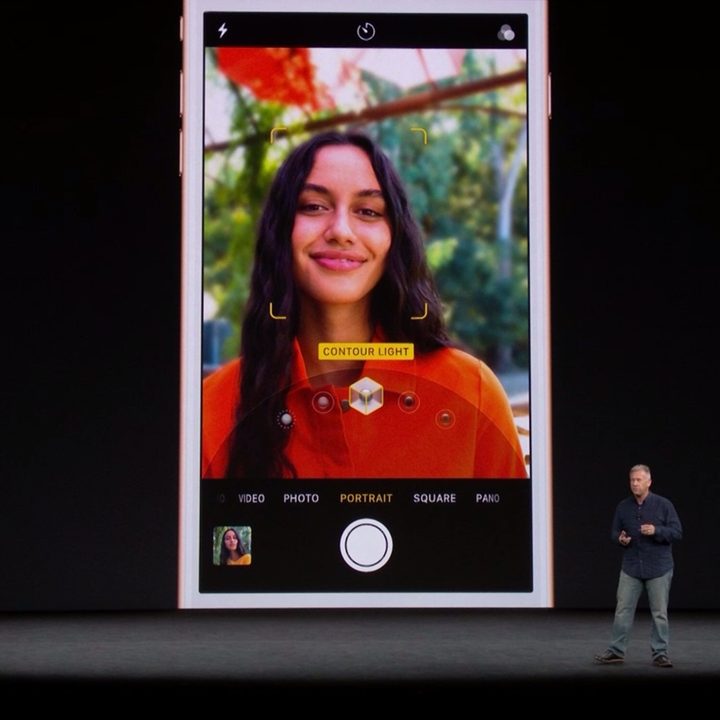
Image used with permission by copyright holder

To use Portrait Lighting, open up the iOS camera app and swipe over to the Portrait mode. Once a face is recognized, you can tap on the screen to bring up an overlay that features multiple lighting styles. These individual lighting styles include Natural Light, Studio Light, Contour Light, Set Light, and Set Light Mono. Each of the styles are designed to replicate a specific lighting setup that would traditionally be made with the help of three or four lights and light modifiers, except it’s all done through intelligent, selective brightening and darkening of facial features.

Normally, the process of dodging and burning an image would take a great deal of time inside a dedicated photo editing program. But, thanks to Apple’s clever implementation of its depth information and accompanying software, iOS can now do it with the tap of a button or two.
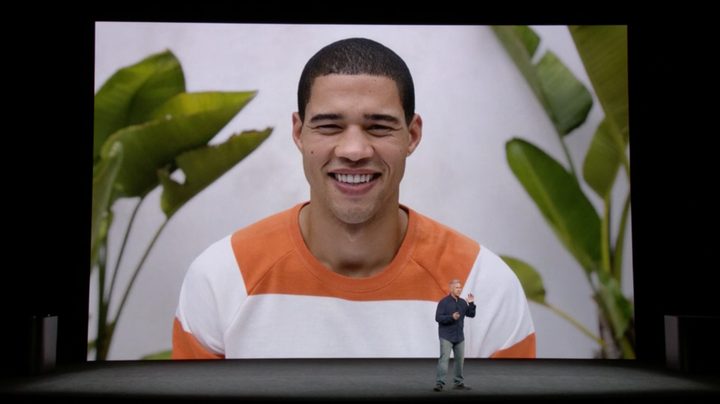
Image used with permission by copyright holder

If it’s anything like the Portrait mode it works alongside, it could prove to be an impressive feature. And one that will likely improve as time goes on. In fact, Apple goes so far as to label the feature “beta” on its website, much like it did with Portrait mode in its infancy.

Will it be putting professional portrait photographers out of jobs anytime soon? No. But it’s a welcomed feature for the masses who don’t have access to thousands of dollars worth of studio lighting for their selfie needs.

Gannon Burgett
Former Editor
Google releases big v4.0 update for its popular Snapseed editing app on Android
Electronics, Phone, Mobile Phone

After years of sitting on its hands, Google appears to have remembered it owns one of the best photo editing apps on mobile. Snapseed 4.0 is now rolling out to Android, bringing the platform up to speed after a stretch of iOS exclusivity that left Android users watching from the sidelines.

The story starts last June, when Google quietly broke Snapseed out of its long dormancy with a significant 3.0 update for iPhone. It was a surprise move that suggested the company was serious about the app again. Google then confirmed at the start of this year that Android wouldn't be left behind for long, and true to that word, the Play Store listing has now been updated to reflect version 4.0 — skipping straight past 3.0 for Android users and landing both platforms on the same version simultaneously.

Read more
Google Photos gets new editing tools that are all about subtle touch-ups
Google Photos just made your camera roll feel like it came with a makeup artist included, and the results are refreshingly understated.
Google Photos Touch Up feature in action.

Whether it is dark circles from a late night of work, a blemish that showed up uninvited, or something similar that could use additional brightness, Google Photos now has you covered.

Google has officially rolled out a new Touch Up suite inside its Photos app editor, integrating face retouching tools directly into the app for the first time. Previously, such adjustments were only available inside Google’s Camera app at the time of capture. 

Read more
Adobe Firefly AI will let you edit in creative software by just talking your way through it
Adobe's new AI Assistant can now run your entire creative workflow. Yes, all of it.
Adobe Firefly logo on dark background

Adobe has quietly been building something big inside Firefly, its all-in-one creative AI studio. And today, the company is ready to show it off.

Meet Firefly AI Assistant, a conversational tool that lets you describe what you want to create and then handles the execution across Adobe's entire app ecosystem, including Photoshop, Premiere, Lightroom, Express, and Illustrator. 

Read more