
Microsoft typically pushes out big Windows 10 updates twice a year, but the naming conventions are always a cause for rumors. Previous Windows 10 releases have been dubbed the Creators Update, and Anniversary Update, but a new rumor suggests that this year’s first big Windows 10 update, currently codenamed 19H1, could officially be called the April 2019 Update.
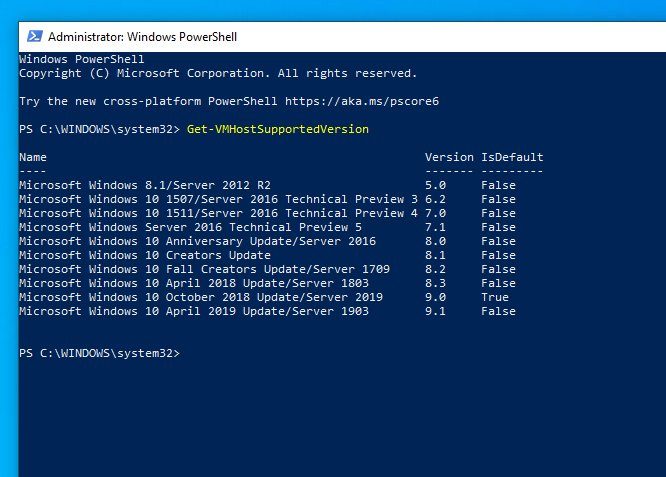
Fueling this latest rumor is a screenshot from Windows Powershell, the task automation and configuration management framework in Windows 10. As posted by Tero Alhonen on Twitter, running the “Get-VMHostSupportedVersion” command in one of the latest Windows Insider beta releases lists the Windows 10 April 2019 Update as one of the results. Though best to taken lightly, it suggests that Microsoft could be following along with its recent naming and release the next version of Windows 10 as the April 2019 Update.
In recent times, final versions of Windows 10 updates have been named for its release months. Though Microsoft pushed out the recent October 2018 update at a month later in November, you could expect to see the latest April 2018 Update at the same time that its name suggests. Microsoft is still in the process of beta testing the release with its Windows Insiders and is running a “Bug Bash” where testers can report back on bugs and other issues encountered. These typically occur at the same time period that the company is preparing to wrap up development on Windows releases and focus attention on the next project.
There are plenty of improvements and new features in the upcoming version of Windows 10. Microsoft will be separating Windows 10 search from Cortana, improving privacy settings with the microphone, and introduce a new Light theme with the release.
As for what’s next with Windows beyond the April 2019 release, rumors speculate that Microsoft could be building for a new wave of foldable devices. Reports have also said that Microsoft is looking to target Chromebooks with a new Windows Lite OS that is much more efficient and only available for preinstallation by laptop makers. It is said to only run Progressive Web Apps, and other UWP apps downloaded from Microsoft’s store, but with the differentiating factor of having everything else stripped out.


