
Your Chromebook’s screen could soon become a lot smarter. Google has announced a new Chrome OS feature called Ambient EQ that will automatically adjust the display’s color temperature and white balance based on your surroundings. The company says the setting will “make the content on screen appear more natural and easier on your eyes.”
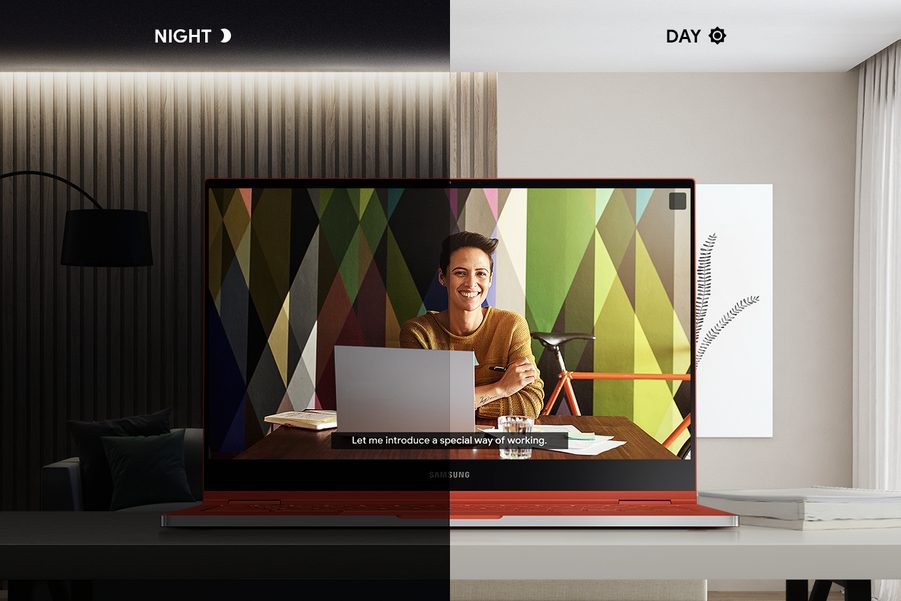
“With Ambient EQ, Chromebook screens adapt to any context — whether you’re working outdoors on a sunny day, or if you’re watching a movie while snuggled under a blanket,” Alexander Kuscher, director of Chrome OS Software, wrote in a blog post.
Ambient EQ first appeared on Google’s latest smartphones, the Pixel 4 series and takes advantage of a mix of algorithms and sensor data to figure out what the screen should look like. It’s fundamentally also similar to the True Tone technology Apple bundles on its iPads and iPhones.
However, Ambient EQ won’t be available on every Chromebook. It will debut on Samsung’s new premium Galaxy Chromebook (and, oddly, not Google’s own Pixelbook Go) in the United States, which is supposed to launch sometime in April. Google says the feature will eventually roll out to more Chromebooks. Although at the moment, it’s unclear when and which Chromebooks will be eligible. Given that Google hasn’t mentioned the Pixelbook Go either, it’s possible the feature will be restricted to the latest Chromebooks.
Ambient EQ is part of the Chrome OS 80 update that also includes a range of other handy additions. The Netflix Android app can now work in a picture-in-picture mode on Chromebooks letting you play a movie or series in a tiny, floating window. It activates automatically as soon as you switch to another window, and you don’t need to switch on any toggle.
In addition, Chrome OS 80 houses a handful of hidden changes Google is testing for the operating system’s tablet mode. The Chrome browser features a revamped tab strip that’s a lot more touch-friendly and offers a carousel view of your active tabs. What’s more, Google is expected to expand Android 10’s navigations gestures to Chromebooks like swiping back on the left or right edge to return to the previous screen.


