
A docking station is designed to make life easier for more complex laptop setups. These stations allow you to route monitor connections through your laptop, charge accessories, hold extra storage, and make your laptop a bit more functional. It’s an ideal solution for managing projects on multiple screens via a laptop, streaming games to an audience, important editing or design work, and more. We’ve reviewed many of the best laptops and looked at a lot of various docking stations for each: Here are our top recommendations!
Note: With the latest ports and operating systems, compatibility with Windows 11 or MacOS isn’t really an issue. All our docking station picks work with both.
Corsair TBT100 Thunderbolt 3 Dock

While Corsair’s spectacular Thunderbolt 3 dock is designed for gamers, it’s an excellent pick for anyone who is juggling a laptop, desktop, and several accessories at the same time. Do you want to out two different 4k video streams at 60Hz at the same time? No problem. Power up your laptop with up to an 85W charger or smaller devices with the 15W option? Easily done. Transfer data at 40Gb/s? Yep! HDMI, USB-C Gen 2, USB-A 3.1, Gigabit Ethernet, and a UHS-II SD card reader are all included, along with the Thunderbolt 3 connectivity.
The Corsair Thunderbolt 3 dock also includes a Kensington Security Slot to discourage theft in more public places, and a 3.5mm jack in case it’s easier to plug in your headset on the dock than any other device. It works equally well with Mac or PC, although Thunderbolt 3 support is necessary.
Belkin Thunderbolt 3 Pro Dock
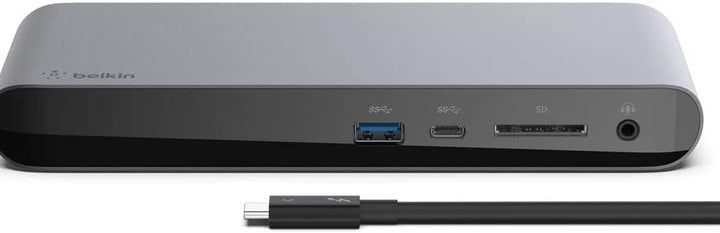
This Belkin model is packed with connection possibilities, including two Thunderbolt 3 ports, DisplayPort, USB-A 3.1, USB-C 3.1, four USB-Z 3.0 ports, and Gigabit Ethernet. There’s also a 170W power supply unit that offers up to 85W of charging power, an SD card reader, and a 3.5mm audio in/out port. that’s enough to support dual 4K displays, offer a 40Gbps data transfer speed, and manage all your peripherals without breaking a sweat. The stylish aluminum case also helps protect the dock while looking great.
The Belkin Thunderbolt 3 Pro docking station is geared toward professional use at editing or design stations, and the price reflects that, but it can also be used at home in a busy home office, gaming station, or similar spot where you have a lot of connections that need management.
Kensington SD5300T Thunderbolt 3 Docking Station

Don’t let the slim design of this Kensington station fool you: Inside is enough power to easily handle two 4K video connections or a 5K resolution single monitor. There’s one Thunderbolt 3 port (with compatible cable included) and one USB-C port, along with five USB 3.1 ports and a Gigabit Ethernet port. The headphone jack supports mics too, and there’s an SD card reader for easy storage expansion. All this combines into one easy-to-use station that even has VESA mounting holes for positioning it above a desk. For those who absolutely need an HDMI connection, a USB-C to HDMI adapter is included.
Belkin Thunderbolt 3 Dock Mini
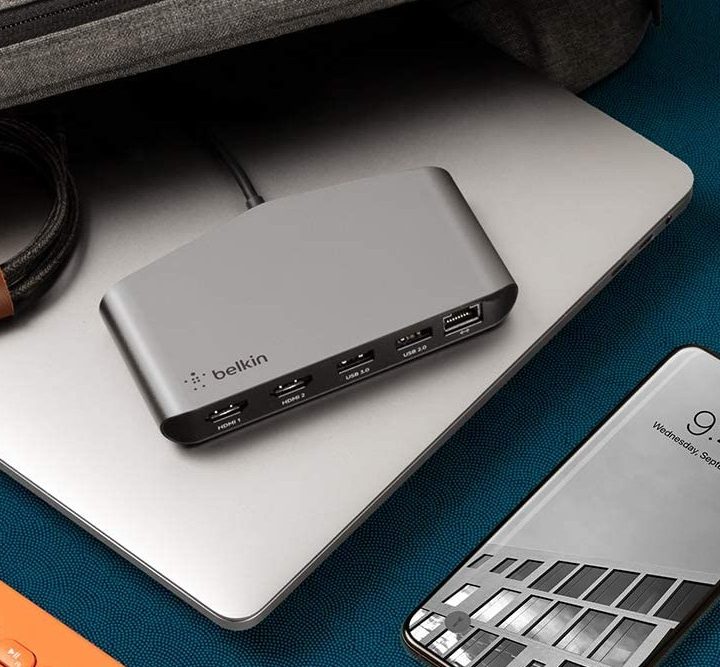
Bulky docking stations can be intrusive, luckily Belkin designed its mini docking station with a small footprint and an eye toward portability. Whether you’re mobile or just prefer a tidy work area, this dock stores easily in a laptop bag or backpack when it’s not in use.
Despite its size, the dock can still handle dual 4K, 60fps displays via HDMI, plus a USB 3.0 and USB 2.0 port. There’s also a Gigabit Ethernet port for wired connections. However, unlike most of our docking station picks, there’s no 3.5mm headphone jack here, so you’ll have to find your headphone connection elsewhere.
Belkin offers its customers both a two-year manufacturer’s warranty for parts and a two-year manufacturer’s warranty for labor, added insurance if this dock is going to be doing a lot of work in a busy environment.
CalDigit TS3 Plus

This Thunderbolt 3 dock really does have a little of everything. It supports both Thunderbolt 3 and DisplayPort connections for up to two 4K, 60fps displays, with a second Thunderbolt 3 port provided for charging accessories or moving lots of data (ideal for photographers and similar jobs). The first Thunderbolt port provides 87 watts of power for charging a laptop, and the second 15 watts for charging smaller devices.
But that’s just the start: The station also includes five USB-A ports, two USB-C ports (both first and second generations), an optical audio port, and a 3.5mm headphone jack. There’s even a UHS-II SD card slot for expanding your storage capabilities if necessary.
All of this resides inside a well-designed aluminum case with an integrated heatsink. With all the port options, it’s a little bulky, but it’s hard to find a better solution for managing laptop connections.
StarTech Dual Monitor Docking Station

Display ports have gone through quite a few updates over the years. Most of today’s docking stations don’t support legacy connections, but this StarTech dock can: It includes a DVI-to-VGA adapter to make any connection work, as well as HDMI adapters and five USB-A 3.0 ports for managing your keyboard, mouse, speakers, etc. Two of the USB ports on the front are fast-charging ports designed to top off your laptop’s battery in short order, too.
The StarTech dock may lack options like USB-C, but if you’re working with DVI, VGA, and HDMI screens then it’s probably the solution you need. It also includes a headset jack and a separate mic port for audio options. We also like its space-saving vertical design.



