
If you’ve got a Nest Video Doorbell, there are a lot of cool things you can do with it — but one of the most fun things is to add new sounds to the doorbell to celebrate Halloween. You see, Google offers what it calls seasonal themes for its Nest doorbell settings. There’s an option for the winter holidays, but right now is the perfect time to choose the version that plays spooky sounds during the Halloween season (no matter how many people may be showing up at your door this year). Here’s exactly how to enable it.
Note: Our guide is for the Nest Doorbell, wired and battery models. The older Nest Hello doorbell works a bit differently, but the steps in this guide should still apply. While newer Nest Doorbells may get more evergreen themes, Google is still rolling out seasonal themes like Halloween to all doorbells for now.
Step 1: Open the Nest app
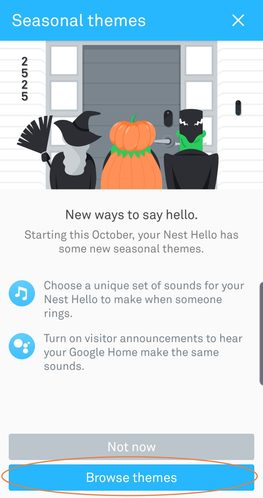
The Nest Doorbell is controlled via the Nest app, which you probably have downloaded on a mobile device. Make sure you are connected to the internet through a reliable connection before you begin. Also check that you are on the right device and, if necessary, the right account for controlling your video doorbell.
Open up the Nest app, and you should see a notification that arrives around the Halloween holiday. It will say New Ways to Say Hello, and at the bottom of the notification, you will see a couple of actions to take. Choose the option that says Browse Themes.
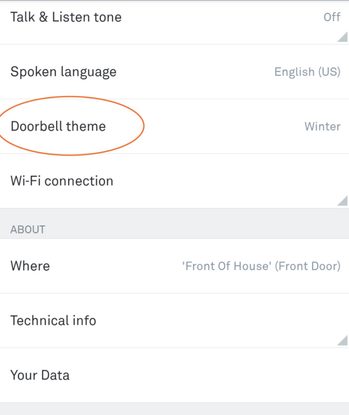
If you don’t see this pop-up in the Nest app, someone may have already closed it. In this case, you’ll have to get there the old-fashioned way. Select your Hello doorbell from the Nest devices, and select the Gear icon at the top right for Settings. Scroll until you see the Doorbell Theme option, and select it.
Step 2: Switch to Spooky sounds

In the Doorbell theme section, you’ll see a section that says Seasonal Themes. Under this section, you should see an option that says Spooky Sounds. Select it, and the dot to the right should turn blue to let you know that it is enabled. That’s it! Your Nest Hello should take care of the rest.
If you do not see the option for spooky sounds, double-check that your Google Home app is updated. The latest version as of October 2021 is 2.44.1.8.
Step 3: Enjoy the doorbell!
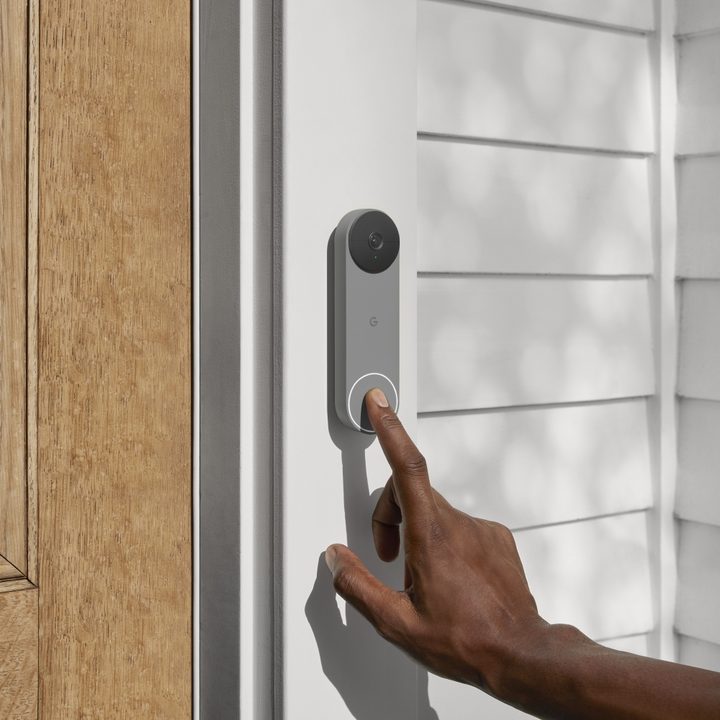
Now, when someone rings the Nest Doorbell, it will play a spooky Halloween sound instead of the normal bell. This sound is randomized, so it may sound different every time, and Google updates the theme each year by removing some old sounds and adding new ones to the mix. This year, the potential doorbell chimes include:
- Evil laugh
- Skeleton dance
- Spooky raven
- Ghost boo
- Howling werewolf
- Cackling witch
The themes will automatically revert back after the spooky holiday is finished, so you don’t have to do anything to stop them or switch back. Unfortunately, this also means you can’t play Addams Family and have the sounds enabled all-year-round — at least, not yet. These themes will play on any other Nest devices in your house if you have visitor announcements enabled, as an accompaniment to the traditional notification.
If you want to get even more involved, you can set up a custom routine to activate any smart bulbs or smart plugs that work with the Nest app when the doorbell goes off. Devices like the Nest Hub can even flash a cartoony haunted house when the sound plays.
When the winter holidays come along, you will see a new set of themes here that include doorbells to celebrate Christmas, Hanukkah, New Year’s Eve, or generic winter solstice sounds. Remember to switch to one of these as well to make sure your Nest Hello keeps celebrating the holidays!



