
With the release of Microsoft Flight Simulator 2020 on Xbox Series X, an influx of new (and returning) players has poured in. And for good reason — this is the easiest way to experience the game, without the need for a powerful (and expensive) PC. In fact, this is the first time Microsoft Flight Simulator has been on a console, opening up the floodgates for an even wider player base.
As its name suggests, Microsoft Flight Simulator 2020 is a simulation game, meaning it focuses on a realistic experience that mirrors the real world. Flight enthusiasts may relish the ability to fly planes in a realistic setting, but newcomers might have a more difficult time getting into it due to its complexity. Thankfully, Microsoft Flight Simulator 2020 has one of the most robust lists of customization options, allowing players to fine-tune the game to their liking.
You can make the game practically play itself, or even turn every assist feature off so it feels like you’re truly flying a plane — and everything in between. Here, we’ll go through all of the best controller settings for the Xbox Series X version (and Xbox Series S). Keep in mind, these settings will make things feel realistic, while still running smoothly — without sacrificing fun. We also won’t be getting into controller button mapping since so much of that comes down to personal preference.
These are the best settings for Microsoft Flight Simulator 2020 on Xbox Series X.
Recommended reading:
- Microsoft Flight Simulator latest mode doesn’t take full advantage of VR’s potential
- Microsoft Flight Simulator 2020 is coming to consoles
- Microsoft Flight Simulator set for takeoff on Xbox Series X/S in 4K
Control options
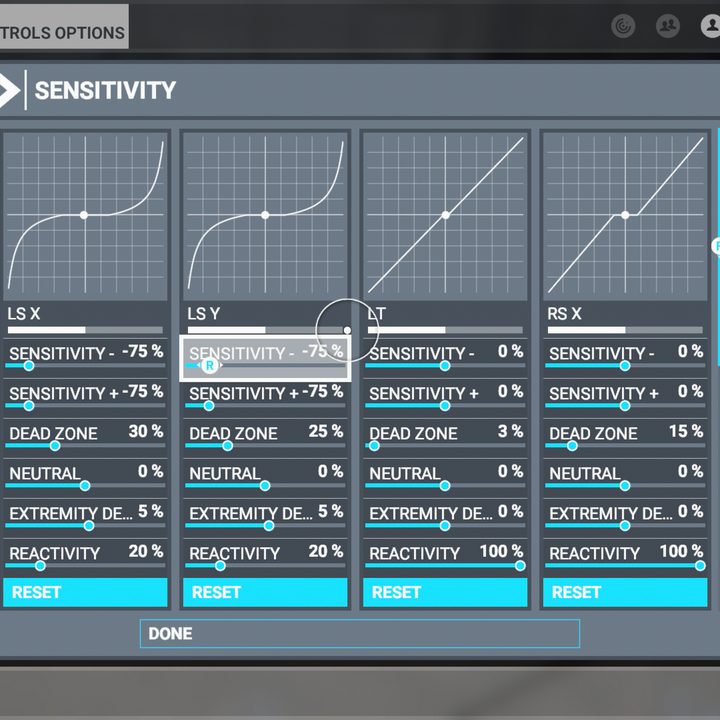
Sensitivity
LS X
| Sensitivity – | -75 |
| Sensitivity + | -75 |
| Dead Zone | 25 |
| Neutral | 0 |
| Extremity Dead Zone | 5 |
| Reactivity | 20 |
LS Y
| Sensitivity – | -75 |
| Sensitivity + | -75 |
| Dead Zone | 25 |
| Neutral | 0 |
| Extremity Dead Zone | 5 |
| Reactivity | 20 |
LT
| Sensitivity – | 0 |
| Sensitivity + | -30 |
| Dead Zone | 5 |
| Neutral | 0 |
| Extremity Dead Zone | 0 |
| Reactivity | 100 |
RS X
| Sensitivity – | 0 |
| Sensitivity + | 0 |
| Dead Zone | 15 |
| Neutral | 0 |
| Extremity Dead Zone | 0 |
| Reactivity | 100 |
RS Y
| Sensitivity – | 0 |
| Sensitivity + | 0 |
| Dead Zone | 15 |
| Neutral | 0 |
| Extremity Dead Zone | 0 |
| Reactivity | 100 |
RT
| Sensitivity – | 0 |
| Sensitivity + | -30 |
| Dead Zone | 15 |
| Neutral | 0 |
| Extremity Dead Zone | 0 |
| Reactivity | 100 |
General options
Graphics
| HDR10 | On |
Camera
Global settings
| Camera selector | Chase |
| Quick view function | Hold |
| Smart camera | Hold |
| Zoom function | Manual |
| Focus mode | Toggle |
Cockpit camera
| Cockpit camera selection | Close |
| Free look mode | Toggle |
| Free look reset | Manual |
| Head up mode | Toggle |
| Height | 50 |
| Horizontal position | 55 |
| Zoom | 50 |
| Zoom speed | 50 |
| Freelook speed | 50 |
| Freelook momentum | 50 |
| Camera shake | Off |
| Flashlight mode | Auto |
| Home cockpit mode | Off |
Instruments
| Instrument view mode | Toggle |
| Instrument view selection | Auto |
Chase camera
| Instrument heads-up display (HUD) | On |
| POV reset | Manual |
| Zoom speed | 50 |
| External freelook speed | 50 |
| External freelook momentum | 50 |
Sound
| Communications selection | Default |
| Warning sounds in external view | Off |
| VHF signal degradation | On |
| Active spatial sound | On |
| ATC text-to-speech settings | Azure |
| Music selection | Color 2 |
Volume levels
| Master | 100 |
| Voices | 65 |
| Aircraft engines | 75 |
| Aircraft miscellaneous | 100 |
| Cockpit | 100 |
| Warnings | 50 |
| Other aircraft | 100 |
| Environment | 100 |
| User interface | 100 |
| Music | 100 |
Traffic
Aviation traffic
| Aircraft traffic type | Real-time online |
| AI aircraft traffic density | N/A |
| Show traffic nameplates | Off |
Airport life
| Airport vehicle density | 100 |
| Ground aircraft density | 100 |
| Worker density | 100 |
Land and sea traffic
| Leisure boats | 100 |
| Road vehicles | 100 |
| Ships and ferries | 100 |
| Fauna density | 100 |
Data
Data connection
| Online functionality | On |
| Bing data world graphics | On |
| Photogrammetry | On |
| Live real-world air traffic | On |
| Live weather | On |
| Multiplayer | On |
Accessibility
Screen narration settings
| Enable screen narrator | Off (personal preference) |
| Screen narrator volume | N/A (personal preference) |
| Screen narrator pitch | N/A (personal preference) |
| Screen narrator speed | N/A (personal preference) |
User interface
| Minimum text size | 25 |
| Interface scale | 100 |
| Menu tooltips | On |
| Instrument name tooltips | Instant |
| Instrument description tooltips | Instant |
| Background opacity | 20 |
| Main color | Default (personal preference) |
| Menu animations | On |
| Subtitles | On |
| Skip pre-flight cinematics | On |
| Controller vibration | 50 |
Cursor settings
| Cursor acceleration | 5 |
| Cursor max speed | 5 |
Assistance options
Aircraft systems
| Automixture | On |
| Unlimited fuel | On |
| Aircraft lights | On |
| Gyro drift | On |
Failure and damage
| Crash damage | Enabled |
| Aircraft stress damage | Disabled |
| Engine stress damage | Disabled |
| Icing effect | On |
Navigation aids
| Route and waypoints | On |
| Taxi ribbon | On |
| Landing path | On |
| Smartcam mode | Auto |
Notification
| Piloting and controls notifications | Off |
| Aircraft system | On |
| Flying tips | Off |
| Objectives | On |
| Software tips | On |
Piloting
| Take-off auto-rudder | On |
| Assisted yoke | On |
| Assisted checklist | On |
| Assisted landing | On |
| Assisted takeoff | On |
| A.I. radio communications (ATC) | Off |
| A.I. anti-stall protection | On |
| A.I. auto-trim | On |
| Assisted controller sensitivity | On |
POI
| Landmark markers | On |
| City markers | On |
| Airport markers | Off |
| Fauna markers | Off |
| Display direction to chosen POI | On |
| Display all labels | Off |
User experience
| ATC UI panel open at start | Off |
| Show message log-in ATC menu | Off |
| ATC voices | Off |
| Checklist UI panel open at start | Off |
| VFR map UI panel open at start | Off |
| Nav log UI panel open at start | Off |
| A.I. piloting in cursor mode | On |


