Google is looking to improve its search results by leveraging both the power of photos, along with additional text for context. The new experience is called multisearch, which will be available on phones and tablets as part of Google Lens inside the Google app.
Google says the feature combines visual and word searches together to deliver the best results possible, even when you can’t describe exactly what it is that you’re trying to search for.
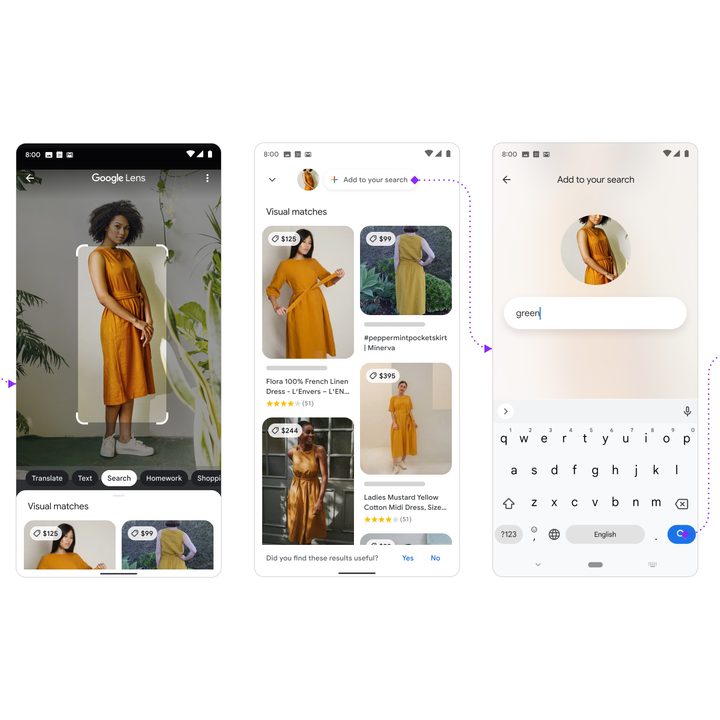
“At Google, we’re always dreaming up new ways to help you uncover the information you’re looking for — no matter how tricky it might be to express what you need,” Google explained of the new multisearch feature. “That’s why today, we’re introducing an entirely new way to search: Using text and images at the same time. With multisearch in Lens, you can go beyond the search box and ask questions about what you see.”
A practical example of where multisearch will be useful is online shopping. Fashionistas may like a particular style of dress but may not know what that style is called. In addition, rather than shopping from a catalog with that particular dress available in a specific color, by leveraging the power of multisearch, you can snap a picture of the dress and search for the color green or orange. Google will even suggest similar alternatives in the colors you want.
“All this is made possible by our latest advancements in artificial intelligence.”
In this sense, multisearch extends the Google Lens experience by not only identifying what you see but by entering additional search text — like the color green — your search becomes more meaningful.
“All this is made possible by our latest advancements in artificial intelligence, which is making it easier to understand the world around you in more natural and intuitive ways,” Google explained the technology powering multisearch. “We’re also exploring ways in which this feature might be enhanced by MUM — our latest AI model in Search — to improve results for all the questions you could imagine asking.”
To begin your multisearch experience, you’ll need the Google app, which can be downloaded as a free app on iOS and Android devices. After you download the app, launch it, tap on the Lens icon, which resembles a camera, and snap a picture or upload one from your camera roll to begin your search. Next, you’ll want to swipe up and click on the plus (+) icon to add to your search.
Some ways to use this new multisearch tool include snapping a picture of your dining set and adding the “coffee table” term to your search to find matching tables online, or capturing an image of your rosemary plant and adding the term “care instruction” to your search to find out how to plant and care for rosemary, Google said.
Multisearch is available now as a beta experience within the Google app. Be sure to keep your Google app updated for the best results.