  1. Home
  2. Gaming
  3. How tos

How to remove a PS5 faceplate and install a new one

Add as a preferred source on Google
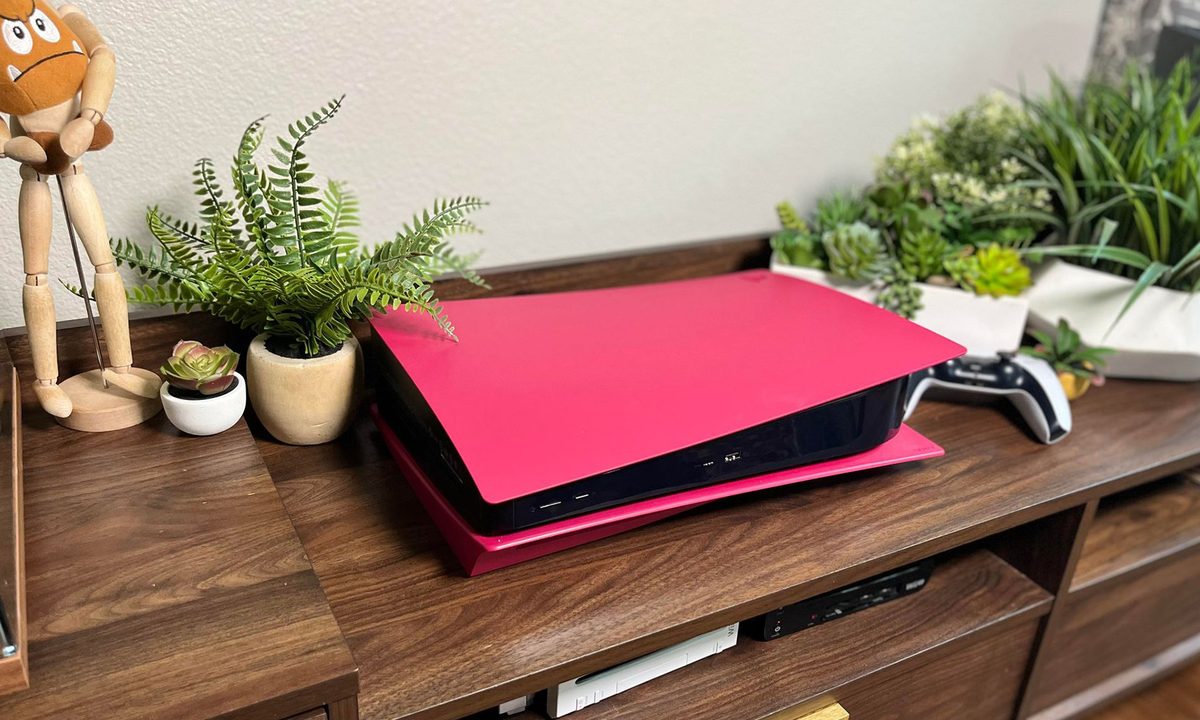
A PS5 sitting in a wood toned entertainment center, showing off it's new red cover.
Image used with permission by copyright holder

The real beauty of the PS5 is in how great the best PS5 games look. The console itself, well, that's another story. We love the design of the best PS5 controllers, but the system itself is kind of an eyesore, but that doesn't have to be the case. If you install a new, colorful cover, you won't have to be embarrassed when you bring your friends over to play some multiplayer games together. If you want your system to really tie your room together, this is an essential PS5 accessory we will help you install in no time.

Recommended Videos

Difficulty

Easy

Duration

5 minutes

What You Need

  • An alternative PS5 faceplate

A new red cover for a PS5 in an unopened white box.
Image used with permission by copyright holder

Before you get started

First, the obvious bit. Before you do anything to your PlayStation, make sure it has been turned off properly, disconnected from power, and, if you have just been gaming on it, has had time to cool. Remove any USB cables and accessories, and find a dry, clean surface to work. Have your new covers on hand and ready to install — no one wants a naked PlayStation in their living room.

Removing the top cover

The white plastic covers on the top and bottom of the PS5 snap into place, which makes removal easy. Place the console with the PS5 engraving to your top right. Press your thumb firmly into the plastic just below the logo, and slide the entire top panel to the left. The entire section will come off in your hand.

The white bottom cover of a PS5 has just been removed, exposing the fan.
Digital Trends

Removing the bottom piece

Flip over your PlayStation, with the front of the console still facing you. Grip the upper-left corner of the plastic cover, and again apply pressure with your thumb. This time, you will be sliding everything to your right. It should give a small “pop” and come right off. We are ready to put the new covers on, but now may be a good time to clean out any dust or animal hair that has accumulated in the console.

Install the bottom

Locate the bottom cover, and align it just to the right of the console. Slide it into place, and press firmly with your thumb near the upper-left corner. A clicking sound will let you know the bottom is securely in place.

Install the new top

Flip the console around, again with the PS5 logo to your top right. Align the cover so that the PS5 cutout is just slightly to the left of the engraved logo on the console. Slide the cover from left to right, pressing near the logo as you do. One last click will let you know that your job is done. Congrats on having the most stylish PS5 on the block.

Justin Koreis
Former Digital Trends Contributor
Justin is a freelance writer with a lifelong love of video games and technology. He loves writing about games, especially…
I found 2 Prime Day gaming laptop deals that dodge the usual RGB regret
The smarter pick depends on what you value more: RTX 5060 performance or a roomier 18-inch screen.
Computer, Electronics, Laptop

Prime Day gaming laptop deals can look impressive until you slow down and read the actual spec sheet. For gaming laptops, the discount only gets interesting after the GPU, display, memory, and storage pass inspection. These two MSI and ASUS deals stand out because their strengths are easy to understand before checkout.

MSI Katana 15 HX

Read more
These gaming accessories are heavily discounted for Prime Day, and I’d buy them myself
After reviewing countless gaming products over the years, these are the Prime Day deals that impressed me the most.
Computer, Computer Hardware, Computer Keyboard

As someone who spends a good chunk of my day gaming, testing gaming hardware, and reviewing everything from monitors and headsets to mice and controllers, I'm always keeping an eye out for genuinely good deals. Over the years, I've used and reviewed hundreds of gaming products, which has also taught me that not every Prime Day discount is as good as it looks. Some products are discounted for a reason, while others become genuinely compelling purchases once the price drops. After digging through this year's Prime Day offers, I've narrowed the list down to gaming accessories that I'd actually recommend to friends and fellow gamers. Whether you're looking for a massive display to transform your battlestation, a tournament-ready controller, or a premium wireless headset, these are the deals that stood out because of their performance, value, and the amount of money you're saving.

1. Sceptre C415B-UUS360 Curved gaming monitor -- best big-screen upgrade

Read more
GTA VI finally gets a price tag and a no-disc rule for physical edition
It will be a single-player experience when it lands on PlayStation 5 and Xbox Series X|S on November 19th.
Poster for GTA 6 game.

Rockstar Games has finally confirmed the asking price of its highly anticipated game, Grand Theft Auto VI aka GTA 6. The game is going to cost $79.99 in the US for the standard edition, and if you're willing to plonk extra cash on the Ultimate Edition, you will have to part ways with $99.99 per copy. Pre-orders for the game are starting today, June 26th, at midnight, and you will be able to reserve a copy for the PlayStation 5, Xbox Series S, and Xbox Series X.

The asking price is definitely on the higher side. However, it's still below the $100+ speculations that were floating just a few weeks ago. By PC and console gaming standards, $80 as a starting price is still quite a high fee. So far, only Nintendo has been able to sell games with a similar price tag and has courted plenty of backlash for it, as well.

Read more