
 Foursquare announced it will officially bring an event check-in feature to its users. Now instead of simply broadcasting your location, Events will allow users to inform friends about what they’re doing and perhaps even entice others to join.
This new check-in feature is a move that simply formalizes what users have been doing already. However, the formalization means less clutter, is less time-consuming and possibly more informative than the way things were done in the past.
“You head off to a movie theater, check in, and type in ‘Harry Potter’ to tell people what you’re seeing. Or check in to a stadium and shout ‘Patriots g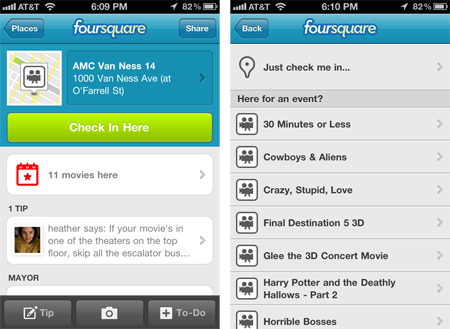 ame ‘ or Lady Gaga concert.’ Sometimes, peole will even create a new venue, like ‘U2 at the Meadowlands,’” the company pointed out in a recent blog post. “In moments like this, a place is often more than just a place; so today, we’re starting to pull major events into our database.”
ESPN, MovieTickets.com and British music startup Songkick will be partnering up with Foursquare for the launch. The three companies’ databases will be tapped to populate hundreds of thousands of events at over 50,000 venues in the months to come.
The event check-in feature will be more than a bookmark for an event; users can expect relevant details for each entry. ESPN promises game information such as facts, stats, and recent info from relevant games from the past. Movietickets will not only be posting showtimes, but summaries and more info. Foursquare users will also be able to troll through the various happenings at each venue and keep up to date on what friends have seen or done in the recent past.
Currently, Events can only be accessed by iPhone users or through the website, but the company promises that other platforms will be seeing the feature soon.



