


Microphones on smartphones are often much better than people give them credit for being. Whether someone is looking to start a podcast, record some music, or simply find a place to record their thoughts, recording apps will capture whatever sounds you need with relatively solid quality.
The best smartphones today have recording apps preinstalled right out of the box, but sometimes they leave a little bit to be desired for those looking for something more out of a voice recorder. Luckily, there are plenty of excellent apps that you can download that have features that your built-in voice recording app might not.
Obviously, a recording from a smartphone microphone isn’t going to be as crisp and clear as something recorded using higher-quality recording equipment, but given the proper room and setting, a smartphone mic can still produce great audio. Use the best voice-recording apps below to get your audio fix and start recording on the go.
Looking for apps beyond voice recorders? See our picks for the best iPhone apps and best Android apps.
Voice Memos

Apple likes to keep things simple, and that applies to its apps as well. The pre-installed iOS Voice Memos app has an easy-to-use interface and is absolutely free. It allows trimming and basic editing within the app. With iOS 14, the app received an update that allowed you to enhance the audio with a button tap, and it eliminates background noise, hums, and echoes from the audio to produce a better overall recording. While the Voice Memos app is pretty impressive, it has limited codec support that includes MPEG-4, AAC (Advanced Audio Codec), or ALAC (Apple Lossless Audio Codec) for compression, so more professional users may want to look elsewhere.
Google Recorder

Google’s very own Recorder app is one of the best when it comes to sound recording on Android. The app offers a bunch of interesting features, including transcription and visualizing sounds. It’s worth noting that the transcription process takes place internally rather than online with a constant internet connection. So, you will be able to use the feature even without the internet. While the app has a lot to like, it has a few downsides. For instance, the app works on select Pixel devices, and the codec support is limited as well.
Voice Recorder and Audio Editor

The Voice Recorder and Audio Editor is one of the most sophisticated audio-recording apps. Apart from recording audio, it is capable of dictating and transcribing. You can record as many audio clips as you want, with no paid limits for numbers. That said, there are in-app purchases for features, such as transcribing speech to text and being able to add notes to individual recordings. It can also record calls on your iPhone with a paid subscription. Besides this, the app allows you to password-protect the recordings, change playback speed, trim and loop recordings, etc.
Recorder Plus: Voice Recorder
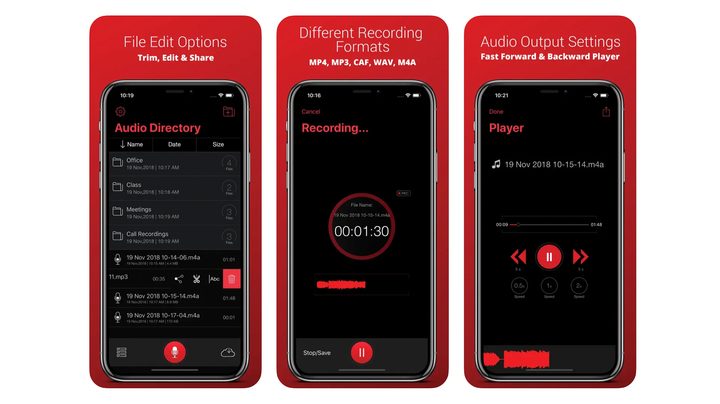
Recorder Plus is another great recording app for your iPhone. The interface is simple, so you won’t be fiddling with menus even if it’s your first time using the app. But what’s great is that recording continues in the background even if you switch to a different app. It also allows you to choose the quality of the sound recording, make basic edits, and use it as an audio player. Moreover, it supports formats such as MP3, MP4, CAF, WAVE, and M4A.
Audio Share

Audio Share is a voice-recording app designed to cater to musicians and other creative artists. It has a large library of supported audio files and a very powerful file management system, and it allows you to record via an external microphone. Plus, you get to choose from a bunch of bitrates, and it can play recordings at different playback qualities. Not an app to miss, this recorder is pretty feature-rich and allows you to trim, fade, convert and normalize recordings.
Easy Voice Recorder

Easy Voice Recorder is a very popular voice-recording app for Android and iOS. The app brings together handy features like noise and echo reduction, high-quality recording, and playback with codecs like 16-PCM and MP4. You also have the option to set a shortcut for recording. However, the best part is that it supports WearOS, so you can record with your smartwatch.
Dolby On

Dolby On is a sound-recording app that has the ability to improve your sound recording with boosts and filters that help enhance sound quality. The key filters include noise reduction, fade-in, fade-out, etc. It packs a feature-rich editor and lets you upload the recording directly to social media, YouTube, and Soundcloud. Moreover, you can record videos and livestream with the same enhancements that apply to audio.
ASR Voice Recorder

ASR Voice Recorder is a near-perfect sound recorder with high-end features, and surprisingly, it works for free. The app supports a host of audio codecs, including MP3, FLAC, WAV, OGG, and M4A. It is capable of playback control and skipping silent parts in a recording. Furthermore, you can add notes to the recording and upload them to cloud platforms like Dropbox, Google Drive, and more.


