  1. Home
  2. Tablets
  3. Mobile
  4. Legacy Archives

Microsoft releases Xbox apps for Windows and iOS devices

Add as a preferred source on Google

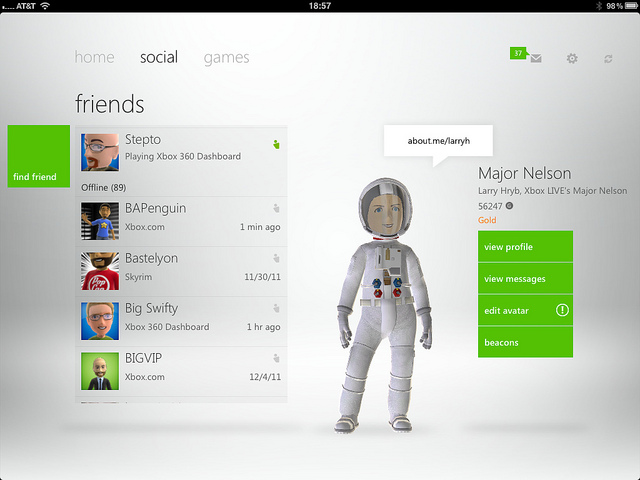
my xbox live via major nelsonCoinciding with the Xbox Live dashboard update, Microsoft has released two new apps for smartphone users. While we knew about the Windows Phone’s Xbox Companion App, the iOS app was a bit of a surprise.

The official Xbox Live iOS app, dubbed My Xbox Live, is free and designed for both the iPhone and iPad. Not surprisingly, My Xbox Live is a slimmed down version of the Windows phone Companion app. Apple device owners will have a limited ability to modify your 3D avatar’s appearance, read and send messages to friends, edit profile, add new friends to the list and view achievements.

Recommended Videos

Interestingly, the iOS app has an interface similar to the Windows Phone Xbox Companion app, replicating that horizontal bar populated with circular icons at the bottom of the screen. Microsoft probably wouldn’t feel bad if it lured defectors over to its OS.

companion via major nelson
Image used with permission by copyright holder

PC World points out that one of the major features the official Xbox Live iOS app is missing is the ability to support notifications; no notifications for new messages or game invites and the app seems to be a ghost in the iOS settings.

Xbox Companion for Windows Phone connects to your console and functions as a sort of remote control. Most noteably, users can use the apps Bing-powered search to trawl through the Xbox catalog for TV shows, games, music, movies and apps, and can then use the Windows Phone to launch a selected search result on your console. Using the app on your phone to navigate the Xbox desktop, purchase content and even control the playback of media on your console. Your smartphone will also give you details about whatever you’re playing, as well as showing you what your friends have recently played. Just like the iOS app, the Windows Phone app is free.

Via Major Nelson

Jeff Hughes
Former Digital Trends Contributor
I'm a SF Bay Area-based writer/ninja that loves anything geek, tech, comic, social media or gaming-related.
There has never been a better time to buy an e-ink reading device
You have run out of excuses to not buy an e-ink reading device.
Supernote nomad in hand

I have explained the benefits of using an e-ink device over physical books. They are easier to handle, can store your entire library for travel, let you buy books at lower prices, and make looking up words or taking notes effortless. 

Another reason to get an e-ink tablet right now is that the e-reader market has never looked this good. There are now e-ink devices for practically every use case and budget, ranging from a pocket-friendly $69 to $600 and beyond. 

Read more
A top Kindle rival is getting jazzy with the looks and you’ll probably want this e-reader
Minimalism is out, personality is in.
Onyx Poke 7 Boox Colours

Amazon’s Kindle lineup may dominate the e-reader market, but Onyx Boox clearly wants to be the cool kid in the room. And with the upcoming Poke 7 series, it is leaning hard into style. Because honestly, these new e-readers look way more fun than most gadgets in this category have any right to.

What's new with the Onyx Boox Poke 7 series?

Read more
I gave up physical books and my reading life has never been better
Physical books are great, but e-readers are just better. There, I said it.
supernote and book in hand

If you are a book purist, you might scoff when I recommend an e-reader instead of buying physical books, and I won't blame you. The allure of the smell of pages, the weight of the book in my hands, the whole ritual, is hard to resist. 

However, if you allow me some leeway to convince you, there’s a strong argument to be made against physical books and in favor of using e-readers. So let me make the case for e-readers, because once you understand what you've been missing, it's hard to go back.

Read more