
The Oppo Find N2 Flip is my favorite clamshell-style folding phone. I prefer it over the Samsung Galaxy Z Flip 4 because it lasts longer on a single charge, exhibits minimal crease on the main display, and has a bigger outer screen. But I wasn’t too impressed by the outer display because it lacks support for individual apps. It only allows you to view a few widgets with access to the camera, weather, timer, and reminder.
Not being able to access apps on the cover display or reply to notifications was my biggest annoyance with the Find N2 Flip. But I came across an app that (almost) fixes the issue completely. It’s called CoverScreen OS, and here’s how it has enhanced my experience of using the phone.
Transforming the cover screen
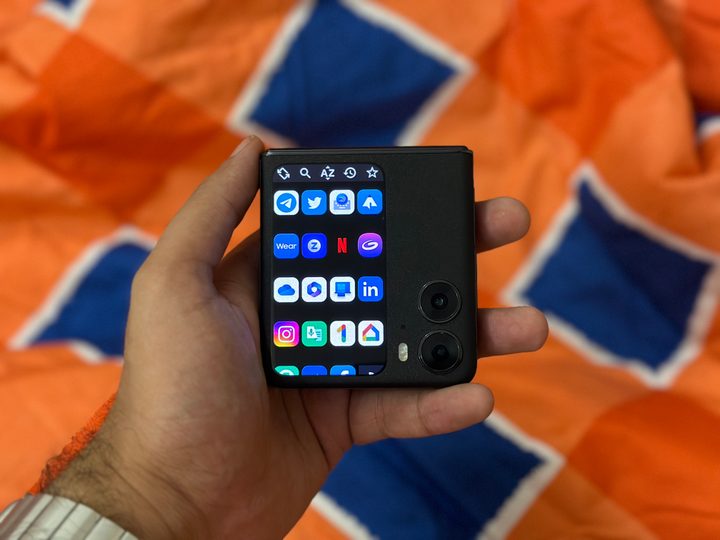
The developers behind the app describe CoverScreen OS as being “more than a cover launcher,” and for the most part, it’s true. To use the app, you just have to download it from the Google Play Store, give it the required permissions, and you’re all set. Since it’s a beta app, you’ll run into bugs, but it’ll still make your life easier.
Once set up, you can tap the cover screen to access the app launcher. I like it because the app lets me access my most-used apps on the cover screen. Left swipe, and you are greeted with the notification panel. Once you tap on a particular notification, it opens the app on the 3.2-inch display – whether it be from Twitter, Instagram, etc. It all works without you needing to open the app. This is the main reason I’m using CoverScreen OS.
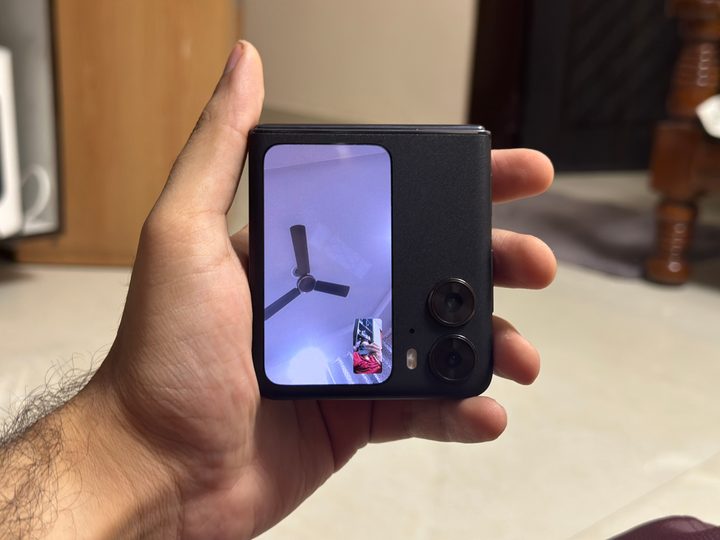
I recently discovered that the app also lets me take video calls from third-party apps like Telegram and WhatsApp on the cover display. It’s useful in certain scenarios. For me, it’s when I want to switch from an audio call to a video call on Telegram, or when I’m typing on the laptop and I still want to stay connected on the call – I simply need to keep the phone in tent-stand mode.
Notably, if you haven’t yet given Telegram permission to access the camera or microphone, you’ll have to unfold the phone to allow the app to use the required elements.


If you want to reply to messages, you can type or use your voice to reply to the notification. If you need to type, you get a T9 keyboard, which is quick and sufficient to get work done. I’m not on the paid tier, so I don’t have access to certain features, like sorting apps alphabetically in the launcher – a feature that I don’t think should be behind the paywall.
It’s not a polished experience (yet)


As mentioned above, CoverScreen OS is still in the beta phase, so there are a lot of minor inconveniences. For example, the app icons in the launcher are in a random order, but you can sort them for free. The app allows you to display the app names below their icons, but the feature never worked for me.
It takes time to figure out how to go back within an app, which I still haven’t done yet. I simply lock the phone when I’m done interacting with a notification, and when I unlock it, I’m back to the home screen. The apps are also unoptimized for the outer display. For instance, the navigation menu icons on Twitter overlap when you open the app on the cover screen.
There is no continuity, so unfolding the phone doesn’t open the same app you were interacting with on the cover screen. You can still access it from the background, but it’s these little things that add to the experience. CoverScreen OS also offers extra widgets that you can add to the cover screen of the Find N2 Flip, but it doesn’t work for me.
CoverScreen OS is off to a good start


CoverScreen OS is still in the beta phase, and I’m sure it will improve immensely when it rolls out.
While Oppo is working on bringing more widgets to the outer display, it is apps like CoverScreen OS that are pushing the boundaries to help you make more of your phone. I can’t wait for the final product to roll out, and I hope it’s sooner than later.


