The best password managers simplify sign-ins while keeping your account information secure. Two of the best solutions come from Keeper and 1Password.
I recently reviewed both solutions, comparing login organization and sharing features, support responsiveness, and overall ease of use to find out which offers the best value for you.
Tiers and pricing
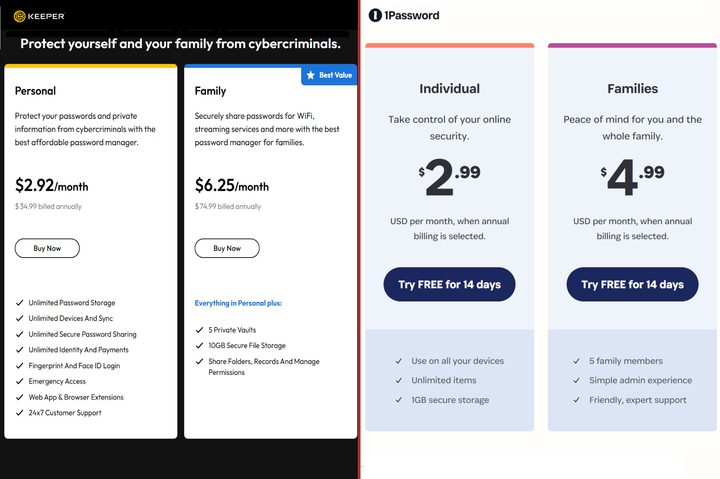
These top-rated password managers share similar pricing. Keeper’s Personal plan costs $35 each year, while 1Password charges $35 annually for an Individual subscription. Both allow unlimited record storage and installation on all your devices.
For groups, the $75 Keeper Family plan provides five accounts with shared folders, reducing the cost to as low as $15 per person annually. Meanwhile, 1Password is even more affordable with its $60-per-year Families plan that shares login folders among five members, dropping the per person fee to $12.
Keeper Family includes 10GB of shared encrypted cloud storage for files and photos. That can come in handy for important documents, IDs, and more. The Personal plan doesn’t come with secure file storage, but you do get unlimited space for passwords and text records, which could include details from ID cards, payment cards, and other details.
1Password provides 1GB of encrypted cloud storage for files and photos with an Individual subscription. The Families plan includes 1GB per person for up to five members, making the maximum shared storage 5GB. Each person gets 1GB, so if you approach the 1GB limit, you’ll need to upload via a member account to add to shared storage.
Both offer business-focused plans as well. Keeper’s Business Starter supports five to 10 members for $24 per person annually. 1Password’s Teams Starter Pack costs $20 per month for up to 10 members.
Since the billing terms are so different, I’ll calculate the annual price for five and 10 members. Keeper’s lowest-cost business plan costs $120 per year for five people and $240 annually for 10 people.
1Password’s cheapest business subscription costs $240 annually for 10 people, matching Keeper. A business that provides 1Password accounts to fewer than 10 users, still pays $240 every year. That makes Keeper’s Business Starter pricing more attractive to businesses with small teams.
However, cost isn’t the only important detail for a password manager. You could just use your operating system’s built-in password manager or make use of one that might be included with antivirus software like Norton and Bitdefender.
Features

The best free password managers automatically fill in logins, which is an important, but standard feature. Passkey support is quite common now as well. Keeper and 1Password make logins effortless, using biometrics or master passwords to unlock the vault.
Both have good cross-platform device support for Windows, macOS, and Linux computers, and both have apps for iPhone and Android users. Keeper and 1Password work with all major browsers.

In my review of Keeper, I found its sharing to be more nuanced and powerful than 1Password’s. Rather than sharing a copy of the login, which could change, Keeper links to the actual record. If the person you share with has permission to edit the password, everyone with access will autofill the recently updated password.
Support
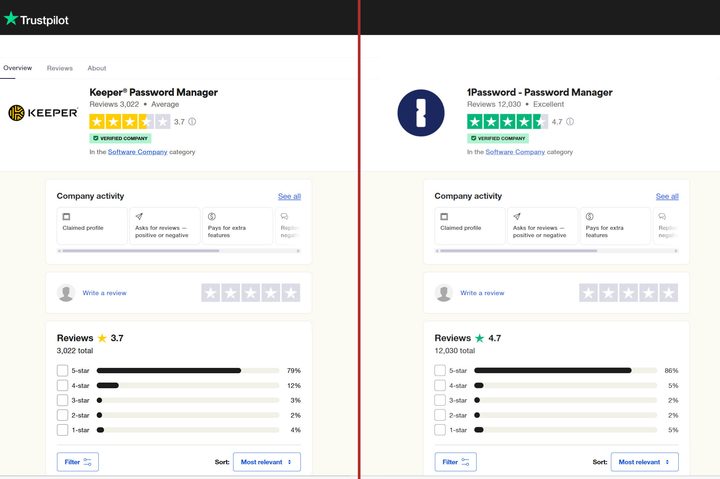
According to TrustPilot reviews, Keeper can’t match 1Password’s excellent 4.7-star average rating across more than 12,000 reviews. Keeper scored 3.7 stars with just over 3,000 reviews. While 79% people gave it 5-star ratings, 12% deducted a star.
I had the opposite experience in my testing. Keeper support was super quick and helpful. The company has live agents available to chat 24 hours a day, every day. That’s a valuable addition to Keeper’s service.
1Password provides support via email within a day. I don’t like to wait that long when I have a question or a problem with my password manager. A series of email replies can make matters worse, delaying the solution by several days.
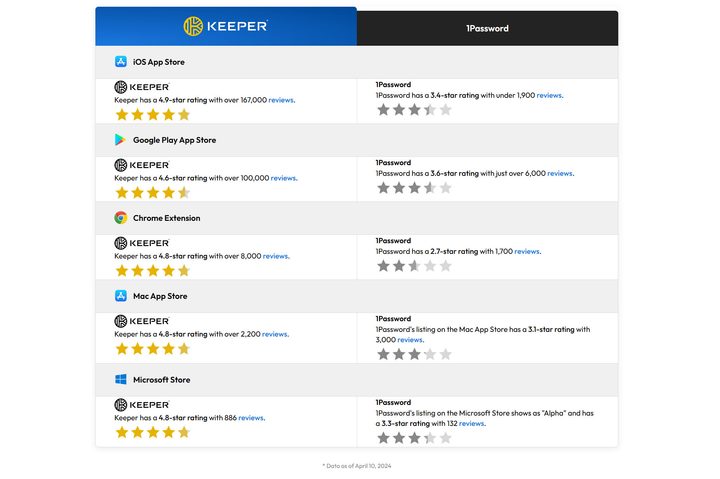
Since my support experience differed from TrustPilot ratings, I dug deeper. Keeper points out on its website that it scores better than 1Password in Apple’s, Microsoft’s, and Google’s app stores.
Privacy and security
Neither company sells, rents, or shares your personal data with third-party advertisers. In fact, end-to-end encryption means your data can’t be read by either company.
Keeper decrypts each record on your device as it’s needed. 1Password uses your computer or phone to decrypt your vault when you unlock it. Keeper’s record-level decryption sounds more secure. However, 1Password uses a combination of the master password and a Secret Key that’s stored on each of your devices to decrypt.
Both undergo annual security testing and have been certified as safe. Keeper and 1Password both keep your data private and secure.
Which password manager is best?
Keeper and 1Password are each excellent password managers and offer great value, simple operation, and robust sharing capabilities.
The single user and family prices are nearly the same. However, for small businesses that need password managers for less than 10 members, Keeper is significantly less than the cost of a 1Password teams subscription.
Keeper also has more advanced sharing options with permission lists to fine-tune access for every family or team member. If you want the best control of password sharing with automatic updates for everyone when a login changes, Keeper is the best choice.
On the other hand, Keeper can’t match 1Password’s 1GB of secure storage for individuals. For a family account, the tables turn and Keeper’s 10GB of encrypted cloud storage is the winner.
Overall, I’d recommend Keeper over 1Password, but both are outstanding password managers. If you also need a fast VPN, Dashlane might be worth a look. For an open-source alternative, Bitwarden is a great choice.