  1. Home
  2. Computing
  3. News

The macOS Sequoia public beta just launched. Here’s how to download it

Add as a preferred source on Google
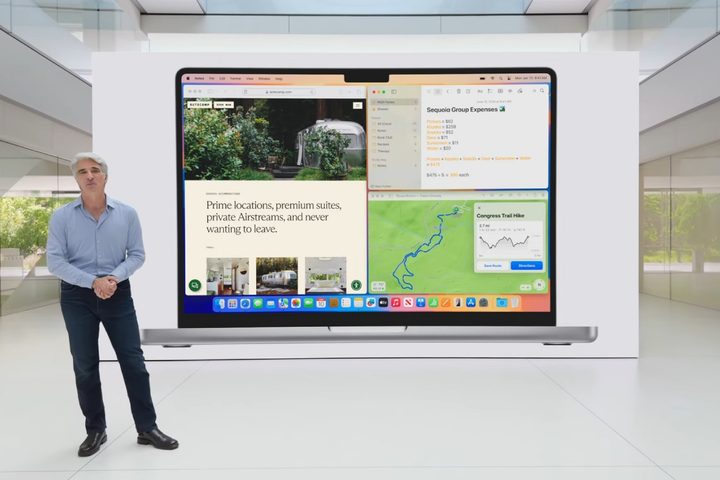
Apple's Craig Federighi introducing the new window tiling feature in macOS Sequoia at the Worldwide Developers Conference (WWDC) 2024.
Apple

The public beta for macOS Sequoia is here, and that means anyone with a compatible device can install it and try it out — no paid developer memberships needed. Here’s how to get it.

First of all, you’ll need a PC that can run macOS Sequoia. This is the list of compatible models:

  • iMac from 2019 or later
  • iMac Pro from 2017 or later
  • Mac Studio from 2022 or later
  • Mac mini from 2018 or later
  • Mac Pro from 2019 or later
  • MacBook Air from 2020 or later
  • MacBook Pro from 2018 or later
Recommended Videos

For the MacBook Air, this includes both the Intel-based 13-inch Retina model and the M1 model from 2020. All of the other products include older Intel-based models too, but be aware that once Apple Intelligence launches, only models with M1 and later will have access to it.

Time Machine back-up feature on macOS.
Willow Roberts / Digital Trends

If you have an older or secondary device, it’s always best to use that instead of your main PC. We’re only a few months away from the full release, but anything can happen with a beta. If you don’t have a spare, make sure to use the Time Machine utility to back up your Mac first.

To sign up for the beta, head to the Apple Beta website, where you can use your normal Apple ID and get everything set up in just a few clicks. Apple interconnectivity (when it works) is always the best.

Setting up macOS beta on macOS.
Willow Roberts / Digital Trends

Next, you need to enroll the device or devices you want to install the beta on. If you select the “Enroll Your Devices” tab, there’s a guide right on the website. For anyone running Ventura 13.4 or later, head to System Settings > General > Software Update and click the little “i” button next to “Beta updates.” This will let you choose the macOS beta you want to install. If you’re running an earlier macOS version, you’ll need to install the macOS Beta Access Utility instead and follow its instructions.

If you set this up before the beta drops, you’ll get a notification when it’s time to download. Otherwise, it’ll instantly pop up in the Software Update window ready for you to install in the same way as any other OS update. All in all, it’s pretty easy.

MacOS Sequoia brings a number of significant updates, including iPhone Mirroring, window tiling, updates to Safari, the new Passwords app, and more. Not all of these features may be in this initial release of the public beta, but may roll out over the following months. Eventually, it will also include a number of Apple Intelligence features, though reports indicate they may not be available to use until 2025.

Willow Roberts
Willow Roberts has been a Computing Writer at Digital Trends for a year and has been writing for about a decade. She has a…
Gemini Spark lands on the Mac, and it wants to tackle your chores while you relax
From messy downloads to date night reservations, Spark is here to lighten your load.
Gemini Spark mac app

Google has just announced a big batch of updates for Gemini Spark, making the assistant far more useful than before. Gemini Spark is finally coming to the Mac desktop app, bringing deeper app connections and a new way to keep tabs on what you care about. Let us break it down.

What can Spark do on your Mac now?

Read more
Anthropic finally brings back Claude Fable 5, but you’ll have to live with a temporary usage limit
Anthropic has received a green light from the US government to restore the AI Model, weeks after a security researcher found a way around its safeguards that triggered the shutdown.
Laptop running Claude Fable

Anthropic is restoring full access to Claude Fable 5 starting tomorrow, weeks after a US government directive forced the company to suspend the model for all users. The government order arrived on June 12 and required Anthropic to block foreign nationals from using Fable 5 and its more capable Mythos 5 model. Since the rule took effect immediately and Anthropic had no way to verify a user's nationality in real time, the company suspended both models entirely rather than risk a violation.

What triggered the shutdown

Read more
Claude’s Sonnet 5 is built to do more on its own and cost you less
Better than its predecessor, nearly as good as the flagship, and meaningfully cheaper than both.
Art, Floral Design, Graphics

Every major AI lab is racing to prove its models can work autonomously with minimal hand-holding; we’re now seeing pricing emerge as the next battleground. 

Anthropic just fired its latest shot, Claude Sonnet 5, a model the company says performs nearly as well as its flagship Opus 4.8 at a fraction of the cost.

Read more