
  1. Home
  2. Computing
  3. News

My favorite Chrome and Safari replacement is now available widely for macOS

Built atop Chrome's foundations, and a lot better than the Safari experience. This is Dia for you!

Add as a preferred source on Google
Launch screen of Dia browser.
Nadeem Sarwar / Digital Trends

Over the past few months, I’ve heavily pushed AI-powered browsers like Dia, Comet, and Opera Neon. My favorite of the bunch is Dia, developed by the same team that also made a splash with Arc. So far, Dia has required an invite from existing users, but it is now finally available freely for Mac users.

How does it stand out?

Dia is built atop the same Chromium foundations as a whole bunch of other desktop browsers out there, including Google Chrome and Edge. That means migrating all your browsing data and tools is seamless and technically hassle-free.

It’s fast, well-designed, and feels like home on my MacBook Air. But what sets Dia apart are a bunch of AI-powered tricks that truly set it apart. Chief among them is the sidebar, which puts an AI assistant at your fingertips. Here, you can ask contextual questions and background information about the on-screen contents without having to open another tab.

Recommended Videos

Talking about tabs, the AI is tab-aware and lets you essentially talk with them. That means it also help with writing, summarization, translation, and OCR. You can even club multiple tabs together and extract information from them in a single place. This superpower is perfect for shopping and planning, among other chores.

The secret superpower

Dia has a secret agentic superpower called Skills. Think of them as one-word AI commands that can accomplish multi-step tasks without having to open multiple tabs or write a detailed prompt. For example, a skill like “/compare” will analyze the contents of all Amazon tabs, create a table, and help you find the best fit based on your preferences.
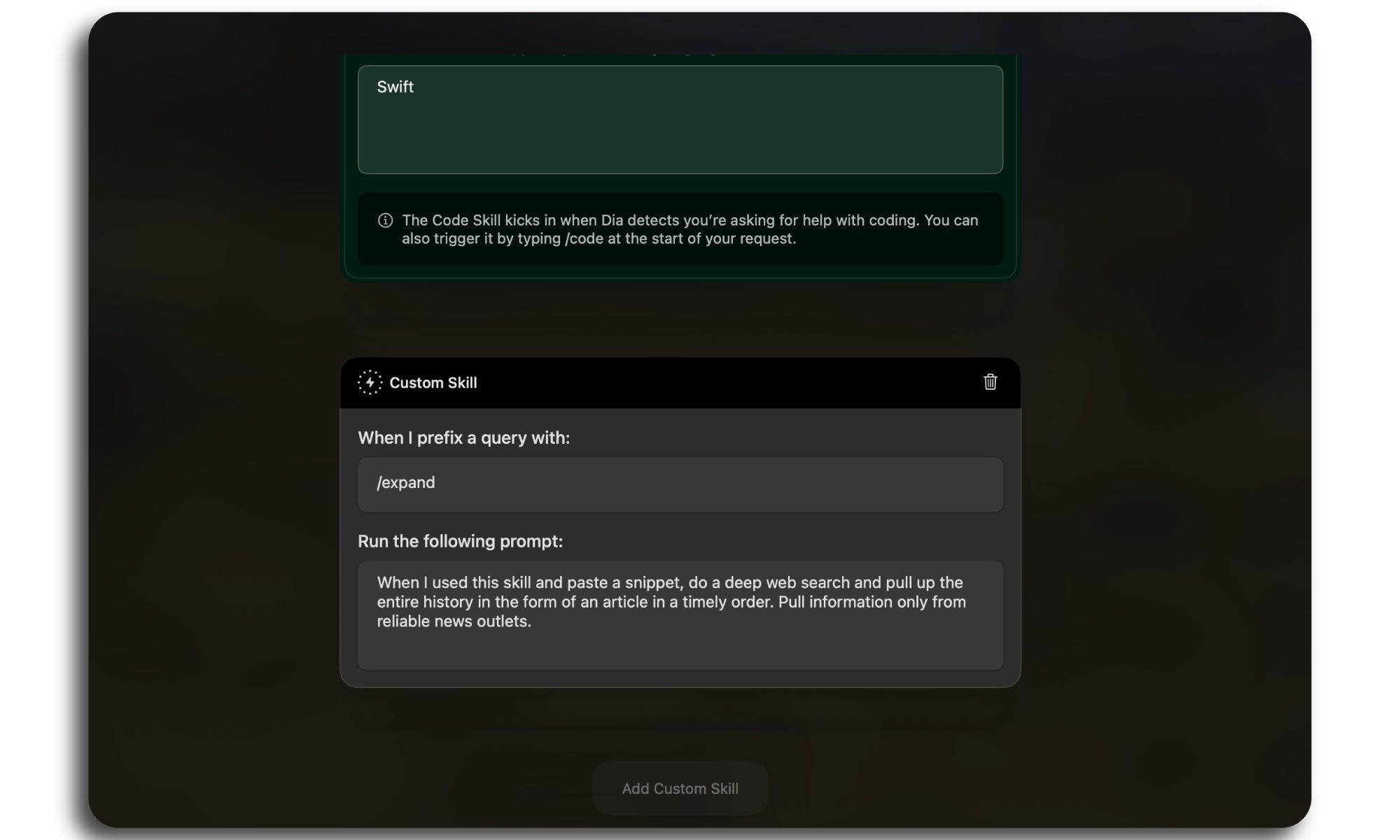
And here’s the best part. You don’t need any coding or technical chops to create your skills in Dia. You can just describe the purpose in plain language, and Dia will create the AI skill for you.

In case you’re looking for some creative inspiration, you can visit the Dia Skills store and add the AI-powered automations that catch your attention. The company has shared some pretty useful Skills to ease your day-to-day web chores.

Dia is now available to download for Macs with the M1 silicon (or newer) running macOS 14+ or a later version.

Nadeem Sarwar
Nadeem is the Managing Editor at Digital Trends.
M5 MacBook Pro tests show Apple is pretty close to fixing its worst weakness
Windows games are now surprisingly playable, through emulation
MacBook Pro.

For years, Macs have had one glaring weakness: gaming. But with the new M5 MacBook Pro, Apple might finally be getting close to fixing that. Or at least brute-forcing its way around it. Recent testing by Andrew Tsai shows the M5 Max MacBook Pro can run a wide range of AAA Windows games smoothly, even through emulation layers like CrossOver.

We’re talking heavy titles like Horizon Forbidden West and Black Myth: Wukong, and while not every game was perfect, the majority ran “superbly” despite not being native macOS apps. That’s kind of wild when you think about it, considering these are Windows games running on an ARM-based Mac… through translation.

Read more
Don’t try this $3 app that makes your MacBook moan, but I know you want to
This absurd $3 Mac app went viral for all the wrong reasons
Computer, Electronics, Laptop, MacBook

There are useful apps, there are pointless app,s and then there is SlapMac, which sits in a category all by itself.

This app has gone viral online for one very stupid (and fun) reason: it makes your MacBook play sound effects when you slap it. Just spank your Mac and hear it moan, fart, or throw punches. The app creator has apparently made $5,000 in just three days, which is what makes the story even more absurd.

Read more
Apple’s ridiculous $700 wheels for its desktop PC are gone for good
The $700 Apple wheels are dead, long live ridiculous tech accessories
Machine, Wheel, Tire, Apple Mac Pro Wheels

Apple has officially discontinued the Mac Pro, and by extension, the $700 Mac Pro Wheels Kit is also dead.

Yes, that sentence is still funny in 2026. It marks the end of one of the company's most infamous desktop add-ons. For anyone who somehow missed this saga, the Wheels Kit launched back in 2020 as an upgrade for the Mac Pro. It allowed you to add wheels for $400, but buying the standalone kit later costs a whopping $700 because the base machine already included the standard feet. Apple also sold a separate $300 Feet Kit for people who wanted to swap back.

Read more