
It may be best known for printers, but Epson has also been working to break into the wearable technology market recently. To that end, it just unveiled the second-generation Epson Moverio BT-200 augmented reality smart glasses at CES in Vegas. These Android-powered smart glasses feature a transparent display, head motion tracking, and a built-in camera.
The original Epson Moverio BT-100 glasses have been on sale for around a year and, at $700 per pair, it wouldn’t be too unkind to say they haven’t made a major splash. Epson is aiming to change that with a raft of improvements in the second generation Moverio BT-200 glasses, which will land at exactly the same price point of $700.
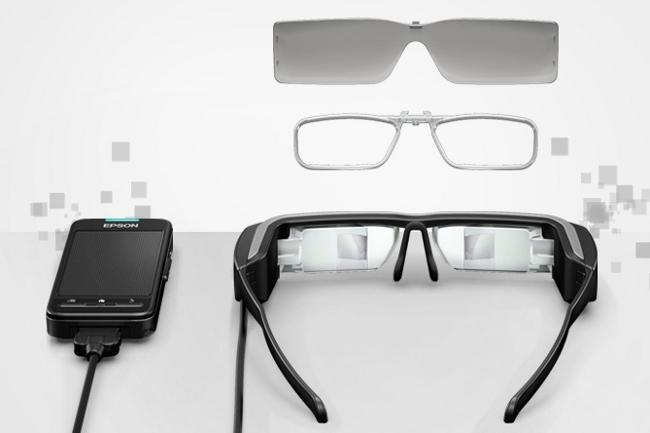 The Moverio BT-200 glasses are 60 percent lighter and significantly smaller than their predecessors. They feature a binocular display using an LCD-based projection lens system, which enables them to overlay digital content onto the real world in the center of your field of view. You can use them to watch video content or play augmented reality games, but Epson is also touting enterprise uses, such as guidance for engineers or medical professionals.
The display has a 960 x 540 pixel resolution, which is the same as the BT-100 glasses. Inside there’s a gyroscope, accelerometer, and a magnetic compass to support head-motion tracking and hands-free navigation. The front-facing camera can capture photos and videos. Built in Wi-Fi allows for video streaming, there’s HDMI connectivity as an option, and wireless mirroring enables you to stream to a big screen. You’ll also find Bluetooth 3.0 support, a microSDHC card slot, which can take cards up to 32GB in size, and Dolby Digital Plus sound.
Unfortunately, instead of hooking up to your smartphone, there’s a handheld controller unit with a touchpad, which runs Android 4.0. This has to be tethered to the glasses via a cord, which seems like an obvious drawback.
The Epson Moverio BT-200 glasses will go on sale in March.



