  1. Home
  2. Computing
  3. News

Windows 11 is about to make your right-click menu less painful to use

Add as a preferred source on Google
windows-11-bluetooth-audio-sharing-preview
Microsoft

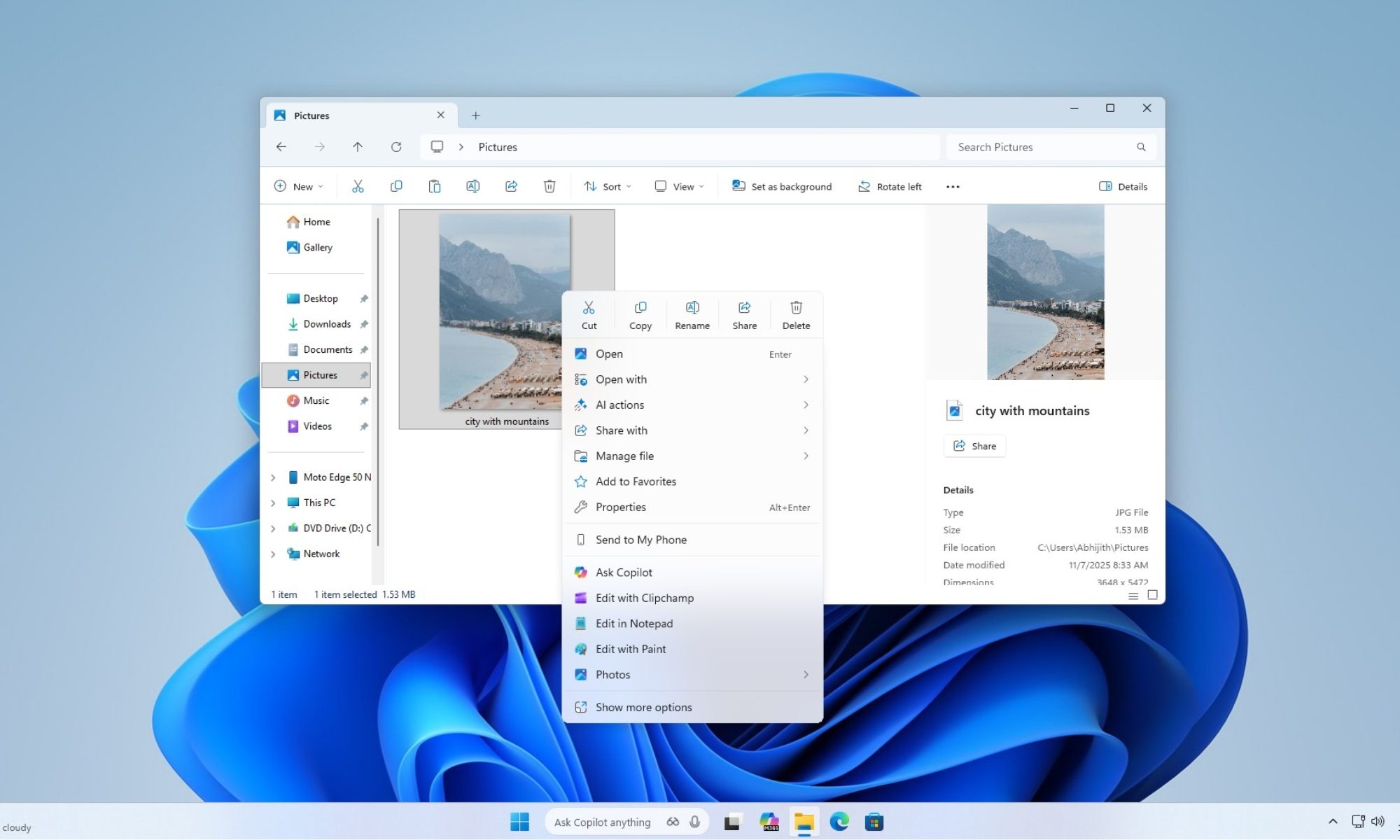
What’s happened? Windows 11 Insider Preview Build 26220.7271 introduces a revamped File Explorer right-click menu that reduces its vertical size by roughly one-third.

  • The new layout groups lesser-used actions, such as “Compress to ZIP,” “Copy as Path,” and “Free up space,” into a nested submenu labelled “Manage File.”
  • This will not only save space but also make it easier for users to locate the required options.
  • Cloud-synced file options, like the items in OneDrive, now live in dedicated submenus under the relevant provider, rather than cluttering the top-level right-click list (via Windows Latest).
Why is this important? Microsoft says the changes are meant to reduce the space taken by actions that aren’t as frequently used.

  • Currently, the right-click menu in Windows 11 can cover up to 75% of the vertical screen on common laptop aspect ratios, making basic actions feel overwhelming and slow.
  • Streamlining this menu improved usability for millions of users who rely on right-click for file management, context access, and productivity tasks.
  • For power users, developers, and enterprise workers, a less-bloated menu means fewer distractions, faster workflows, and potentially fewer mis-clicks.
Recommended Videos

Why should I care? The change highlights Microsoft’s shift back toward polish and UX refinement rather than only adding flashy new features.

  • If you use Windows 11 for everyday work, this update means your right-click experience will be faster, cleaner, and less visually overwhelming.
  • If you’re using a smaller laptop screen, you’ll especially benefit because the context menu won’t dominate your screen anymore.
  • You’ll spend less time hunting for actions and more time focused on tasks, whether you’re moving files, compressing folders, or managing cloud content.
OK, what’s next? Microsoft will likely extend the clutter-reduction approach beyond just the File Explorer context menu. As a result, users should expect cleaner UI elements in other parts of Windows 11.

  • We may see this refreshed UI roll out from Insider Dev channel into Beta and finally into the publish release, likely in the next major feature update.
  • As this structural clean-up continues, it paves the way for deeper optimizations, faster context menu load times, improved responsiveness, and better consistency across devices.
  • Ultimately, a simpler right-click menu may set the stage for larger Windows 11 refinements.

Shikhar Mehrotra
For more than five years, Shikhar has consistently simplified developments in the field of consumer tech and presented them…
I’m not sold on Googlebook’s future, but it sure has two big wins I can’t ignore
Magic Pointer and native Android app could help Googlebook prove its future
Googlebook

Shortly after its announcement, the discourse surrounding Googlebook quickly took over forums, subreddits, X, and other social media platforms. Google just introduced a new category of laptops built around Gemini Intelligence, Android integration, ChromeOS, phone continuity, premium hardware, and OEM partners.

Yet, I am still not fully sold on the larger future Google is describing here. Google has been in laptops for more than 15 years through Chromebooks, and the company itself frames Googlebook as a move from an operating system to an “intelligence system.” This sounds like the "future" of laptops, but it also carries the Google problem, where it introduces an interesting idea before the ecosystem has proven itself.

Read more
Google will let some Chromebooks transition into a Googlebook experience soon
Google says some existing models will move into the Googlebook experience, while ChromeOS support continues for devices left behind
Clothing, Coat, Footwear

Googlebook is launching this year, but Google isn’t cutting every Chromebook loose.

In an interview with Chrome Unboxed, Google VP John Maletis said some Chromebooks will be able to move into Googlebook-style software through a firmware update. This means Googlebook shifts Google’s laptop plans toward an Android foundation, with Gemini built more deeply into the laptop experience and Android apps no longer sitting behind the same emulation layer.

Read more
Googlebook laptops will come in multiple chip options beyond just Intel, and that’s a relief
More chips, more choices. Google is giving Googlebook buyers real hardware flexibility from day one.
Googlebook

After Google's bombastic Android Show, where the company unveiled tons of new features, Google VP John Maletis sat down with Chrome Unboxed to talk Googlebook. The interview contains several nuggets of information, and one of the most reassuring confirmations we got was about the chips powering these new laptops. 

Maletis said that Google is working with Intel, Qualcomm, and MediaTek, meaning the platform won't live or die by a single silicon provider. For anyone who has followed the Chromebook space for a while, this is genuinely good news.

Read more