I have been watching MKBHD for years. Long enough that Marques’ voice is part of the experience. So when a recent upload started playing on my TV and he was suddenly speaking Japanese, it took me a moment to process what was actually happening.
This was not something I had turned on. YouTube had somehow decided, apparently due to the Japanese text on his T-shirt (but probably because I watch a lot of anime with English subtitles), that I should be hearing a dubbed version in a language I did not understand. It did not matter that the video was recorded in English or that I had watched hundreds of his videos in English without issue. There was no warning, no prompt, and no clear instructions to switch back. Just a different voice coming out of a familiar face.
That experience is what auto-dubbing looks like for many viewers. And the frustrating part is not that the feature exists. It is that viewers have almost no say over when it applies to them.
Creators got a switch. Viewers did not.
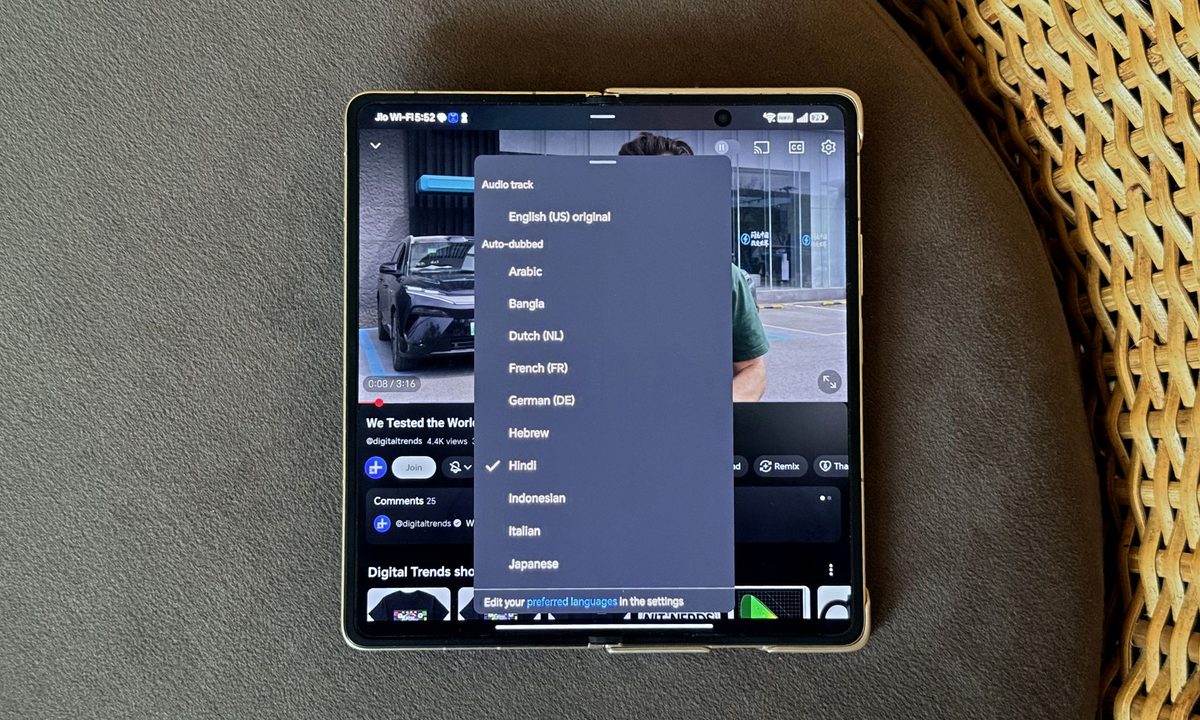
YouTube has, to its credit, given creators meaningful control. A creator who does not want their videos auto-dubbed can disable it in YouTube Studio. That is a sensible approach. It acknowledges that a creator’s voice is their identity, and that replacing it requires consent. But that logic doesn’t extend to viewers. On the viewer’s side, the only option is to manually switch the audio track on each video, one at a time, every single time. There’s no global setting. There’s no “always play original audio.” There’s no memory of what you chose five minutes ago.
This asymmetry is strange. YouTube has somehow concluded that creators deserve a persistent, channel-level preference about their own content, but that viewers do not deserve the same courtesy about their watching experience. The platform that remembers your watch history to the minute, that knows which videos you rewatched and which you abandoned at the three-second mark, cannot remember that you switched a dubbed track off yesterday.
Auto-dubbing doesn’t affect all viewers equally. Multilingual users are often served auto-dubbed videos even when they understand the original language. Language learners studying through immersive content have the actual foreign audio swapped out for a translation, precisely the opposite of why they opened the video. Expats maintaining fluency in a language they no longer live around face the same problem. In each case, YouTube’s system sees a language setting and applies a rule without nuance.
When users start fishing for workarounds, something is wrong
The workarounds people have resorted to tell the real story. Browser extensions that force original audio. Modified third-party apps that bypass auto-dubbing. Guides on Reddit walking users through the steps to disable the feature using the “Preferred languages” option (though comments on that very thread report the setting does not always hold, with the platform quietly reverting to dubbed audio for some videos). Some are doing this on principle, frustrated by the lack of control. Others have a simpler reason: the dubbed voices are flat, robotic, and lack personality.
YouTube heard that last complaint, at least. Earlier this year, it rolled out an Expressive Speech update that uses Gemini to replicate the creator’s tone, pitch, and emotional delivery. The idea was that dubs would finally stop sounding like a waiting-room announcement, but the results have been mixed.
While the quality of the dubs may improve as the technology matures, the lack of an off switch will remain a pain point for many viewers. When a significant portion of your user base is engineering their way around a feature you shipped as an improvement, the feature has a problem, and the problem is not the technology.
One toggle. That’s all it takes.
Auto-dubbing is not a bad idea. There are genuine use cases: a viewer who cannot read subtitles, someone watching in a second language who wants a crutch, a casual viewer who simply prefers their native tongue and has no strong attachment to the creator’s original voice. For those people, auto-dubbing is a meaningful improvement, and the platform should absolutely offer it.
But offering a feature and silently defaulting to it are different things. YouTube has built the machinery to translate the world’s content and forgotten to ask whether each individual viewer wanted to be translated to. The assumption that everyone watching in a given language wants the audio in that language sounds reasonable in a product meeting. In practice, it is frustrating enough that you’ll find related threads across every forum where YouTube users gather.
The fix is not complicated. A single toggle in the account settings that lets users disable the feature. One that applies to every video on the platform, including Shorts. Creators already have their version of this. Viewers should have theirs.
Until they do, auto-dubbing will feel less like accessibility and more like a service that is very confident it knows what you want, and very uninterested in being corrected.