  1. Home
  2. Phones
  3. Android
  4. Mobile
  5. Reviews

Hands on: Acer Liquid Jade Primo

Thanks to Windows Continuum, the Acer Liquid Jade Primo is worth a try

Add as a preferred source on Google
acer liquid jade primo hands on 9714
Andy Boxall/Digital Trends

“Why you can trust Digital Trends – We have a 20-year history of testing, reviewing, and rating products, services and apps to help you make a sound buying decision. Find out more about how we test and score products.“

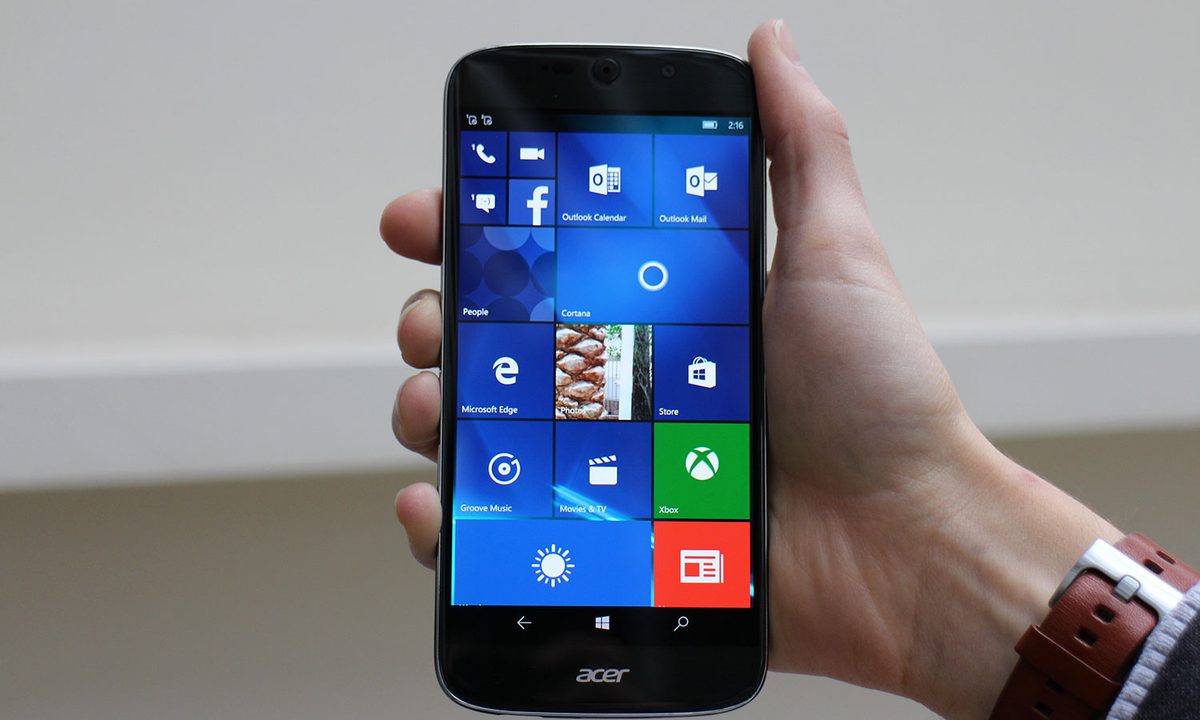
The Liquid Jade Primo is Acer’s Windows 10 smartphone, and it has been hotly anticipated — well, in relative terms, it’s a Windows phone after all — since it was shown as a non-working model in September. The phone is ready to go on sale in the next few months, and we got a chance to try it out. The phone’s headline feature, and the reason it’s sparked so much interest, is Windows Continuum, which turns the phone into a full PC.

Recommended Videos

Before we get there, let’s look at the Jade Primo. The design is typical of Acer, with a massive circular camera lens on the rear, bookended by a oversized speaker at the other end. The rear cover has a brushed metal finish, but is really made of plastic. It does feel good in the hand thanks to the curvy shape, which disguises the overall size you expect from any 5.5-inch device.

The Jade Primo is a smartphone we’d instantly want to use.

The screen is a beauty. It may have a standard 1920 x 1080 pixel resolution, but it’s an OLED panel covered in 2.5D glass. That means pure blacks and great contrast, and it has an equally curvy body on the front. This adds up to the Jade Primo being a smartphone we want to use. The trusty Qualcomm Snapdragon 808 processor and 3GB of RAM also give it enough power for most situations.

Unlike other Acer phones, the Liquid Jade Primo has Windows 10 installed, rather than Android. Windows 10 worked smoothly and effectively during our brief hands-on, but the big draw is Continuum, which turns a compatible monitor into a Windows 10 computer when the phone is slotted into Acer’s dock. The dock connects using HDMI or USB 3.1 — Acer’s the only company producing a monitor with that feature at the moment — and when the phone’s plugged in, the change over happens within a few seconds. On the first occasion, it didn’t work at all, with no explanation, suggesting it may not be entirely stable just yet.

Once connected, the phone’s home screen is shown on the monitor and can even be used as a mousepad to navigate on the larger display. This is awkward when the phone is in the dock, though. It comes into its own when paired with a Bluetooth keyboard and mouse. Microsoft Edge, Word, Messages, and other standard apps are all blown up on the monitor, with the phone powering it all. There are people reading this who instantly see how this feature will fit into their lives, and others who’ll think the exact opposite. The question is: Will everyone else find it useful, or not?

Acer-Liquid-Jade-Primo_9713
Andy Boxall/Digital Trends

The Liquid Jade Primo, as a phone, is cool; but it has one thing that’s going to count against it for wavering buyers — price. It’s 570 euros in Europe, or about $620, plus 30 euros for the dock. That’s a lot for an Acer phone, even one with a gorgeous display, a USB Type-C connector, and a 21-megapixel camera. However, if Continuum and Windows 10 are on your personal wish list, the Jade Primo is better value than the Microsoft Lumia phones introduced late last year.

Acer will bring the Liquid Jade Primo to the United States, but it hasn’t set a final date. We’re told it’ll launch sometime before mid-year, and that’s when the price will be finalized. The Jade Primo’s a good Acer phone, and it’s worth close examination if you’re a Windows 10 devotee, or even somewhat interested in trying Windows on your phone.

Highs

  • Gorgeous OLED screen
  • Windows Continuum works well
  • Available with the dock
  • Confortable to hold

Lows

  • Niche appeal
  • Expensive
Andy Boxall
Andy has written about mobile technology for almost a decade. From 2G to 5G and smartphone to smartwatch, Andy knows tech.
Apple should just give the Neo treatment to its upcoming iPhone 18e and I’ll bite
There, I said it, I want the iPhone Neo
iPhone XR

For years, Apple has approached its affordable iPhones with a predictable formula: take an older flagship design, remove a few premium features, lower the price slightly, and position it as the “entry point” into the ecosystem. Financially, the strategy works. Emotionally, it often does not.

That is exactly why the upcoming iPhone 18e represents such a major opportunity for Apple. Instead of treating it as another watered-down flagship, Apple should fully embrace a “Neo” identity, one built around color, personality, experimentation, and smart hardware reuse. Apple has already executed it perfectly with the MacBook Neo. It just needs to follow that template for an affordable iPhone.

Read more
Your Android phone can now share files with any iPhone using a Quick Share QR code
Quick Share just got a trick that makes cross-platform file sharing almost painless.
iPhone receiving file via quick share qr code

Sharing files between Android and iPhone has always been a pain, but Google is quietly fixing that. The company launched a new Quick Share feature that made Android devices compatible with Apple’s AirDrop, allowing users to easily transfer files between iPhones and Android devices. 

However, not all Android devices have the hardware to support Quick Share-AirDrop compatibility, which means not all Android smartphones can access this feature. To solve this problem, Google announced a new QR code-based file-sharing system, which allows any Android device to transfer files to iPhones. 

Read more
Your next free Google account might only come with 5GB of storage
Google's free storage has been a competitive advantage over Apple's 5GB iCloud limit for years, but that’s changing.
Electronics, Mobile Phone, Phone

Google has quietly altered one of the most reliable promises in consumer tech: 15GB of free cloud storage. For years, signing up for a Google account meant getting 15GB of free storage, shared across Gmail, Drive, and Photos. However, that’s changed. 

New accounts are now defaulting to 5GB (same as iCloud), with the full 15GB available only if you have entered your phone number during setup. The prompt users are seeing reads: “Your account includes 5GB of storage. Now get even more storage space with your phone number.”

Read more