This post is brought to you in paid partnership with QuickBooks
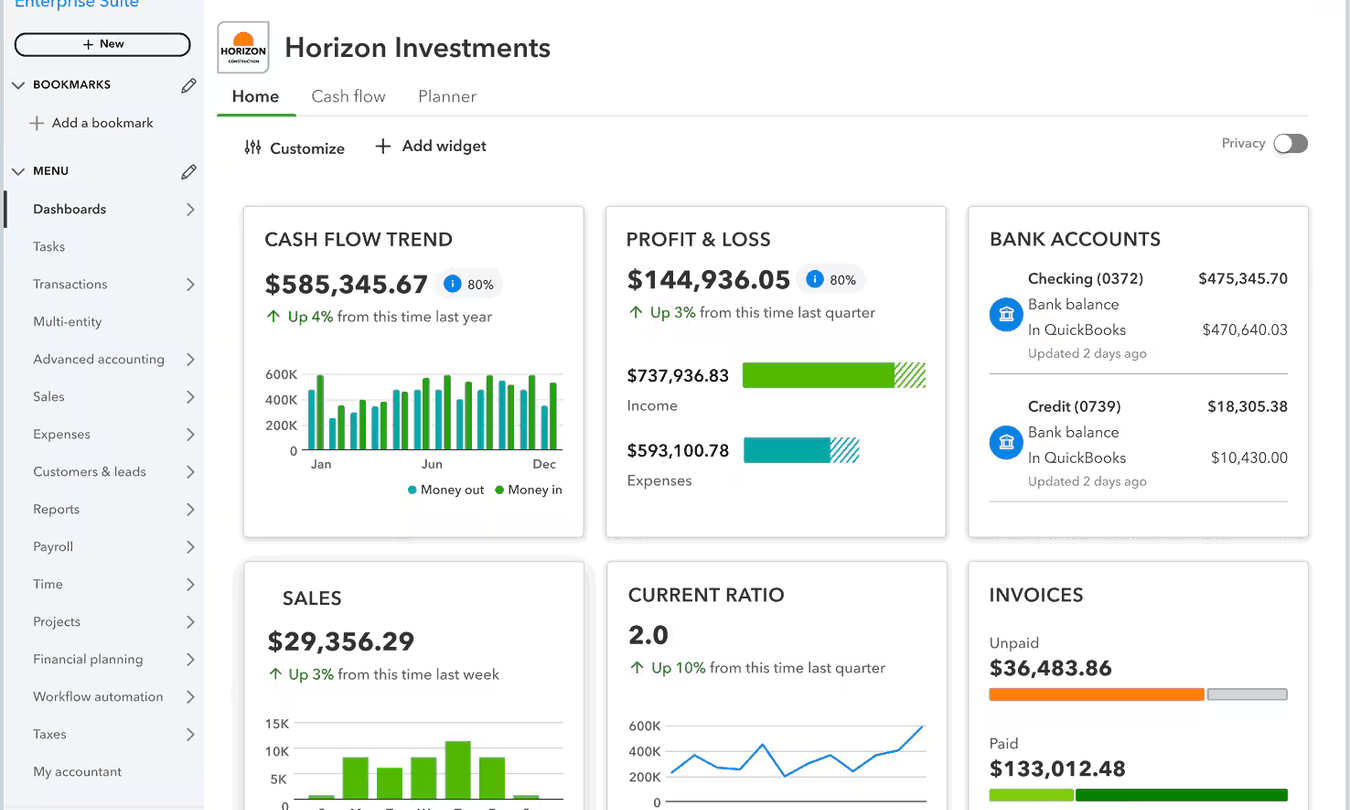
The Intuit Enterprise Suite (IES) interface doesn’t dramatically differ from QuickBooks Online. Core navigation, workflows, and accounting functions remain familiar. The main difference is added functionality for managing multiple entities, user permissions, and consolidated reporting. This means most users can adapt quickly while gaining tools to handle more complex financial operations.
Key takeaways
- IES keeps familiar workflows but adds multi-entity functionality.
- Navigation remains similar, with additional controls for managing entities.
- Users adapt quickly by learning reporting and entity-level differences.
What is the difference between IES and QuickBooks Online?
Intuit Enterprise Suite (IES) builds on the structure of QuickBooks Online but is designed for businesses managing multiple entities or more complex financial operations. While QuickBooks Online focuses on single-company accounting, IES introduces entity-level controls, consolidated reporting, and more advanced user permissions without changing core accounting workflows.
How to adapt from QuickBooks Online to Intuit Enterprise Suite (IES)
Moving from QuickBooks Online to Intuit Enterprise Suite (IES) involves learning how to work across entities rather than relearning accounting basics. The steps below help users adjust quickly and avoid common confusion.
- Start with familiar tasks: Begin with workflows like invoicing, expenses, and reporting to build confidence in the system.
- Understand how entities are structured: Learn how companies are organized and how to switch between them when working.
- Recognize where workflows change: Identify tasks that now involve selecting an entity or working across multiple entities.
- Learn consolidated reporting early: Understand how to generate reports that combine data without merging records.
- Adjust to permission-based access: Get used to seeing only the data relevant to your assigned entities.
- Test common workflows across entities: Practice recording transactions and reviewing reports in more than one entity.
- Train users based on their role: Focus training on what each user actually needs rather than the full system.
What changes when moving from QuickBooks Online to IES?
| Area | What changes in IES |
| Company structure | Manage multiple entities instead of one company |
| Navigation | Familiar layout with added entity controls |
| Reporting | Includes consolidated reporting across entities |
| User access | More granular permissions across companies |
| Workflows | Similar tasks with added entity-level steps |
Key differences users notice when moving from QuickBooks Online to a multi-entity system.
Example: Adapting to multi-entity workflows after moving from QuickBooks Online to Intuit Enterprise Suite (IES)
A regional property management company previously used QuickBooks Online to manage a single entity. As the business expanded, it created separate legal entities for each property group, which led to multiple QuickBooks accounts and manual consolidation in spreadsheets.
The finance team moved to Intuit Enterprise Suite (IES) to manage all entities in one system. During the transition, they found that daily tasks such as raising invoices and tracking expenses felt familiar. The main adjustment was selecting the correct entity when recording transactions and learning how to run consolidated reports.
Within one reporting cycle, the team reduced time spent on monthly consolidation and eliminated manual spreadsheet work. Managers could review performance across all property groups without switching systems, while entity-level reporting remained unchanged for local teams.
Checklist: Validating your transition to Intuit Enterprise Suite (IES)
Use this checklist to confirm that your team has adjusted to the key workflow and reporting changes in Intuit Enterprise Suite (IES).
- Confirm all entities are set up correctly and accessible in one system.
- Check that users only see the entities they are assigned.
- Run sample reports to compare entity and consolidated outputs.
- Verify transactions are consistently recorded in the correct entity.
- Test a full workflow across entities, from invoice to reporting.
- Review dashboards to ensure they reflect expected performance.
- Identify and remove manual consolidation processes.
Best practices and pitfalls for adapting to Intuit Enterprise Suite (IES)
Follow these best practices to help users adjust faster and avoid common transition mistakes.
- Expect workflows to expand slightly when working across entities.
- Don’t treat IES like a single-company system with extra tabs.
- Align reporting structure early to avoid rework later.
- Make sure teams understand when to work at entity or group level.
- Don’t carry over manual workarounds that the system replaces.
Intuit Enterprise Suite (IES) vs QuickBooks Online FAQs
Is Intuit Enterprise Suite (IES) difficult to learn if I use QuickBooks Online?
No. Most users familiar with QuickBooks Online can adapt quickly because core workflows remain similar. The main learning curve comes from understanding how to work across multiple entities and how reporting changes when combining data from different companies.
Does Intuit Enterprise Suite (IES) look the same as QuickBooks Online?
The interface is similar in structure, with familiar navigation and workflows. However, IES includes additional controls for managing multiple entities, user access, and reporting, so some screens and processes include extra steps or options.
What is the biggest difference between IES and QuickBooks Online?
The main difference is multi-entity capability. IES lets businesses manage several companies within one system, including consolidated reporting and more advanced permissions, while QuickBooks Online is typically designed for single-entity use.
Will my team need training to use Intuit Enterprise Suite (IES)?
Some targeted training is helpful, especially for teams working across multiple entities or using consolidated reporting. However, users familiar with QuickBooks Online can usually transition quickly by focusing on how entity structure and reporting differ.
This content is paid for by the brands indicated. Digital Trends works closely with advertisers to highlight their products and services to our readers. Although this article is informational and not opinionated, it reflects thorough fact-checking by our team to ensure accuracy. Our dedicated partnerships team, not external advertisers, crafts all branded content in-house. For more information on our approach to branded content, click here.