
Apple’s new M2 MacBook Air is now available, and true to form, iFixit tore it down in order to peek inside and take a better look at the hardware.
The teardown revealed a few interesting design choices, but most of all, it showed that Apple must have a lot of faith in the new MacBook Air, seeing as it didn’t even equip it with a heat spreader. Another potential issue was also unearthed.
In a display of endless bravery, iFixit did something that many of us wouldn’t be able to work up the nerve to do — it completely disassembled the new M2 MacBook Air. As one of the two products to house Apple’s new silicon, the MacBook Air received widespread attention, but not all of it has been good. According to several reviewers, the notebook has a heat problem — and unfortunately, iFixit’s teardown does nothing to dispel that notion.
Even though the M2 MacBook Air houses the same M2 chip as the latest 13-inch MacBook Pro, the former doesn’t come with any fans or heat pipes. That’s a lot of trust that Apple is putting into the stability of the device. The M2 MacBook Pro was also found to have heating issues, complete with throttling and hitting extreme temperatures of 108 degrees Celsius when dealing with heavy workloads. Even then, the MacBook Pro at least had one fan — the MacBook Air has none.
iFixit didn’t even find a heat spreader during the teardown, and it’s still quite unclear as to how exactly the passive cooling system works on the new M2 MacBook Air. Apple did, however, give it ample thermal paste and graphite tape. On the other hand, seeing as the M2 MacBook Air is even thinner than the previous generation, the components have even less room to breathe. The results of that are often mentioned by reviewers: The laptop tends to heat up when under pressure.
A different teardown performed by MaxTech revealed just why the SSD in the 256GB version of the M2 MacBook Air might experience an up to 50% drop-off in performance. This is because the 256GB version comes with a single NAND storage chip as opposed to two 128GB NAND chips, and although Apple claims this would be an improvement, the benchmark results say otherwise.
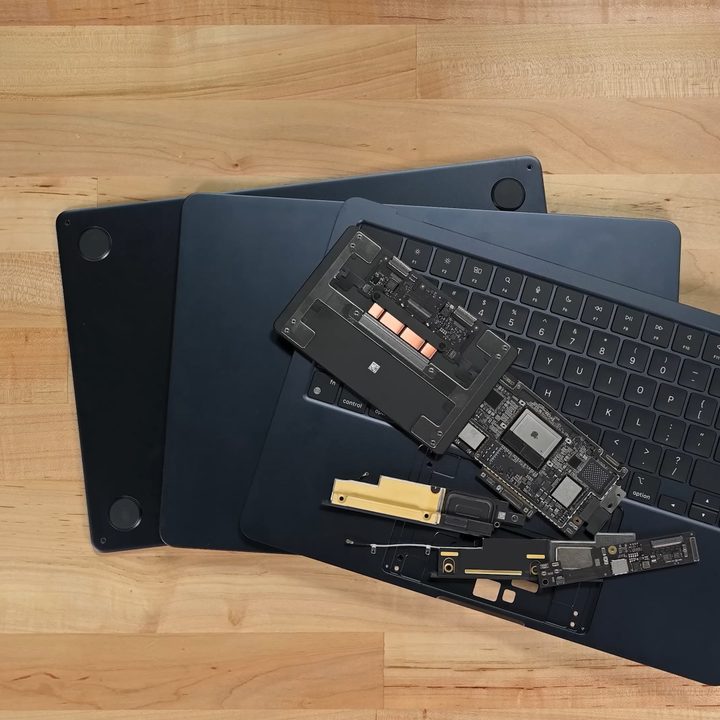
iFixit also looked closely at the rest of the logic board, including the 64-bit, 8-core M2 chip, a Wi-Fi chip, a USI Bluetooth chip, and a custom Apple Thunderbolt 3 driver. There’s also an accelerometer with no explanation as to why a MacBook Air might need one. It could be used for spatial audio or for the purpose of running iPhone/iPad apps, but in any case, it’s a surprising choice.
Apple’s latest offering comes with a 52.6-watt-hour battery which is a step up from the 49.9-watt-hour battery found in the M1 version of the notebook. It’s secured by adhesive pull tabs that seem quick and easy to remove. The ports are not glued down, but both the M2 chip and the SSD are soldered and thus difficult to replace.
The M2 MacBook Air seems like a solid notebook in its price range, but the potential heating issues raise some concerns. Oh well, at least we have a mysterious accelerometer.
In all likelihood, for most users, this won’t be an issue. The MacBook Air was never meant to be the sort of laptop you’d use for the most resource-heavy tasks. For day-to-day computing, it will likely serve its purpose as the ultra-light notebook it was built to be.


