
Artificial intelligence (A.I.) can do a huge amount to help our lives, and that’s especially evident in the devices we use every day. There are tons of apps that make great use of A.I. to introduce fantastic new features that save huge amounts of time, identify whatever you point your camera at, and much more.
If you are looking to get a helping hand from some ingenious algorithms, look no further. We have rounded up the best apps that can do the hard work for you on your mobile device or computer. Just download them and start reaping the benefits.
Scan Thing

Platform: iOS, Mac
Price: Free (offers in-app purchases)
Ever wanted to point your camera at something and have it instantly cut out and saved as an image file? Scan Thing’s smart algorithm is just what you need. Snap a picture of an object in front of you and a couple of seconds later you have yourself a cutout image ready to share or save.
That is fun, but Scan Thing is useful in other ways as well. You can scan documents and convert them to PDF files or lift text off a document and copy it to the clipboard. All that clever artificial intelligence in the app is put to great use in a variety of ways that will save you time.
TextSniper

Platform: Mac
Price: $9
TextSniper is a bit like Scan Thing for your Mac. All you need to do is press the dedicated keyboard shortcut, drag your mouse over your target area, and all the text is then copied to your clipboard. It is as simple as that.
There is an impressive range of sources that TextSniper can work with, including images, PDFs, YouTube videos, websites, screencasts, and much more. It is so versatile and fast that you will wonder how you lived without it.
PictureThis

Platform: iOS, Android
Price: Free (offers in-app purchases)
If you have an unidentified flower in your garden, there is no need to go scrambling through encyclopedias or searching around online to figure out what it is — just use the PictureThis app. Take a quick picture of the plant in question and PictureThis will get to work identifying the species for you in seconds.
The app is not just about solving horticultural mysteries — PictureThis offers extensive care and growing advice for your newly discovered blooms, including pest control, watering frequency, interesting facts, and much more. With its help, you will be a green-thumbed expert in no time.
FaceApp

Platform: iOS, Android
Price: Free (offers in-app purchases)
Chances are you have used FaceApp at some point (or at least know about it). This app is a fun little timewaster that takes one of your selfies and shows you how you would look in various scenarios — in 30 years’ time, for example, or with a beard or longer hair.
What is amazing is how well it does this. The results are quite incredible, an often indistinguishable from an actual photograph. If you have ever wanted to satisfy that kind of curiosity and be blown away with the results, give it a try.
Gemini Photos

Platform: iOS, Mac
Price: Free (offers in-app purchases)
Taking a bunch of selfies and editing them in FaceApp is fun, but it generates a lot of extra files on your device. In fact, there is a good chance your device is already stuffed to the brim with screenshots, blurry photos, duplicates, and all sorts of other cruft.
Gemini Photos is here to help. It scans your device and sorts your photos into categories ready for deletion. You can remove just the blurry photos, or just the duplicates — the choice is yours. It can even suggest which photo is the best from a bunch of similar shots. And don’t worry, you can review everything before deletion, meaning you never lose anything important.
Luminar AI
Platform: Mac, Windows
Price: $79
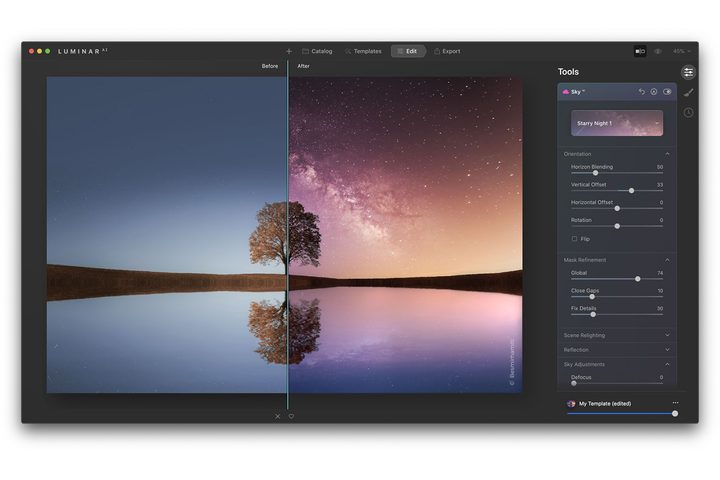
Love taking photos but hate editing them afterwards? Try Luminar AI. This app builds on the popular Luminar photo editor by throwing superintelligent artificial intelligence into the mix. It does the hard work for you, tweaking and editing your snaps to perfection at the press of a button.
Each photo loaded into the app is analyzed for key areas. Once this is complete, you get a range of templates to instantly apply for quick touchups and changes. You can leave it there or go deeper with a range of controls to truly bring your photos to life.
Oval

Platform: iOS, Android
Price: Free (offers in-app purchases)
Managing your money can be complicated, but it does not have to be if you use Oval. This app uses A.I. to recognize areas where you can save money, such as rounding up the price of your regular coffee and saving the extra cash.
It also learns from your habits to help your finances in other ways. If you have lots of big payments once a year, it will suggest you save less at this time to lessen your financial burdens. You can see your progress toward your savings targets and set smart goals so you are always in control. It is a handy app that helps take the strain out of being financially savvy.


