


Some of the best gaming mice come in all shapes and sizes and offer a variety of features like RGB lighting, programmable buttons, DPI control, and more. Gaming peripheral makers have also been focusing on making mice lighter in terms of weight by punching holes and using thinner material for the chassis. This allows for a smoother glide, which means better control, speed, and accuracy for gamers.
Here are our picks of some of the best lightweight gaming mice that you should consider buying in 2022.
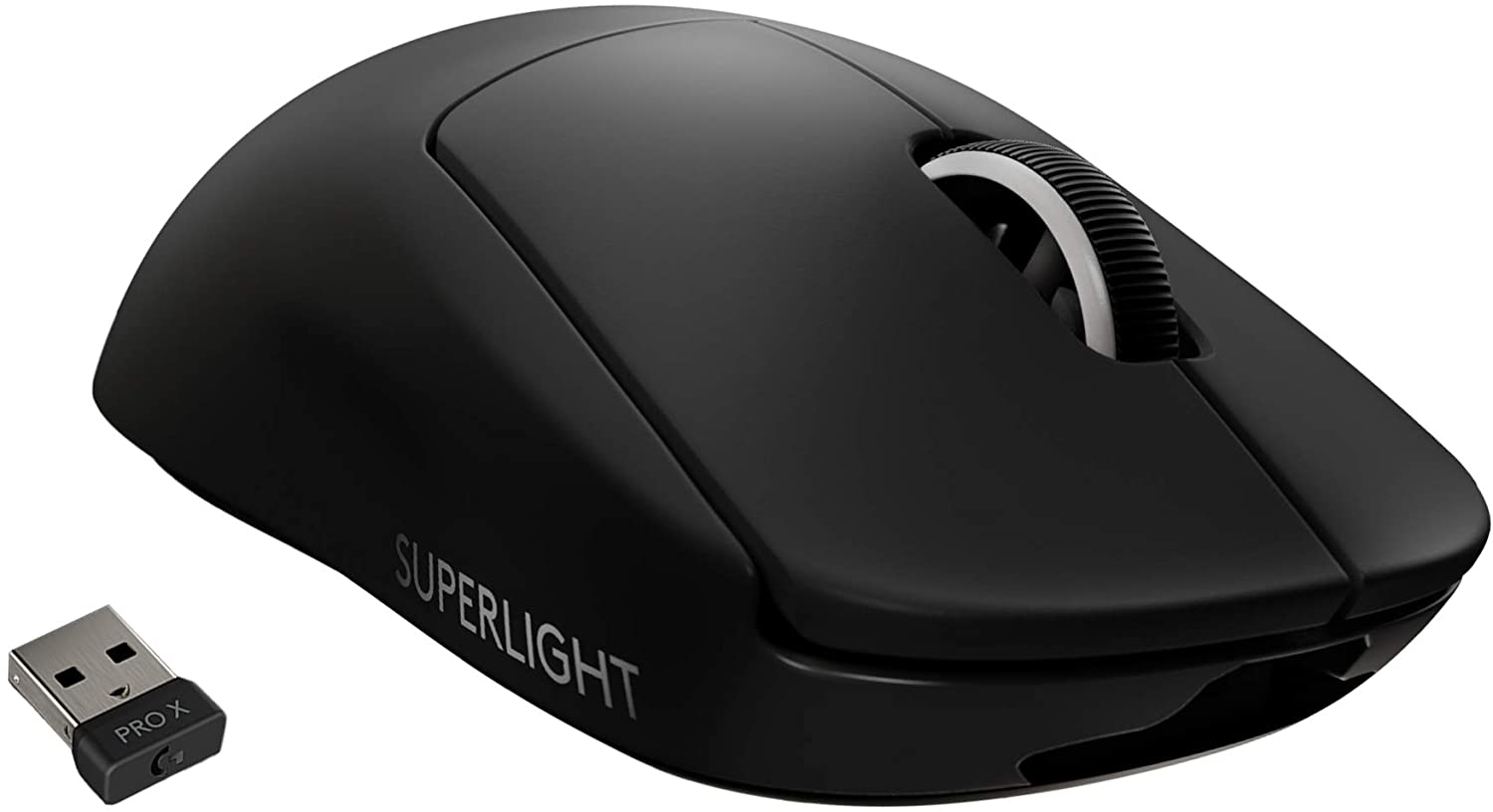


Best lightweight wireless gaming mouse
Logitech G Pro X Superlight
- Ultra-lightweight design
- Premium sensor
- Low-latency wireless connectivity
- Expensive price tag
- Proprietary wireless charging
- Micro-USB port
- No Bluetooth
Why you should buy this: It's a premium lightweight wireless gaming mouse that offers excellent performance.
Who's it for: Gamers who are into esports or take their FPS games seriously.
Why we chose the Logitech G Pro X Superlight:
If you don't have any budget limitations, then the Logitech G Pro X Superlight is highly recommended. It weighs just under 63 grams, which is extremely light for a mouse that offers wireless connectivity. It features a clean, minimalistic design and even skips on any sort of RGB lighting to make it as lightweight as possible. Targeting esports professionals, it offers exceptional performance and comes with Logitech's highly praised 25K Hero sensor that offers a range of 100 to 25,600 DPI. You can also expect extremely low click latency whether using it wired or wirelessly.
Speaking of which, it features Logitech's lag-free Lightspeed wireless connectivity and offers a dedicated compartment for the 2.4GHz dongle. The bundled Micro USB cable allows you to charge and use the mouse in wired mode. The battery is claimed to last for about 70 hours, and apart from the cable, the mouse can also be charged wirelessly. Sadly, that only works with Logitech's special Powerplay wireless charging mousepad, which costs an additional $120. As for the buttons, it has the bare basics, including the left and right click, a scroll wheel, and forward and backward navigation buttons.

Best lightweight wired gaming mouse
Glorious Model O
- Very well-built
- Available in matte or glossy finish
- Accurate and precise control
- Nice RGB lighting
- Honeycomb design is susceptible to dust accumulation
- Not recommended for small hands
Why you should buy this: It is the best lightweight wired gaming mouse.
Who's it for: Those who are looking for a gaming mouse that offers great precision and at the same time, offers a premium design and build quality.
Why we chose the Glorious Model O:
Next, we have our pick of the best lightweight wired gaming mouse. The Model O by Glorious comes with a perforated honeycomb styling that allows it to shed weight, making it one of the lightest mice around at just 67 grams. It is available in black or white and has the option of either a matte or glossy texture. The overall build quality is excellent, and while the ambidextrous design is appreciated, the browser buttons are only available on the left side. Even the braided cable feels excellent, as it offers a good amount of flexibility. The PTFE (polytetrafluoroethylene) feet at the bottom come with rounded edges for a smooth and snag-free experience. It might not be the best for large hands, though, and we recommend that you check out the Model O-, which is a smaller version that offers similar performance.
The mouse uses a Pixart 3360 sensor, which is one of the best in the business. It delivers accurate and precise tracking with up to 1000Hz polling rate and a DPI range of 12,000. The Omron switches ensure high durability of up to 20 million clicks, and with the dedicated software, you can customize various aspects of the mouse.

The most lightweight gaming mouse
Cooler Master MM720
- Extremally lightweight
- Comfortable to use
- IP58 certified
- Glossy and matte finish options
- Awkward-looking design
- Not suitable for extra-large hands
Why you should buy this: It's an extremely light gaming mouse that offers great ergonomics at an affordable price.
Who's it for: Those who are looking for an ultra-light gaming mouse for a claw grip.
Why we chose the Cooler Master MM720:
The Cooler Master MM720 is one of the most unique products on this list. Not only is it the lightest at 49 grams, but the awkward-looking shape is surprisingly comfortable, especially for a claw grip. Like the Glorious Model O, the MM720 is available in both black and white, with the option of choosing between glossy and matte textures. The design is quite different from most mice that you might have seen, with a lot of curves and a honeycomb pattern. It favors right-hand users due to the bulging support on the right, but overall, it should feel comfortable unless you have extra-large hands. There are two browser buttons on the left as well as two-zone RGB lighting that can be controlled using Cooler Master's MasterPlus+ software.
The mouse uses a Pixart PMW3389 sensor capable of up to 16,000 DPI that can be adjusted in steps of 100. The mouse also offers low click latency, which is great for gaming, and the lightweight design ensures smooth gliding and precise tracking. Instead of mechanical switches, Cooler Master has optical switches for the primary left and right buttons, which are claimed to offer an increased lifespan. Additionally, the MM720 comes with IP58 dust and water protection so you don't have to worry about sweat or accidental spills.

Best value-for-money lightweight wireless gaming mouse
HyperX Pulsefire Haste Wireless
- Comfortable and pleasing design
- Good battery life
- Included grip tape and PTFE feet
- Well-priced
- No Bluetooth
- Limited RGB
- Click latency can be better
Why you should buy this: It offers great value for money in a lightweight wireless gaming mouse.
Who's it for: Those who want a lightweight wireless gaming mouse that is not overly expensive.
Why we chose the HyperX Pulsefire Haste Wireless:
Giving stiff competition to the Logitech G Pro X Superlight, the HyperX Pulsefire Haste is a great lightweight wireless gaming mouse. It is available at almost half the price of the G Pro X Superlight and has honeycomb cutouts to reduce the overall weight down to just 61 grams. It comes with IP55 dust and water protection to keep away sweat and oil, and the overall design looks very appealing, especially the white version. The symmetrical shape and low vertical profile offer comfort for all hand sizes and it is suitable for most grip types.
It comes with a dedicated 2.4Ghz dongle for wireless connectivity, which also ensures a lag-free experience. There are two dedicated browser buttons on the left and a DPI switch button below the scroll wheel. There's subtle RGB lighting on the scroll wheel, while the TTC Golden micro dustproof switches are said to offer satisfying clicks and are rated for up to 80 million clicks. The PTFE feet ensure a smooth glide on mousepads and desks, and HyperX also bundles some grip tape for the left and right mouse buttons as well as side buttons. Best of all, the mouse offers up to 100 hours of battery life on a single charge, which beats the G Pro X Superlight by 30 hours! If you don't care about wireless connectivity, the Pulsefire Haste also comes in a wired version, which is equally impressive and about 2 grams lighter.

Best lightweight gaming mouse for small hands
Razer Viper Mini
- Compact and lightweight
- Premium design
- Brilliant RGB lighting
- Well-priced
- Limited DPI range
Why you should buy this: It's an excellent lightweight mouse for gamers with small hands.
Who's it for: Gamers who have small hands or generally looking for a compact gaming mouse at a reasonable price.
Why we chose the Razer Viper Mini:
Razer has an impressive range of gaming mice, and the Viper series has been quite popular, thanks to its shape and premium design. The smallest and most affordable of the series is the Viper Mini, and it is a godsend for gamers with small hands. At $39, it is one of the cheapest gaming mice from Razer, but it does not skimp out on features. It comes with the same shape and design as the original Viper and the Viper Ultimate, only smaller. It weighs just 61 grams, making it quite lightweight, and we appreciate Razer managing to shed weight without having any cutouts or holes.
It uses a Pixart 3359 sensor with up to 8,500 DPI rather than the 16,000 that is on the more expensive Viper models. You also get an RGB illuminated Razer logo and an additional strip below for a nice under glow effect. The build quality is great, as one would expect from Razer, with no creaking, and the braided cable is also nice and flexible to use. The 100% PTFE feet underneath offer a smooth gliding experience but sadly are not easily replaceable. There are a total of six programmable buttons, with two on the left side and a dedicated DPI switch, while all the mouse functionality can be controlled using the Razer Synapse software.

Best lightweight gaming mouse with low profile
Xtrfy MZ1
- Extermely lightweight
- Well-built
- Satisfying switches
- Customizable top button
- No software controls
- Only suitable for fingertip grip
Why you should buy this: It's a unique, compact, and lightweight gaming mouse that can potentially help improve your aim in games.
Who's it for: Gaming mouse enthusiasts looking for a compact and lightweight mouse for precise aiming.
Why we chose the Xtrfy MZ1:
Created in collaboration with famous mouse reviewer Zy “Rocket Jump Ninja” Rykoa, the Xtrfy Z1 is a very unique lightweight gaming mouse that is definitely worth the money. While it might look odd, it is actually a pretty impressive product, especially if you play a lot of FPS shooters and want to work on your aiming. Weighing just 59 grams, it has a compact and lightweight design with a low profile and honeycomb perforations. The plastic material actually feels good despite its translucent finish, and you get two additional browser buttons and a custom button right behind the scroll wheel.
It uses high-quality components, including the Pixart PMW3389 sensor that is capable of 16,000 DPI, while the Kailh 8.0 switches for the primary buttons sound and feel excellent. There is also some RGB lighting on the inside that can be customized to your liking. Speaking of which, the mouse does not come with any dedicated software. Instead, there are dedicated buttons at the bottom that can be used to adjust the DPI, polling rate, lift-off distance, and RGB lighting. There is also the option to custom set the top bottom as the F11 key and then bind it in-game.
Frequently Asked Questions
Investing in a gaming mouse that is lightweight makes sense if you play a lot of fast-paced FPS games. While it is subjective, anything below 80 grams is considered to be in the lightweight category. Lower weight allows you to move the mouse with less force, allowing you fast and precise movements within the game. It also reduces strain on your wrist during long gaming sessions, as you require considerably less effort when compared to a heavier mouse. Having said that, you shouldn't have any trouble using a lightweight mouse for regular day-to-day tasks.
You can get lightweight gaming mice at various price brackets depending on the brand and requirement. There are some really good affordable options like the Cooler Master MM720 and the Razer Viper Mini. Wireless options are generally more expensive as it gets difficult to shed weight due to the battery.
Lightweight gaming mice are not very different when it comes to basic functionality. However, they can be a little sensitive to use, especially if you choose one that is made out of cheap materials. It is highly recommended to go for a mouse that has a strong and long-lasting build. You might also notice that lighter mice don't come with a ton of features, as it is necessary to reduce any additional weight.


