Apple is fresh off the announcement of a developer preview of MacOS Monterey at WWDC 2021 and there’s a lot to be excited about. If you’re well invested in the Apple ecosystem of devices, then Apple has your back with this new operating system.
The latest MacOS release brings lots of new features that are all designed to help your iPad and Mac play nicely together. Here’s a look at the best new Mac OS Monterey features to try out once the public beta opens up next month — or with the developer preview that opened up today on June 7.
Universal Control
When Apple launched MacOS Catalina in 2019, the operating system picked up the new “Sidecar” ability to use an iPad as a secondary display for your Mac. Several years later, Apple is again playing into that interoperability with the addition of Universal Control in MacOS Monterey.
Universal Control adds more value to your iPad or your subsequent MacOS devices. Instead of plugging multiple keyboards into your devices or using a mouse or keyboard that supports pairing multiple devices, productivity power is now natively in your hands.
With a single mouse and keyboard, you can move between a Mac and an iPad seamlessly with no dongles or extra setup required. You’ll even be able to drag content between devices, saving you the need for an email, or a service like DropBox, or even Apple’s own iCloud.
AirPlay to Mac

In addition to Universal Control, the other big highlight of MacOS Monterey is AirPlay to Mac. If you ever wanted to cast a movie or a song to your MacBook, then you know how difficult it can be. You need an AirPlay server to use in between your devices to handle the connection.
Well, Airplay to Mac finally solves that. With the click of a button (as long as your devices are on the same Wi-Fi network) you’ll be able to send the content from your iPhone or your iPad right to your Mac machine.
Perhaps it’s a movie or perhaps you want to share your screen. It’s now quite easy.
Then there’s the audio side of AirPlay to Mac. No longer do you have to invest in an expensive speaker. If you have a new MacBook or iMac with high-fidelity speakers, then you can cast your audio to that device without the need for cables. Your Mac can become your own secondary speaker for your iPhone!
A revamped Safari

Last year’s WWDC saw the reveal of a revamped Safari, and this year, things are getting even better. While Google and Microsoft have updated Chrome and Edge regularly through the past year, Safari has lagged behind in the visual department. With MacOS Monterey, though, Safari is catching up with a few new features.
The first of those is a new tab design. A bit like what Mozilla has done with Firefox version 89, Safari now puts more emphasis on the webpage, rather than the tab itself. The tab bar takes the color of the webpage you’re on and combines the toolbar and search field into a more compact design. It’s a clean and concise experience to help you stay focused on what matters most.
The new tab design isn’t all. Like Microsoft’s “Collections” feature in Edge, Safari has a new way to follow you where you go. It’s known as “Tab Groups.” With Tab Groups, you’ll be able to save and manage your tabs across Mac, iPhone, and iPad. You no longer have to worry about emailing or bookmarking links. It’s just natural.
Shortcuts
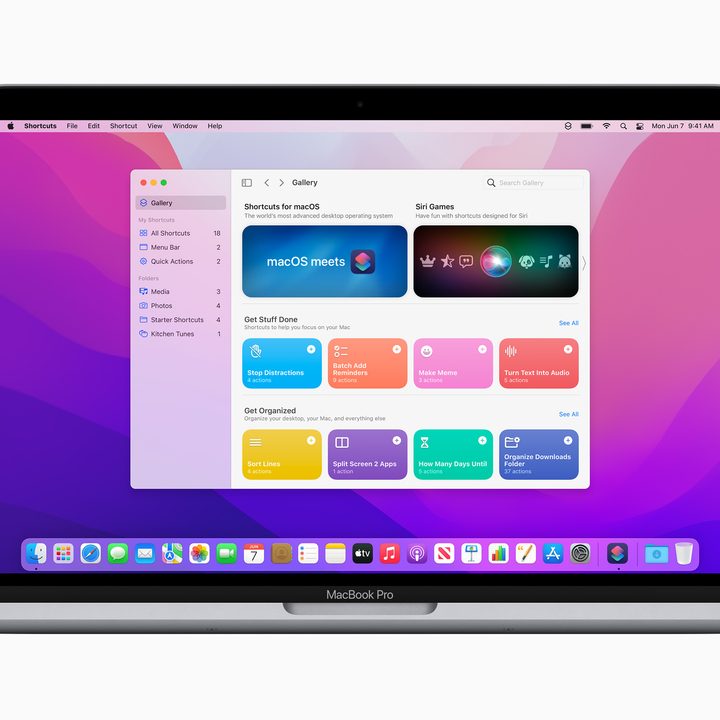
Last on the list is Shortcuts. This is a feature familiar to iOS and iPadOS users, but it now comes to MacOS, too. Designed to help make doing common tasks on your MacBook much easier, Apple is planning to push Shortcuts as an alternative to the Automater app, and it might be worth it.
According to Apple, the Shortcuts app on MacOS will help you “achieve peak productivity.” With the app, you can select pre-built actions for sharing files, making GIFs, converting files, and a lot more. You even can customize the shortcuts for your own workflow, as it is integrated across the Finder, in Spotlight, and works with Siri. But don’t worry, it also will let you import from Automator, too.
Other features
We just hit the highlights, but there are many other features in MacOS Monterey that are worth trying out. Lower Power mode, FaceTime support for spatial audio and voice isolation, new privacy features in the Mail app, and Live Text detection in photos are just a few. Of course, there is the developer side of things, too. These include the introduction of TestFlight on MacOS, so developers can beta test apps with the general public more easily.
If you’re a developer, you can download MacOS Monterey today by going to Apple’s developer program website. The general public, meanwhile, will be able to start testing Monterey next month, followed by a full rollout in the fall.