
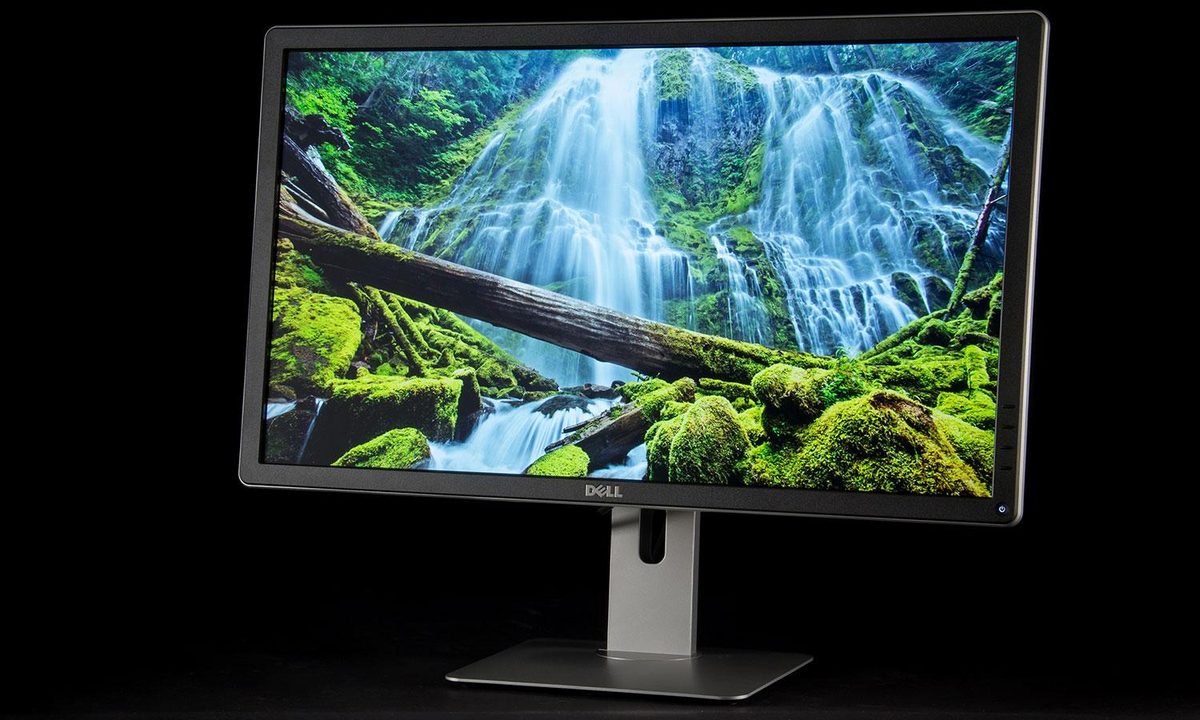

“The P2715Q is a no-compromise 4K monitor, and we love it.”
- Plenty of connectivity
- Intuitive on-screen controls
- Ergonomic stand
- Beautiful picture
- Boring design
- Limited image quality adjustments
“Why you can trust Digital Trends – We have a 20-year history of testing, reviewing, and rating products, services and apps to help you make a sound buying decision. Find out more about how we test and score products.“
Dell was one of the first to jump on 4K monitors, offering models to consumers as early as winter 2013. Perhaps too early, as those first models had serious handicaps. Today though, Dell makes some of the best 4K monitors in the world, and the competition is stiff. With that in mind, how does its first real, great entry in the 4K space hold up today?
It might be a few years old, but it’s still an Ultra HD, IPS panel with numerous connection options, and a wide color gamut. Unless you’re a heavy gamer, there’s not much more to ask for. You can find it just over $430 straight from Dell and even less if you catch it during a sale period. Does the lower price make the P2715Q still worth buying compared to some its newer contemporaries?
Simple, yet sensible
The P2715Q doesn’t impress out of the box. Dell’s traditional matte black design is livened by silver plastic trim, but the material doesn’t look expensive, even at a distance. In comparison, monitors with a glossy bezel provide more visual punch, especially nowadays.


Take a closer look, though, and you’ll notice this monitor means business. Its relatively slim panel doesn’t include any unnecessary frills and feels durable when handled. Unlike a number of the alternatives which include cheap touch controls, this display offers chunky buttons that seem ready for abuse.
An ergonomic stand is included and provides a full range of adjustability: height, tilt, pivot, and swivel. It tracks true with just enough resistance to keep it in place but not enough to make it difficult to move with one free hand. The monitor is VESA compatible, too, so you can switch to a third-party stand if needed.
Portpalooza
Search around back and you’ll find a wide variety of connection options including DisplayPort and Mini-DisplayPort for video-in as well as DisplayPort-out (so the monitor can be daisy-chained). Two 4K displays can be daisy-chained at once, but doing so drops the refresh rate to 30Hz.
HDMI, speaker-line out, and four USB 3.0 ports are also part of the package. All the USB ports are on the rear panel, however, so the P2715Q isn’t a great place to plug thumb drives and other peripherals that you’ll frequently move.
Simple, but you’re not in control
Let’s get back to those buttons. Silly as it may sound, Dell’s reliance on physical buttons is one of our favorite features. We’ve seen no shortage of alternatives over the last year ranging from resistive touch controls to joysticks, but traditional clicky buttons still work best. They’re easy to find quickly, provide positive feedback — and most importantly they tend to last under years of abuse.
Calibration provided minor but noticeable improvements.
Dell’s on-screen control menu is precise and simple to use. Everything is easy to find and labeled with clear text rather than with vague icons. Having said that, there’s not a lot of adjustment available. Users can only change brightness, contrast sharpness and RGB values. If you’re curious why this IPS monitor isn’t sold as an UltraSharp, well, here’s your answer.
The lack of adjustability is disappointing, especially as a number of more modern displays offer better customization. That said, professional controls often come with a higher price tag.
Pre-calibration quality
Dell’s P2715Q is a very special display. Its IPS panel offers wide viewing angles, strong color and deep blacks. Throw in the sharpness of 4K on a 27-inch panel (which translates to 163 pixels per inch) and you have the formula for a spectacular experience.
Objective tests made it clear our first impressions weren’t misguided. The gamut spans 100 percent of sRGB and 79 percent of AdobeRGB while maintaining a contrast ratio of 690:1 at maximum brightness and 650:1 at half that. Those specifications aren’t as impressive today as they once were, with a number of 4K displays now offering higher contrast ratios, but it’s enough to deliver a beautiful image and real-world results of the competition don’t always stand up to their paper specs.

Color accuracy on the P2715Q is good too, with an average difference of only 1.74 (most of which is in the cyan and green range). A difference below one is generally undetectable, so this is close to perfect. Gamma was just a tad off the perfect 2.2 curve.
You won’t be impressed until you turn the display on.
All of this adds up to image reproduction with no easily detected faults. The color variance in cyan can make scenes look a tad cool at times, but even then the P2715Q is better than most, and the outstanding contrast ratio gives content real depth.
While viewing Interstellar‘s 4K trailer, for instance, we were stunned by how well the monitor handles the inky nothingness of space. It’s not on par with a good UHD TV but it’s obviously better than an average LCD monitor.
Post-calibration quality
Dell’s monitor is great out of the box but with some calibration, it looks even better.
We eventually settled on a calibration that lowered average color difference to 1.39 while preserving the gamma curve and increasing gamut to 80 percent of AdobeRGB. Contrast ratio at half of maximum brightness didn’t budge from 650:1, but the contrast at maximum increased to 720:1.

Speaking of brightness, there’s plenty here, as we saw a maximum output of 332 lux. That figure, combined with the semi-gloss panel coat, makes the monitor usable in almost any environment. We turned it down to about 180 lux for use in our office.
The numbers suggest a minor improvement overall, and that’s what we saw in our viewing. Switching the calibration on and off made it clear our adjustments slightly tamed the coolness of the default settings, but it wasn’t a night-and-day difference
Our take
The Dell’s P2715Q looked and performed great when we first reviewed it, and it holds up very well today. There’s a reason it tops our list of the best 4K displays — it offers excellent image quality, a great ergonomic stand, and Ultra HD at a price that’s more affordable than ever.
You do miss out on advanced gaming features like fast response times and a high-refresh rate, but you’d have to spend several times the cost of this display to get that if it’s truly important to you. For now, the P2715Q offers the best bang for buck of any 4K display out there.
Any alternatives?
Since you’re unlikely to be considering the P2715Q for its gaming chops, the best comparisons are professionally-orientated displays like the HP Z27. It retails for around $150 more than the Dell, but has fantastic color options and a much better looking stand, with thinner bezels. If you need more size and don’t mind spending double, the BenQ PC3200UA is hard not to recommend. With stunning visuals and a massive 32-inch panel, you can really take full advantage of the 4K resolution.
How long will it last?
As with most great monitors, a few years at least. While the PS2715Q doesn’t have all of the latest features and ports, there is unlikely to be a major shift in connectivity in the next few years which makes this display outdated. The picture quality and resolution will keep this monitor relevant for a good few years to come.
While this monitor isn’t an UltraSharp it’s also not a standard consumer monitor. As a result, receives a better warranty than usual. Dell offers three years of coverage with “advanced exchange service,” which means the company will send you a replacement immediately if it can’t troubleshoot a problem over the phone (instead of waiting for you to ship your old monitor back). It’s not unusual for a monitor this expensive to have a three-year warranty, but the advanced exchange service gives Dell a slight edge.
Should you buy it?
If you’re a gamer, there are better options out there with faster response times, higher refresh rates, and syncing technology. For everyone else? Absolutely.



