  1. Home
  2. Computing
  3. Mobile
  4. Legacy Archives

Dell slashes price of XPS 10 Windows RT tablet by $150, base model now starts at $300

Add as a preferred source on Google
dell-xps-10-price-cut
Image used with permission by copyright holder

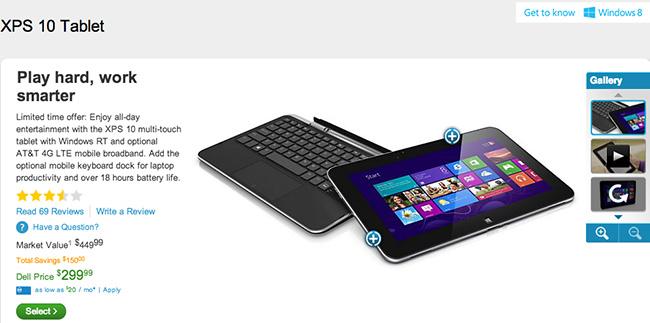
What can $300 buy these days? Well, a lot of things, but you can now add Dell’s XPS 10 tablet to the list. The Windows RT slate that used to cost at least $450 (after a $50 initial price drop), is now available for $150 less via Dell’s online shop. It comes with a 10.1-inch 1,366 x 768 pixel resolution display, a 1.5GHz Qualcomm Snapdragon processor, 32GB of storage that can be supplemented by a microSD card, front and rear cameras, up to 10 hours of battery life, and a copy of Microsoft Home and Office 2013.

Note that we weren’t superbly impressed when we reviewed the XPS 10 in February, mostly because of Windows RT’s glitchy performance. RT users have a lot to complain about, including the system eating a large part of your device’s storage capacity, random instances of muting and audio stuttering, flash sites not working, lack of video support for Silverlight, problems detecting and connecting to Wi-Fi networks, and sudden system crashes. Thus far, Windows RT device usage has been on par with Chromebook usage, but that’s not exactly a good thing.

Recommended Videos

Still, a considerable price cut might convince some to try a Windows RT tablet out. If you do pick up the Dell XPS 10, make sure to give our Windows RT tips and tricks list a read to give you an idea of how to work your new tablet. Those who want their XPS 10 to come with 4G LTE connection, you unfortunately have to shell out more cash, as the 64GB LTE version of the tablet still costs $500. 

Mariella Moon
Mariella loves working on both helpful and awe-inspiring science and technology stories. When she's not at her desk writing…
This cross-device clipboard app solves the copy-paste problem I keep running into on my Mac
ClipboardAI keeps a searchable history of everything you copy
Text, Electronics, Mobile Phone

I have lost count of how many times I have copied something important, copied another thing before pasting it, and then realized the first item was gone. It is a small frustration, but it happens often enough to become annoying. I recently came across ClipboardAI, which caught my attention because it goes beyond Apple’s built-in clipboard by saving copied items into a searchable history.

Instead of replacing the last thing you copied every time, ClipboardAI keeps a searchable record of copied text, links, codes, email addresses, phone numbers, addresses, and images across iPhone, iPad, and Mac. That means an older clip does not disappear just because you copied something new.

Read more
If you miss the feel of paper in the digital age, this app gives your Mac’s screen a textured look
A paper-like screen overlay could make long work sessions feel less harsh.
Advertisement, Poster, Electronics

Most screen-comfort tools work by changing color temperature. Apple’s Night Shift makes the screen warmer, often giving everything an orange tint. Paperman is an interesting alternative because it adds a subtle paper-like texture over the display instead.

The app is available for Mac and Windows, and it is designed to make a screen look closer to paper, matte glass, or an e-ink display. It softens the harsh contrast and reduces the glossy look of modern screens during long reading or writing sessions.

Read more
I dug these last-hour Prime Day smart home, laptop, and accessory deals that are irresistible
Deals up to 60% off, a few hours left, and no reason to wait any longer.
Electronics, Phone, Speaker

Amazon's Prime Day 2026 sale is in its final hours, giving you your last chance to get your hands on the best smart home, security, tablet, laptop, and accessory deals. I've pulled together the picks that are still live, still deeply discounted, and still worth buying before the sale ends tonight or until the stock lasts.

Best Amazon Prime Day deals on smart home devices

Read more