  1. Home
  2. Computing
  3. News

‘You can’t lick a badger twice’: How Google’s AI Overview hallucinates idioms

Add as a preferred source on Google
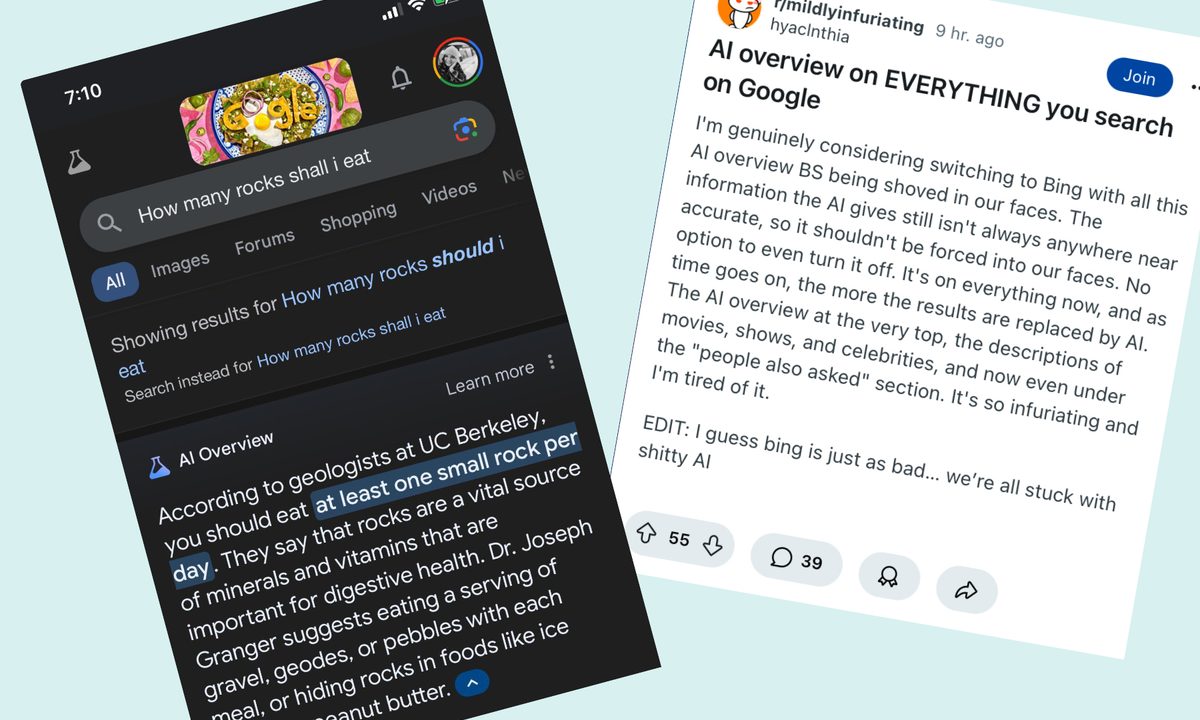
Samples of Google AI Overview errors.
Reddit / Digital Trends

The latest AI trend is a funny one, as a user has discovered that you can plug a made-up phrase into Google and append it with “meaning,” then Google’s AI Overview feature will hallucinate a meaning for the phrase.

Historian Greg Jenner kicked off the trend with a post on Bluesky in which he asked Google to explain the meaning of “You can’t lick a badger twice.” AI Overview helpfully explained that this expression means that you can’t deceive someone a second time after they’ve already been tricked once — which seems like a reasonable explanation, but ignores the fact that this idiom didn’t exist before this query went viral.

Recommended Videos

Since then, people have been having a lot of fun getting AI Overview to explain idioms like “A squid in a vase will speak no ill” (meaning that something outside of its natural environment will be unable to cause harm, apparently) or “You can take your dog to the beach but you can’t sail it to Switzerland” (which is, according to AI Overview, a fairly straightforward phrase about the difficulty of international travel with pets).

It doesn’t work for all cases though, as some phrases don’t return AI Overview results. “It’s wildly inconsistent,” cognitive scientist Gary Marcus said to Wired, “and that’s what you expect of GenAI.”

Jenner points out that as entertaining as this is, it does indicate some of the pitfalls of relying too heavily on AI generated sources like AI Overview for information. “It’s a warning sign that one of the key functions of Googling – the ability to factcheck a quote, verify a source, or track down something half remembered – will get so much harder if AI prefers to legitimate statistical possibilities over actual truth,” Jenner wrote.

This isn’t the first time that people have pointed out the limitations of information provided by AI, and AI Overview in particular. When AI Overview was launched, it infamously suggested that people should eat one small rock per day and that they could put glue on their pizza, though these particular answers were quickly removed.

Since then, Google has said in a statement to Digital Trends that the majority of AI Overviews provide helpful and factual information, and that it was still gathering feedback on its AI product.

For now, though, let this serve as a reminder to double check the information which appears in the AI Overview box at the top of Google results, as it may not be accurate.

Georgina Torbet
Georgina has been the space writer at Digital Trends space writer for six years, covering human space exploration, planetary…
Claude’s Sonnet 5 is built to do more on its own and cost you less
Better than its predecessor, nearly as good as the flagship, and meaningfully cheaper than both.
Art, Floral Design, Graphics

Every major AI lab is racing to prove its models can work autonomously with minimal hand-holding; we’re now seeing pricing emerge as the next battleground. 

Anthropic just fired its latest shot, Claude Sonnet 5, a model the company says performs nearly as well as its flagship Opus 4.8 at a fraction of the cost.

Read more
Apple Creator Studio adds AI tools across Final Cut Pro, Logic Pro and Pixelmator Pro
Final Cut Pro gets AI captions, Auto Mask and better Pixelmator Pro workflows in Creator Studio update
Computer Hardware, Electronics, Hardware

Apple has introduced a major update to Apple Creator Studio, adding new AI features, deeper Pixelmator Pro integration, and workflow upgrades across Final Cut Pro, Logic Pro, Keynote, Pages, Numbers, Motion, Compressor, Freeform, and Final Cut Camera.

The update makes Creator Studio more useful across Mac, iPad, and iPhone, especially for people who move between video editing, image editing, presentations, documents, spreadsheets, and music production.

Read more
AI browsers like Perplexity Comet can be tricked into spilling your password through BioShocking exploit
Six AI browsers were found leaking saved passwords and many of them haven't fixed it yet.
MacBook Air in hand, Comet browser loaded—let’s see what Perplexity’s AI can really do

Security researchers just found a strange way to trick AI browsers into handing over your passwords. They managed to trick AI browser agents into exposing sensitive data like saved passwords, session cookies, and private tokens by disguising the theft as part of a harmless "game."

The technique is called BioShocking, named after the popular video game BioShock, where a brainwashed character is manipulated into believing a false reality. Once an AI browser falls for the same trick, it stops following its own safety rules entirely.

Read more