
As a Google Drive user, you may have heard or read about Google One. What was once simply paid additional storage for Google Drive is now known as Google One. Since 2018, Google Drive users have had the option to subscribe to the service for the added storage along with extra benefits.
You may be wondering if you need Google One, what the benefits of the service include, and how much it costs. We’re here to give you answers.
Google One versus Google Drive
Google Drive is a storage service where you can collect, organize, and share files, images, and videos. The service gives you 15GB of storage at no charge.
Google One is a paid subscription plan that provides more storage than you receive for free with Google Drive. The storage you purchase spreads across Google Drive, Gmail, and Google Photos. You also receive added benefits with Google One, which we’ll describe below.
What’s included in your storage
The 15GB of free storage you receive with Google Drive, as well as the storage you purchase with Google One, includes the following:
- Google Drive: All items including images, videos, and Trash as well as files from Google Docs, Sheets, Slides, Forms, and Sites.
- Gmail: All emails, attachments, Spam, and Trash.
- Google Photos: All photos and videos.
To see how much storage you’re currently using, visit the website for one of the above applications. You’ll see Storage at the bottom of the left-hand menu.

If you’re using the “new Gmail view,” select your Inbox or another label in the menu on the left. Do not select an email in that location. You’ll see your storage in the preview pane on the right or bottom as shown below.

You can also see a breakdown of the storage you’re using per service. Visit the Google One site and select Storage on the left.

Extra benefits of Google One
Although the member benefits of Google One may vary by country and do change over time, these are a few of those extras you can enjoy.

Take advantage of Google One plan sharing. You can share your Google One subscription plan with up to five family members at no additional charge.
Get help from Google experts when you need it. You can ask questions about Google’s products or services and receive answers from trained Google experts. Using the Google One app or Google One website, you can ask for assistance wherever Google One is available.
You can also receive Google Play credits, up to 10% back on Google Store purchases, and additional editing features in Google Photos.
Google One pricing and plans
If your decision comes down to the cost of the additional benefits you receive, let’s summarize the basic pricing and plans for Google One. These are the available options at the time of writing.
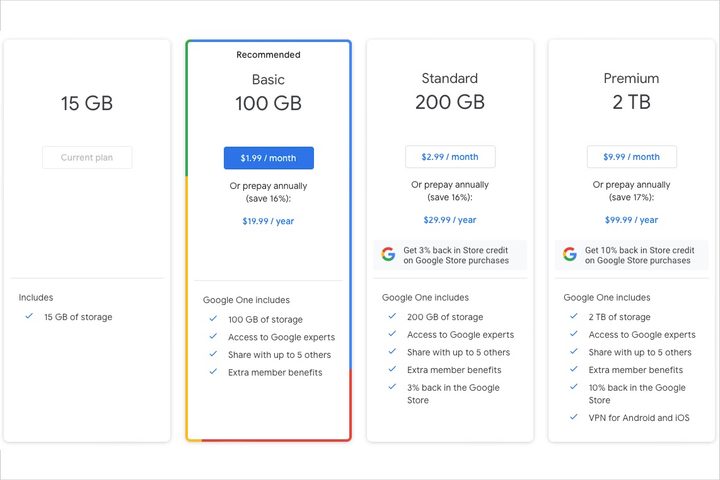
- Free: 15GB of storage.
- Basic ($1.99 per month or $19.99 per year): 100GB of storage, access to Google experts, extra member benefits, and the option to share with up to five other people.
- Standard ($2.99 per month or $29.99 per year): 200GB of storage, all features of Basic, and 3% back in the Google Store.
- Premium ($9.99 per month or $99.99 per year): 2TB of storage, all features of Basic, 10% back in the Google Store, and VPN for Android and iOS.
Do you need Google One?
If you see that you’re getting low on storage space and plan to continue using the Google services described above, or if you’re considering backing up your phone and syncing media with Photos, this is a good time to think about upgrading to a Google One plan.
Plus, if you have family members who could also benefit from the additional storage, it’s worth considering a plan that’s affordable for your family.
For more details on Google One, including how to sign up and share your plan with family, take a look at our Google One subscription article.


