
The Surface Duo and Surface Neo will ride or die on their apps, just like all mobile devices do.
But these aren’t your average tablets or phones. The unique dual-screen designs make the task of porting over apps even more challenging than normal. Toss in requiring support for both Windows 10 and Android, the short timeline, and Microsoft’s infamous record, and you’ve got yourself plenty of reason for concern.
Ahead of its developer day, Microsoft shared how it would put those concerns to rest and create a real solution for the Surface Neo and Duo.
Windows, Android, who cares?
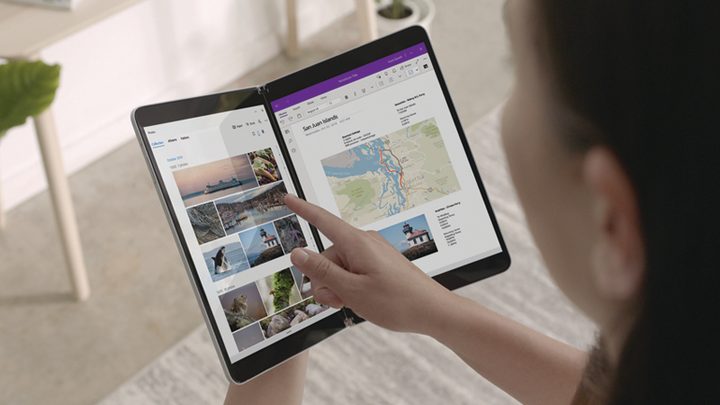
From the beginning, Microsoft has maintained that the Surface Neo and Surface Duo will run dual-screen applications from just about every source possible. More specifically, that’s the millions of Android apps from the Google Play Store on the Surface Duo and all existing Windows apps on the Surface Neo. With their previous app-gap failures with Windows RT and Windows 10 Mobile, Microsoft was quick to make assurances that these devices will be successful thanks to the software behind it.
At Microsoft 365 Developer Day, Microsoft finally showed us exactly how it would happen. First off, any app regardless of what platform it was made on, should run. That includes old Win32 apps, UWP apps, web apps, and Android apps (on the Duo).
That doesn’t mean, however, that these apps will magically take advantage of the dual-screen form factor and the different postures of these new Surface devices. Microsoft is distributing a series of tools and SDKs to help developers make that happen, as well as build new apps from the ground-up with this form factor in mind.
For the Duo and Neo, developers will have access to a new dual-screen SDK for the Xamarin.Forms framework. Xamarin has been around for years, and it’s an open-source framework designed for building cross-platform apps, including iOS, Android, and Windows. It even uses .NET from a single shared codebase.
Essentially, developers could use this to build cross-platform dual-screen apps across both Windows 10X and Android. That’s thanks to its ability to allow developers to create user interfaces in XAML with code-behind in C#. These interfaces are rendered as performant native controls on each platform.
That means developers can build iOS, Android, & Windows apps with just one code and won’t have to re-write the app for a specific platform.
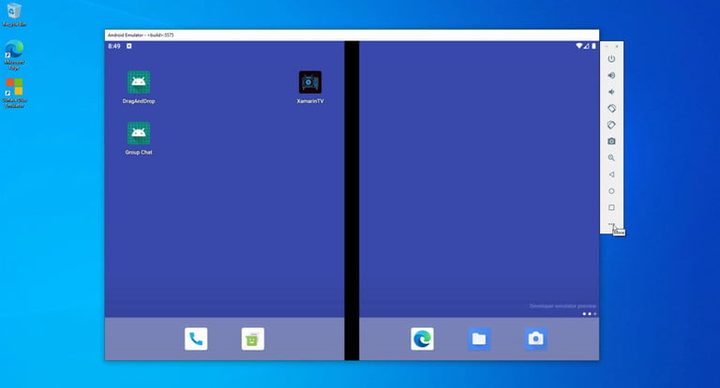
Even better, with a TwoPane View control, and other APIs and tools built into Xamarin.Forms, developers are also able to adjust their apps to dual-screen Windows 10X devices and the Surface Duo automatically.
This should ensure that any apps you download on Windows 10X and on the Surface Duo will work not only in single screen-mode, but also when spanned, rotated, and when using one of the many unique patterns available on these devices.
Microsoft promises that Windows apps in this new flavor of Windows 10 will run in containers. This means that they’ll run virtualized in the background and run quickly and more reliably. Microsoft announced its Win32 container, which allows old Win32 apps to work seamlessly in Windows 10X. However, Windows Central reports that while most traditional Win32 apps will work in Windows 10X, programs that manipulate OS system data will not work. Drivers also will be handled exclusively via Windows Update, which means you won’t be able to install drivers manually.
In addition, that means less-intrusive updates, a more reliable system, and improved battery life.
Developers are able to test this all out today with the new Microsoft Emulator, which should help in the development and testing of apps for Windows 10X and for dual-screen apps on the Surface Duo.
Web apps are the future

Apps from the Microsoft Store or Google Play Store aren’t the full story as to how Microsoft will solve the Surface Neo and Surface Duo’s app problem. With the release of a new Edge browser, and new developer tools that can simulate and remotely debug dual-screen devices, the company is also betting big on web apps, better known as Progressive Web Apps (PWAs.)
Microsoft emphasized that one of the most used apps on any device is web browser. This is especially important, as PWAs are essentially webpages, which are simpler to code and maintain. However, they can run similar to an app you download in the Microsoft Store. They also have the same access to Windows 10 features, like offline support, notifications, and more.
That’s why Microsoft is pushing developers to come on board with web apps, too. Microsoft wants to give web developers more tools to improve web apps for dual-screen devices. Most PWAs are powered by HTML, CSS, and JavaScript, but Microsoft is betting on the future. The company is working with CSS Working Groups at the World Wide Web Consortium to ensure that as PWAs become more popular, developers would be able to build them for dual-screen devices too, across web browsers and operating systems.
The Universal Windows Platform (UWP) was absent from Microsoft’s solution, which has allowed developers to code apps that work across Windows devices. Although it wasn’t mentioned, Microsoft has said in the past that UWP apps will be supported in Windows 10X.
Be it with Android apps on the Surface Duo, Windows 10X apps, web apps, or the UWP, Microsoft seems committed to finding a proper app solution for the Surface Neo and Duo. It could get messy with all these different options, but one thing is for sure: There will be no lack of apps on these new dual-screen devices.


