  1. Home
  2. Computing
  3. News

The macOS Sequoia public beta just launched. Here’s how to download it

Add as a preferred source on Google
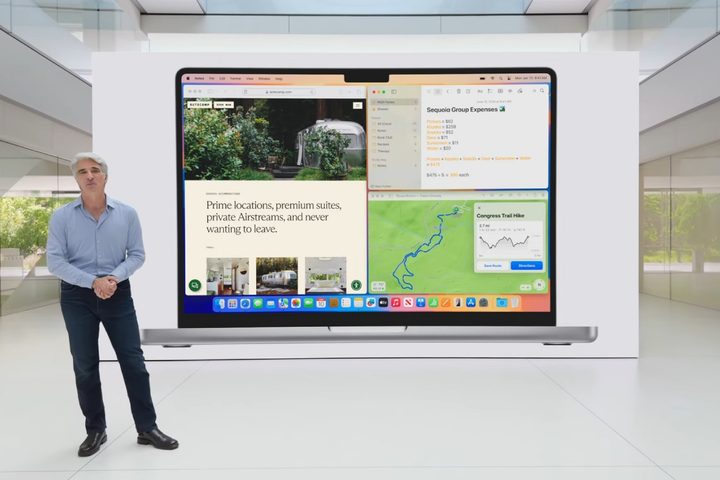
Apple's Craig Federighi introducing the new window tiling feature in macOS Sequoia at the Worldwide Developers Conference (WWDC) 2024.
Apple

The public beta for macOS Sequoia is here, and that means anyone with a compatible device can install it and try it out — no paid developer memberships needed. Here’s how to get it.

First of all, you’ll need a PC that can run macOS Sequoia. This is the list of compatible models:

  • iMac from 2019 or later
  • iMac Pro from 2017 or later
  • Mac Studio from 2022 or later
  • Mac mini from 2018 or later
  • Mac Pro from 2019 or later
  • MacBook Air from 2020 or later
  • MacBook Pro from 2018 or later
Recommended Videos

For the MacBook Air, this includes both the Intel-based 13-inch Retina model and the M1 model from 2020. All of the other products include older Intel-based models too, but be aware that once Apple Intelligence launches, only models with M1 and later will have access to it.

Time Machine back-up feature on macOS.
Willow Roberts / Digital Trends

If you have an older or secondary device, it’s always best to use that instead of your main PC. We’re only a few months away from the full release, but anything can happen with a beta. If you don’t have a spare, make sure to use the Time Machine utility to back up your Mac first.

To sign up for the beta, head to the Apple Beta website, where you can use your normal Apple ID and get everything set up in just a few clicks. Apple interconnectivity (when it works) is always the best.

Setting up macOS beta on macOS.
Willow Roberts / Digital Trends

Next, you need to enroll the device or devices you want to install the beta on. If you select the “Enroll Your Devices” tab, there’s a guide right on the website. For anyone running Ventura 13.4 or later, head to System Settings > General > Software Update and click the little “i” button next to “Beta updates.” This will let you choose the macOS beta you want to install. If you’re running an earlier macOS version, you’ll need to install the macOS Beta Access Utility instead and follow its instructions.

If you set this up before the beta drops, you’ll get a notification when it’s time to download. Otherwise, it’ll instantly pop up in the Software Update window ready for you to install in the same way as any other OS update. All in all, it’s pretty easy.

MacOS Sequoia brings a number of significant updates, including iPhone Mirroring, window tiling, updates to Safari, the new Passwords app, and more. Not all of these features may be in this initial release of the public beta, but may roll out over the following months. Eventually, it will also include a number of Apple Intelligence features, though reports indicate they may not be available to use until 2025.

Willow Roberts
Willow Roberts has been a Computing Writer at Digital Trends for a year and has been writing for about a decade. She has a…
One of the most controversial US agencies is reportedly taste-testing Anthropic uber-powerful Mythos AI
The agency's reported use of Mythos highlights a widening split inside the US government over AI risk
Claude AI on an iPhone.

The US government's AI fight just got harder to square. The National Security Agency is reportedly using Anthropic's Mythos Preview even as senior Pentagon officials keep pushing to cut the company off over supply chain concerns. It shows how quickly real security needs can outrun official policy.

Since February, the Defense Department has been trying to block Anthropic and push vendors to do the same. Yet, according to an Axios report, the NSA appears to be moving ahead with one of the company's most powerful models anyway, suggesting cybersecurity demand is carrying more weight than the feud now playing out inside government.

Read more
AI streaming is going mainstream in China, whether audiences want it or not
IQiyi wants AI to make most of its content someday, and it's already starting.
man holding tablet watching iQiyi

China's Netflix, iQiyi, is making one of the biggest bets in streaming history. The company wants AI to create the bulk of its films and shows someday soon, and it's already restructuring its 16-year-old business to make that happen.

At its annual content showcase in Beijing, founder and CEO Gong Yu announced that iQiyi is pivoting its popular streaming platform into a social media destination built around AI-generated content. 

Read more
This wild gaming laptop wants to fight motion sickness at 300Hz
Honor’s new gaming laptop has a 300Hz anti-dizziness display
Honor Win H9 Gaming Laptop Teaser

Gaming laptops usually sell themselves with the usual checklist that includes higher watts, bigger GPUs, faster screens, and more. But Honor's upcoming Win H9 is trying something a little strange and, honestly, it is a little more interesting.

In an official teaser, Honor has confirmed the new flagship Win H9 gaming laptop ahead of its full announcement on April 23. You get the typical powerful hardware under the hood and a powerful cooling system, but what really impresses is the new “3D Game Anti-Dizziness” display technology.

Read more