  1. Home
  2. Computing
  3. Web
  4. Evergreens

How to update Google Chrome

Add as a preferred source on Google

Since its release in 2008, Google Chrome has remained one of the most popular web browsers for its ease of use, G-Suite integration, and superb performance across multiple platforms.

Created as part of the Google Chromium Project, the open-source project launched Google Chrome as a web browser that’s free for anyone to try or use and enjoys internet-wide compatibility. Anyone with a Google email address (i.e., almost anyone with an internet connection) can seamlessly sync and personalize their account with Chrome for an optimized and familiar experience. You can also import bookmarks and settings from your previous browser, set your name and picture for your Chrome account, or open a new link to manage your Google account features directly.

Recommended Videos

Google Chrome even offers features to save you time and effort, including managing logins, checking for password breaches, making and securing online transactions, and saving and auto-filling address information. Of course, none of these incredible features will do you any good if your version of Chrome is out-of-date and unable to function properly.

Learn how to update Google Chrome quickly and easily on your PC, iOS, or Android device and get back to surfing the internet in no time!

How to update Google Chrome on your PC

Step 1: Open Chrome and select the three vertical dots to open the Settings menu.

Image of Google Chrome Settings Menu
Daniel Martin/Screenshot

Step 2: Select Safety Check and Chrome will check to see if updates are required and install them if need be.

Image of Google Chrome Safety Check Menu
Daniel Martin/Screenshot

How to update Google Chrome on your iPhone/iPad

Step 1: Open the App Store and tap your Profile in the top right.

Image used with permission by copyright holder

Step 2: Select Available Updates and search for Chrome.
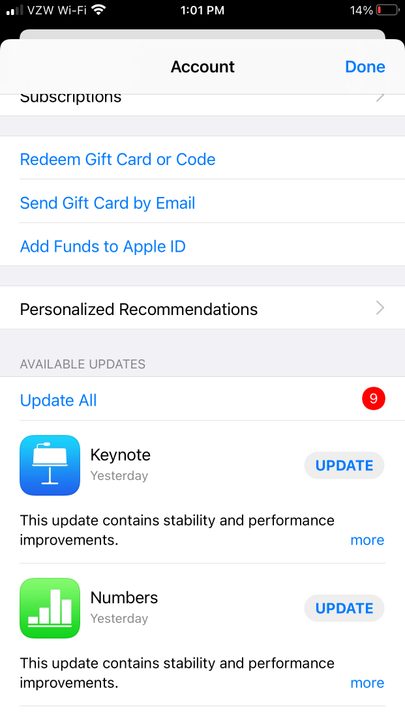
Image of Apple App Store Available Updates Section
Image used with permission by copyright holder

Step 3: Should you see Chrome listed, tap Update to install and enter your Apple ID password, if asked.

How to update Google Chrome on your Android device

Note that users of Chrome 76 and above should open Chrome on their device. Tap More > Update Chrome and restart the app.

Step 1: Open the Play Store app and tap Menu > My Apps & Games.

Google Play android app screenshot
screenshot

Step 2: Under the Updates tab and then under the Updates Pending header, find Chrome (if it is listed), and then tap Update.

Google Play update screenshot 2
screenshot

Note: Chrome will only be listed if there is an update available for it and the update hasn’t already been installed.

Need more from your browser? Choose new features from our list of the best Google Chrome extensions and stay connected to your favorite apps and services.

Daniel Martin
Former Digital Trends Contributor
Daniel Martin is a technology expert, freelance writer, and researcher with more than a decade of experience. After earning a…
AI may have just won a literary prize. My heart weeps seeing it poison our love for books.
updated book and AI photo

I had a hard time processing this news. As someone who has been deeply in love with stories since childhood and who grew up on the works of Arthur Conan Doyle, Terry Pratchett, J.R.R. Tolkien, and other such venerable authors, seeing an AI-written story win a prestigious writing award is hard to digest. 

If you are unaware, the winners for the Commonwealth Short Story Prize for 2026 were announced, and three of the five winning regional stories have been found to be entirely or partially written by AI. Or at least that seems to be the consensus among readers. As a reader and an amateur fiction writer, this hurt me deeper than any other tale of AI corroding our lives.

Read more
Canva and Adobe are coming to Gemini, and they want to make everything chatty
Adobe and Canva are plugging into Google’s assistant, betting that creative work starts with a prompt, not an app icon
Art, Collage, Photography

Canva and Adobe are moving deeper into Google Gemini, giving the assistant a bigger role before users ever open a design app.

Adobe says its "Adobe for creativity" connector is coming to Gemini in the coming weeks, giving users a way to describe tasks and send them through Adobe tools for imaging, design, and video. Canva is already rolling out its Connected App for Gemini in select English-language markets, with full availability coming soon.

Read more
AI can pass the Turing Test in live chats and appear more human than us. I am spooked now
UC San Diego researchers found GPT-4.5 was judged human 73% of the time in live conversations
Image of a human woman next to an AI-generated face with Real or Fake text at the bottom.

AI can pass the Turing Test in live chats, and the latest result lands with a chill. In a UC San Diego study, GPT-4.5 outperformed real participants at convincing judges there was a person on the other side.

The setup was harder to shrug off than a standard benchmark. Judges reacted to real-time exchanges rather than static prompts, then made a fast call based on conversation alone.

Read more