  1. Home
  2. Computing
  3. Evergreens

How to use Gmail’s new ‘smart compose’ feature

Feeling lazy? Here's how to get Gmail's smart compose to write emails for you

Add as a preferred source on Google

Gmail’s option to enable experimental features gives users access to unreleased functions and tools which, though still in an unfinished state, can provide solid and convenient upgrades to email. One such feature is Smart Compose. Expected to be rolling out in the next couple of months, this is a neat tool that can eliminate the need to type common phrases and streamline email writing.

Smart Compose draws on the same technology as Gmail’s Smart Reply feature, released last year. That functionality, which offered potential messages for the user to send in an email reply, has been extended by Smart Compose to apply to new email compositions. Not only this, but the recommendations come in line, as the user is typing, allowing for a faster, modular approach to email writing.

Recommended Videos

If you’re inviting people to an event, Smart Compose might suggest phrases indicating time of day, the location of the event, or the cordial language typical of an invitation. Now implemented for simple phrases, Google’s AI Blog indicates that future iterations of the feature may be able to match the user’s specific writing style when generating suggestions.

How do I enable it?

Step 1: To access experimental features, you’ll first have to upgrade to the latest version of Gmail. You may have already received a notification like the one below.

Image used with permission by copyright holder

Step 2: If not, click the gear icon in the upper right corner of the page and then click on “Try the New Gmail” at the top of the drop down menu:

Image used with permission by copyright holder

Step 3: Then click Settings. Under the General tab, scroll down and check the box that reads “Enable experimental access.”

Step 4: Finally, scroll to the very bottom of the page, hit Save Changes, and you’re ready to start using Smart Compose!

In Practice

Step 1: To use the feature, hit compose as you normally would.

Step 2: While typing, you’ll notice grayed out suggestions after the cursor for certain sentences.

Step 3: Hit Tab as the prompt indicates and the suggestion will fill in.
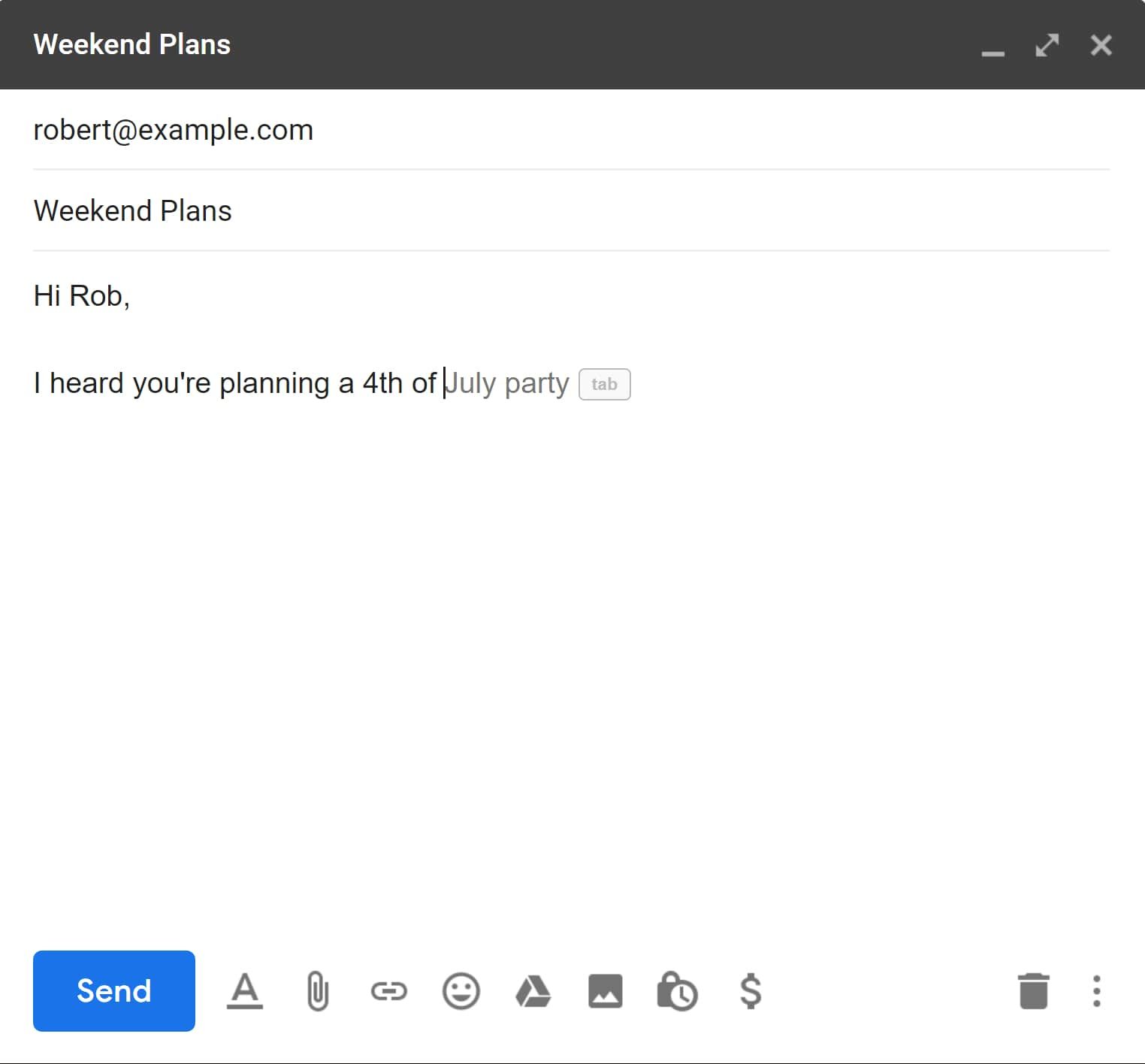
And you’re off and running with Smart Compose! To learn more about the new Gmail design you can look at our article detailing the changes and new features.

For more tips to help optimize your workflow, check out this article on Gmail shortcuts and tricks.

Max Kwass-Mason
Former Digital Trends Contributor
Max is a student at Columbia University, studying Philosophy and Computer science in the scholars program. He's interested…
Topics
Anthropic launches Claude design to simplify visual creation with AI
Finally, AI that designs your slides so you don’t have to
Claude

Anthropic has introduced a new AI-powered design tool called Claude Design, aimed at helping users create visual content such as prototypes, presentations, and marketing assets through simple conversational inputs. The product, developed under Anthropic Labs, is currently available in research preview for paid Claude subscribers and is being rolled out gradually.

Claude Design is powered by the company’s latest vision model, Claude Opus 4.7, and is positioned as a tool that bridges the gap between technical design expertise and everyday creative needs.

Read more
AI triggered a RAMmageddon so bad that Apple looks like the sensible choice
Laptop prices got so stupid in 2026, that Apple turned into the value king.
Student using MacBook Neo in classroom.

I really didn't want to believe it, but here we are. Apple is now looking like the sensible laptop brand. Not the cool underdog. Not the affordable alternative. Apple, in 2026. The reason is not that the company suddenly became generous, but rather the rest of the competition has suddenly become so deranged that a MacBook lineup starting at $599 feels weirdly grounded.

Apple's MacBook Neo starts at $599, while Microsoft's own 13-inch Surface Laptop now starts at $1,199 after this month's price hikes. This isn't a small gap that you can ignore. Meanwhile, Apple's MacBook Air with M5 starts at $1,099 with 16GB of memory and 512GB of storage, which looks like one of the few premium laptops still priced by human beings.

Read more
AI mode in Chrome gets a big upgrade to save you some tab hopping
Chrome just made tab hopping a thing of the past with its upgraded AI Mode, and it's genuinely useful.
Google AI mode mockup showing new feature

If you have ever gone down a rabbit hole while searching for something online, you know the drill. You open one tab, follow a link, open another, and another, and suddenly you have 14 tabs open and zero answers.

It was one of the reasons that forced me to switch to Arc Browser, which offered easier-to-manage vertical tabs, which, incidentally, Google Chrome also added a week back. But Google is not stopping there, and is adding a meaningful upgrade to AI Mode in Chrome to fix this issue.

Read more