


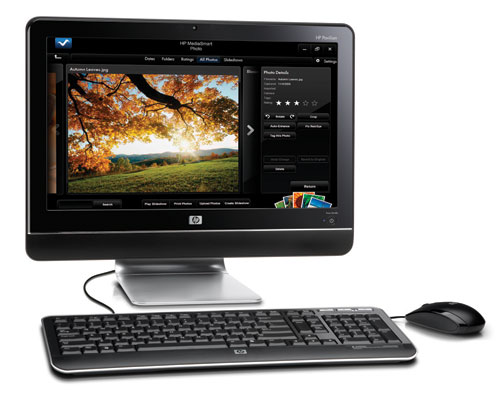
“HP’s Pavilion MS225 wraps capable hardware in an attractive all-in-one design without blowing the budget.”
- Inexpensive
- Equipped with a real desktop CPU
- 64-bit Windows 7 Home Premium (which includes Windows Media Center)
- 320GB hard drive
- 4GB of RAM
- Not suited to demanding applications
- Wired mouse and keyboard
- Wired networking limited to 100Mb/s
- Wireless networking limited to 802.11b/g
“Why you can trust Digital Trends – We have a 20-year history of testing, reviewing, and rating products, services and apps to help you make a sound buying decision. Find out more about how we test and score products.“

Introduction
Few companies have done as much to advance the popularity of all-in-one PC designs as HP (except for maybe Compaq, and that was long before HP acquired the company). While the HP Pavilion MS225 doesn’t have all the sexy features found in HP’s more expensive TouchSmart series—it’s not endowed with a touchscreen, obvioulsy—but it’s a much better value than some of the other inexpensive all-in-one PCs we’ve seen lately. Read on to find out why.
Features and Design
Put simply, the difference lies in HP’s component choices. A number of manufacturers have elected to use inexpensive CPUs, such as Intel’s Atom series, in order to hold down costs. That choice, paired with just one or two gigabytes of memory, keeps price tags low, but it also leads to unpalatable performance and usability compromises. HP could never offer the Pavilion MS225 at just $600 without making its own dive into the bargain bin, but at least it comes up with a full-fledged desktop processor: AMD’s Athlon II X2 250u running at a modest 1.6GHz.
 Admittedly, that chip’s not going to fuel anyone’s mad-scientist fantasies, but it does put a much bigger herd of horses under the hood than anything in the Atom line will. It’s a 64-bit, dual-core chip fully capable of running Windows 7, and HP pairs it with 4GB of 800MHz DDR2 memory (the system comes with the 64-bit version of Windows 7 so the machine can address all the memory). Unlike the TouchSmart line though, which features discrete graphics processors with their own frame buffers, the MS225 relies on integrated graphics (namely, AMD’s ATI Radeon HD 3200) that reserve 256MB of that system memory for its own purposes. Don’t buy this machine with the expectation of playing anything other than the simplest of mainstream games.
HP’s hard drive choice, a 320GB model that spins at 7,200 RPM, boosts the value proposition just a wee bit higher. There’s also a memory card reader integrated into the left side of the monitor bezel, along with a headphone jack and mic input. A fixed-position webcam is embedded in the top bezel. HP’s other component choices, on the other hand, are more what you’d expect in this price range: The vertically mounted DVD burner relies on a tray, the wired network adapter is limited to 100Mb/sec, and the wireless network adapter card supports only 802.11b/g. (The more elegant TouchSmart series features a slot-feed optical drive, gigabit Ethernet, and 802.11n wireless.)
The built-in 18-inch LCD delivers resolution of 1366×768 pixels. It can be tilted and swiveled, but it’s not height adjustable and cannot be pivoted (which isn’t unusual for this type of machine). As is typical of all-in-one PCs, your expansion opportunities are limited to devices you can plug into the machine’s USB port. There are two of these in the left side of the machine and four more in back, but keep in mind that the mouse and keyboard will consume two right off the bat.
Performance
There’s nothing fancy about the keyboard and mouse—both rely on USB cables—but the keyboard offers solid tactile feedback and has buttons for controlling the software media player and the volume. Unless you’ve been blessed with extremely keen hearing, you’ll want to plug a set of powered speakers into the audio line-out in back, because the ones built into the machine are so weak that the fan noise from a nearby tower machine nearly drowned them out.
 The MS225 itself is relatively quiet, but it’s louder than ViewSonic’s VPC100 all-in-one and, surprisingly enough, slightly noisier than HP’s much more powerful TouchSmart 300. The machine draws power from an external brick and is very energy efficient, drawing 44 watts of juice while idle and 55 watts while running our Photoshop benchmark test. It’s worth noting, however, that the Atom-powered VPC100 drew just 35 watts at idle and only 38 watts during our Photoshop test.
The presence of a dual-core CPU, on the other hand, renders the MS225 a much better productivity machine than the VPC100 could ever hope to be. Our benchmark test loads a digital photo (shot in raw format with an Olympus C-8080) into Photoshop and then sequentially applies and reverses every one of the program’s filters. The VPC 100 required 11 minutes and 11 seconds to run through the entire script; the MS225 required a somewhat more reasonable five minutes and 16 seconds. That’s still not as fast as a conventional desktop computer—HP’s Pavilion Slimline s5160f, for instance, completed the task in nearly half that time—but at least you won’t find yourself questioning your sanity over your decision to buy a budget box.
Conclusion
The HP Pavilion MS225 delivers better performance than we expected to find from a $600 PC. While there’s no getting around some of its limitations—you can’t drive a second monitor, for example—you can add many of the other features it doesn’t already have. You can plug a TV tuner into one of its USB ports, for instance, and add a network-attached-storage (NAS) box or a home server machine to augment its storage capacity. And wireless mice and keyboards are pretty cheap if you don’t like dealing with cables.
Just don’t fool yourself into thinking you’re going to find a powerhouse machine at this price point. If you’re planning to edit digital photos and video all day long or play the most demanding videogames, this is not the right system. But if you want a compact PC you can tuck in a corner of the kitchen on your bedroom dresser for watching DVDs and checking email, then the Pavilion MS225 is a compelling value.
Highs:
- Inexpensive
- Equipped with a real desktop CPU
- 64-bit Windows 7 Home Premium (which includes Windows Media Center)
- 320GB hard drive
- 4GB of RAM
Lows:
- Not suited to demanding applications
- Wired mouse and keyboard
- Wired networking limited to 100Mb/s
- Wireless networking limited to 802.11b/g


