

Intel’s most powerful, high-end consumer CPUs fall under the banners of Core Ultra 7 and Core Ultra 9 chips. Where once they were known as Core i7 and Core i9, that nomenclature was retired with the Core Ultra 100 Meteor Lake generation. The new Core Ultra branding has maintained through the latest generation. For the top chips, you want Core Ultra 7 or Core Ultra 9.
But if you’re in the market for the most powerful CPUs Intel has to offer, how do you decide which is right for you? There are different core counts, clock speeds, and cache quantities to consider, and pricing looms over the entire debate. Picking the right CPU for you isn’t easy, but to help, we’ve put together this guide on what separates Intel’s best from each other.
Just want to buy Intel’s best right now? Here are our favorites.
Intel Core Ultra 7 vs. Core Ultra 9: What’s the difference?
The technical difference between Intel’s classic Core i7 and Core i9 and its newer Core Ultra 7 and Core Ultra 9 CPUs has always been cores, clocks, and cache, and that’s in service of their different market focus. Core Ultra 9 CPUs are aimed at those performing professional workloads with their CPUs, or gamers with deep pockets who want the absolute best possible performance.
In contrast, Core Ultra 7 CPUs are seen as the top-end consumer chips, designed for high-end gaming or gaming and streaming. They’re the slightly-less-capable version of the Core Ultra 9 flagships, but often run about as well in less demanding games and applications. It’s only when apps and services can take advantage of a few extra cores or of a few hundred extra megahertz that there’s even much of a performance difference.
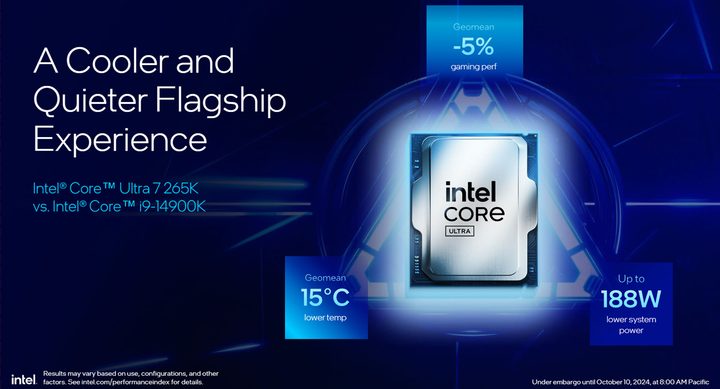
The latest generation of Intel CPUs, Arrow lake, include just one Core Ultra 9 chip, although it has a few variants. The Core Ultra 9 285 comes in standard form, as well as the K variant, which has a higher boost clock and is overclockable, and a T version which is designed for more lower power devices while maintaining the same core count.
Core Ultra 7 also has a single chip, the 265. It has K and T variants too, as well as F and KF models, which drop the onboard graphics support.
Core Ultra 100 chips were mobile exclusives, and though the Core i9 CPUs from previous generations are still high-performance, they’re harder to recommend now. They have no upgrade path outside of their generations, and their power efficiency was exceptionally poor.
Should you buy Core Ultra 7 or Core Ultra 9?
To answer this question we need to consider two things: What are you going to do with it, and what is your budget?
That said, for almost anyone, the best option will be Core Ultra 7 and maybe even Core Ultra 5 if you don’t need the extra cores of the Ultra 7. Core Ultra 7 is designed more for the mainstream, offering strong gaming performance, excellent productivity capabilities, and decent energy efficiency. Core Ultra 9 is designed for those who will make money from what their PC is doing and therefore shaving off a little time from that render or transcode job makes a material difference.
If your pockets are deep and budget isn’t of much concern, then get the Core Ultra 9 model as it’ll be faster for sure and with zero compromise. But for everyone else, Core Ultra 7 is probably the better pick.

After recent price drops, the Core Ultra 7 265K is now available for under $300, making it one of the best buys at that price point of any CPU — AMD or Intel. In comparison, the 285K, which only has four more efficiency cores and an extra 200MHz on the performance core boost clock, is just under $600.
Twice the price for maybe 10% extra real world performance is a hard sell. It’s worth it if you can really make the most of those added cores, as certain apps really love extra threads to play with. But for games, lighter workloads, or even more heavy day to day tasks, Core Ultra 7 is plenty and offers far greater value for money.
Core Ultra 7 vs. Core Ultra 9 on desktop
The main factors that differentiate between Core Ultra 7 and Core Ultra 9 CPUs are core counts and clock speed, but there isn’t a lot in it between the different classes of chips. There is greater difference between the different models of CPUs, though, with the K-series options offering greater clock speeds at a higher power draw.
Note: Since the T-series models are designed for ultra low power scenarios and aren’t sold to general consumers, we won’t be covering them here.
| Cores/Threads | Boost clock (P/E) | L2+L3 Cache | TDP (Base/Turbo) | |
| Core Ultra 9 285K | 24 (8P+16E)/24 | 5.7GHz/4.6GHz | 76MB | 125W/250W |
| Core Ultra 9 285 | 24 (8P+16E)/24 | 5.4GHz/4.6GHz | 76MB | 65W/182W |
| Core Ultra 7 265K | 20 (8P+12E)/20 | 5.5GHz/4.6GHz | 66MB | 125W/250W |
| Core Ultra 7 265 | 20 (8P+12E)/20 | 5.2GHz/4.6GHz | 66MB | 65W/182W |
As you can see, both Core Ultra 7 and Core Ultra 9 CPUs have almost identical core counts, with the Core Ultra 9 models only sporting four additional efficiency cores. This is distinct from previous generations, where the Core Ultra 9/Core i9 models had many more cores, but in this case there isn’t much to separate them. Indeed, without hyperthreading thread counts are the same, too.
The additional cache from the four extra cores gives Core Ultra 9 chips a little boost, as does the slightly increased clock speeds, but this generation there is little differentiating these two lines of chips. A 265K will perform better than a 285 in most scenarios.
Core Ultra 7 vs. Core Ultra 9 in laptops
Intel’s latest Core Ultra 7 and Core Ultra 9 laptop chips are similar to their desktop counterparts in that each only has a few models, but they come in different variants. These are U-series, H-series, and HX-series. U-series CPUs are the low power variants, pulling as little as 15W at their base and 57W in turbo mode. H-series CPUs are more powerful with more cores and higher clocks but pull more power, starting at 28W and going up to 115W at the top end.
The fastest versions of Intel’s Core Ultra mobile CPUs are the HX models. These have the highest clock speeds and the most cores, but demand the most power. They have a base draw of 55W and a maximum Turbo power of 160W.

For Core Ultra 7 there are 255 and 265 CPUs, and these are available in U, H, and HX forms. For Core Ultra 9 there’s basically just the 285, and it doesn’t have a U-variant. However you can buy a laptop with a 285H, or 285HX CPU. There’s also a 275HX, which is the same as the 285HX, but with a slightly reduced boost clock.
As with the desktop chips, the Core Ultra 9 CPUs are faster and in this case, particularly faster in HX form than H, and significantly faster than all U-series models, Core Ultra 7 or otherwise. However, it’s harder to directly compare these chips because performance is so dependant on other aspects of the laptop, like its thermal cooling system and power limits.
With that in mind, look to individual laptop reviews to gauge system performance or qualities of specific laptops. In general, though, HX CPUs are faster, Core Ultra 9 tends to be faster than Core Ultra 7, but it’s far from straightforward. A Core Ultra 7 265HX may well be faster than a Core Ultra 9 285H, for example.
What about Core Ultra 5 CPUs?
If you really don’t need the performance of a Core Ultra 9 or Core Ultra 7 CPU, or your budget is a little tighter than those chips allow, there is nothing wrong with Core Ultra 5 CPUs. They offer comparable gaming performance to Core Ultra 7 (and sometimes even Core Ultra 9) and aren’t that far behind on productivity performance. They still have a strong mix of P and E cores, and if you grab a K variant then overclocking can close the gap even more.
If you’re considering other CPUs though, don’t forget AMD’s Ryzen chips. They are some of the best processors for gaming in the form of the 9800X3D and 9950X3D, and their productivity is very strong too.


