

Upon getting the new MacBook Air M3 in my possession, I had one major question: Can you play games on it?
That might sound like a silly first thought for a laptop of this type. After all, it’s not marketed as a gaming laptop — it’s an incredibly thin, fanless laptop. Not exactly something even meant for any high-performance tasks.
But with the M3, that calculus changes. When it was first announced in the iMac and MacBook Pro, Apple did mention that even the base M3 could do some basic gaming thanks to all the new graphics prowess. In its press release, Apple says that some games will run up to 60% faster than an M1 MacBook Air.
A lot of the enhancements come from two new features: mesh shading and something called Dynamic Caching. We still don’t know exactly how it works, but Dynamic Caching is a way of allowing more efficient memory allocation, thus improving performance.
All that brings me back to my question: how does the M3 MacBook Air perform in games? As it turns out, better than you might assume. I was quick to install Baldur’s Gate 3 first on the machine, a game I fell in love with while playing it on the M3 Max MacBook Pro last year. It was a perfect fit for that system, running like a dream and fully utilizing the HDR capabilities and faster refresh rate of the display.
Of course, the MacBook Air lacks all those high-end display features, and the difference between 10 GPU cores and 30 GPU cores is significant.
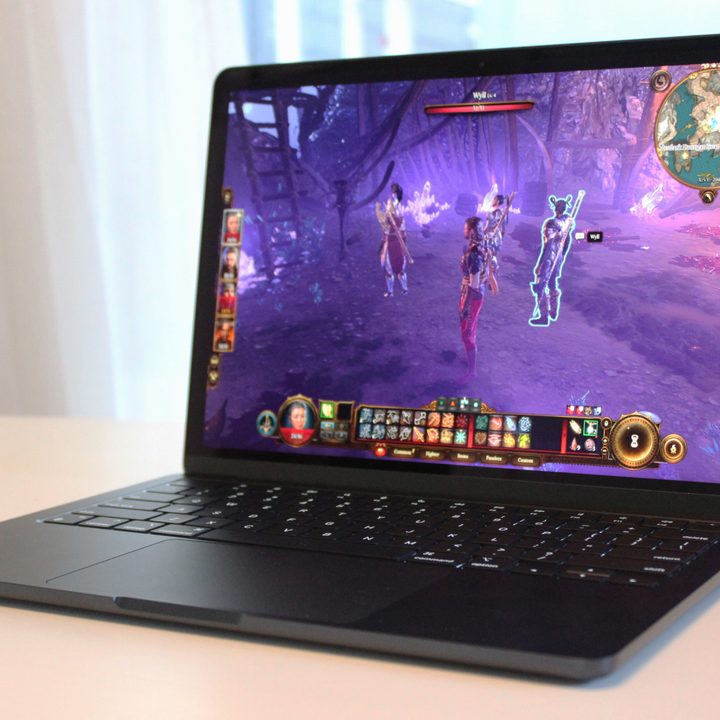
And yet, while I’d never call this a great gaming experience, the M3 MacBook Air actually handled the game better than I thought it would. I saw some decent results running it at 1710 x 1068 resolution, which is the “~16:10” option. I set the preset to Low and then made some manual tweaks to improve quality, notably bumping the model quality and texture quality to Medium. This was netting me around 40 fps (frames per second). I wouldn’t call that super smooth, but it’s certainly playable, especially in a turn-based game like Baldur’s Gate 3.
Unfortunately, on Mac, the game only includes FSR 1.0 as an upscaling option, which just isn’t very effective. By turning it to its lowest setting, Ultra Quality, though, I was able to average closer to 50 fps without losing too much visual fidelity. That was starting to feel like a decent balance of performance and image quality. Of course, there are things I could do to get closer to 60 fps, such as using the levels of FSR, but the visuals get increasingly smudgy and ugly. The point being, though, it’s possible.
During the game, the surface temperatures of the laptop certainly got warmer, though never uncomfortably hot. Many gaming laptops I’ve reviewed get much hotter (and louder, of course) during games. Looking at you, Razer Blade. And remember, the MacBook Air is completely silent, even allowing you to play the game using the speakers if you please. It almost feels magical to be able to play games of this caliber on a laptop like this.
Now, there are some who claim Baldur’s Gate 3 can actually run well on an M2 MacBook Air, but trust me, it is not an enjoyable experience. You really have to pull down the settings to achieve even remotely smooth frame rates. The M3 MacBook Air just barely gets over that hump for me. Would I prefer to play out my run on Baldur’s Gate 3 on my PC or MacBook Pro? Absolutely. But the M3 makes gaming on the MacBook Air possible in a way that it wasn’t before. And considering the huge price difference between the M3 Max MacBook Pro and M3 MacBook Air, that difference is justified.

I should specify that my review unit is the 13-inch model and came with the more powerful version of the M3 — the 8-core CPU and 10-core GPU. It also has 16GB of RAM and the new Midnight black colorway (which looks great). The base 8-core GPU is a step down from there, for sure, and 8GB of RAM would certainly throttle performance, so your mileage may vary with the cheaper configurations.
Of course, adding the M3 doesn’t solve the biggest problem with Mac gaming, which is the selection of games themselves. There’s a decent selection of smaller indie titles in Steam and the Mac App Store that run natively on Mac, but you’re missing many of the latest PC releases, as well as some of the most popular esports titles.
But to get some more testing in, I also installed Death Stranding Director’s Cut and Resident Evil 4. The former came to Mac just this year, almost years after being ported to Windows. But it’s also playable on the iPad, and ran fairly well on the M1 iPad Pro. So, seeing it to run well on the Mac didn’t exactly feel like breaking new ground. Resident Evil 4 is a new port as well, coming to the Mac App Store last December.
Seeing both games play with settings turned up fairly high on the MacBook Air was impressive. Death Stranding was the more impressive of the two, especially after some rejiggering in the settings (which are a bit sloppily integrated, if I might add). The game defaulted to a very heavy-handed amount of MetalFX Upscaling, which made the game look messy (and didn’t actually improve performance all that much). With the graphics settings maxed out, I was still able to average around 45-50 fps. I still dropped the resolution down from native to get smoother frame rates, but this is going to be a huge improvement over how the game played on either Macs or iPads from previous generations.
In Resident Evil 4, playing at native 1600p resolution also wasn’t preferred, and this one required some more significant drops in visuals to get smoother frame rates. I found the sweet spot of averaging around 45 fps by dropping Image Quality to 70% and turning on MetalFX Upscaling to “Quality.” Like in Baldur’s Gate 3, performance here just barely crosses the line of being enjoyable to play. But again — these two are brand-new AAA games being played on a MacBook Air.

None of this is going to impress someone coming from a laptop with a discrete GPU, of course. But when you keep in mind what this laptop is, it’s hard not to be excited by the possibilities.
To get an idea of how the GPU performs in a broader sense, I also threw Cinebench R24 on it to see where the GPU score would land. With a GPU score of 3049, it was 43% faster than the 15-inch M2 MacBook Air, showing just how big of a leap this really is. For some additional context, the Dell XPS 14 with the discrete RTX 4050 is still 46% faster in this same GPU test. Unfortunately, Cinebench R24 won’t run the GPU test on integrated Intel or AMD graphics, so I don’t have a direct quantifiable comparison between the M3 and the Intel Core Ultra Arc graphics at the moment. Intel has made some huge strides in its most recent generation, but based on what I see here, my gut says the M3 still wins out.
I’ll have my full review of the M3 MacBook Air coming soon once I’ve had a bit more time with it. There’s plenty more to test and discuss, including its increased CPU performance and its ability to support two external monitors with the lid closed.
But for now, I’m fairly impressed by what this little laptop can do on the gaming front.


