
AMD and Intel publish official numbers indicating the settings at which a particular processor should run, and these figures are often taken as if they were cast in stone by fire from the sky. A processor is a processor, and two of the same kind should perform identically. Right?
Experience, however, tells a different story. We’ve tested numerous laptops over the years and have sometimes noticed that two different models with the same processor do not manage equivalent results in our benchmarks. The fastest and slowest laptops with the Core i5-4200U processor, for example, are separated by a gap of 25%.
The differences we see are the result of a range of variables that include system cooling, power profiles and manufacturer tweaks to performance. To illustrate the impact these factors can have, we’ve tested a single Ultrabook, the Editor’s Choice award-winning HP Spectre 13t, under a broad range of conditions. The results show that dramatic change which can be achieved with just few clicks.
Power preset testing
All Windows laptops ship with several different preset power plans that alter how the laptop operates. These settings are Power Saver, Balanced and High Performance. On our test laptop, the Balanced plan had been renamed to HP Recommended, but otherwise appeared to be a normal Windows 8 “Balanced” preset.
A look at the settings of each shows there are differences in maximum and minimum states for the processor. But do these settings make a difference? To find out, we used 7-Zip, a file compression utility that includes a handy benchmark which heavily relies on processor performance. We ran the benchmark five times at each preset, then averaged the scores.
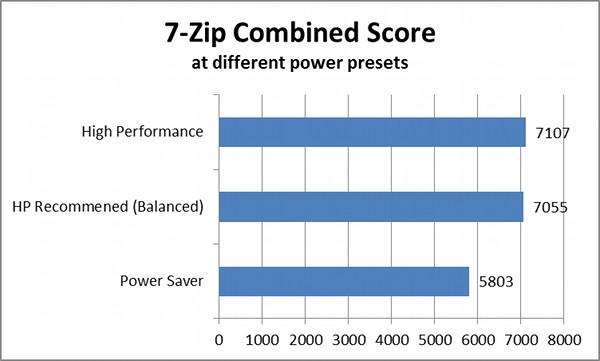
While the Balanced and High Performance plans delivered almost identical scores, the Power Saver preset drastically reduced performance by over 20%, putting a serious dent in 7-Zip’s benchmark results. That’s something you’d notice any time you performed a processor intensive task, and which may even result in a general sense of lethargy during daily use.
This just goes to show that power management is a very important part of overall speed. If your system feels slow, check the power plan. You may have forgotten to change it back from Power Saver the last time you traveled.
Presets performance while on battery power
Another factor we tested is how a system performs at different presets when unplugged. Power management settings typically reduce performance to enhance battery life – but by how much?
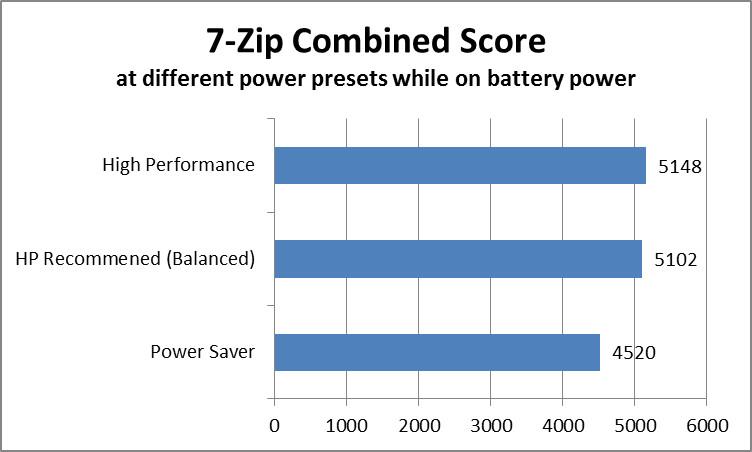
The difference is significant and impacted our test system at all power presets, not just Power Saver. The drop fell between 30 percent and 40 percent, with the largest gap between High Performance modes when plugged and un-plugged. This variable has the largest negative impact of any we tested.
Clearly, plugging a laptop into an outlet is a good idea if you intend to run demanding software. This may seem obvious, but laptop owners often want to take advantage of their mobility by working from the nearest Starbucks or simply their living room couch. Doing so doesn’t impact functionality at first glance, but it can increase the amount of time some tasks require. Editing a video while unplugged, for example, could become frustrating.
Temperature testing
Most of Intel’s processors include a feature called Turbo Boost that automatically increases processor clock speed when needed and when thermal headroom allows. Since this feature is tied to the thermals of a system, it makes sense that a processor may perform differently at different ambient temperatures.
To test this, we put ran the 7-Zip benchmark in three different scenarios; a normal room heated to a typical temperature of 68 degrees, an outdoors area with an ambient temperature of 42 degrees, and six inches above a heater, which raised the immediate ambient temperature to 92 degrees. All tests were conducted at the High Performance preset.
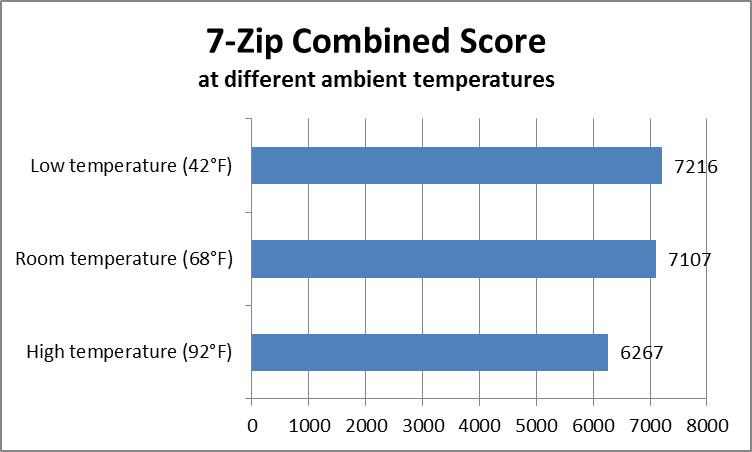
Heating the laptop caused the most dramatic difference. While the Spectre 13t did not shut itself down at any point, the CPU’s temperature sensor reported a maximum reading of 71 degrees Celsius, which roughly translates to 160 degrees Fahrenheit. Overall performance was reduced by a little more than 10 percent, as the processor could not increase its clock as aggressively as it could at room temperature.
Placing the Ultrabook outside had a big impact on internal temperatures, which were lowered by over 12 degrees Celsius to a maximum of 56 degrees at full load, but this didn’t make the Spectre much quicker. 7-Zip’s score increased barely more than 100 points, an improvement of less than two percent. This simply shows that the Spectre 13t’s cooling works as intended, providing little room for improvement when it is enhanced.
Conclusion
These tests show that power presets not only matter, but are the single largest contributor to performance differences from identical hardware. We normally test laptops under the Balanced preset, so it’s theoretically not an issue in reviews, but your experience at home may be different because manufacturers can sometimes be very aggressive with their customized power plans. We’ve seen this in Toshiba laptops, for example, which often ship with an “Eco mode” that automatically activates when a system is unplugged. Though it can extend battery life, it also holds back performance.
Temperature is a factor too, and has the potential to hamper performance noticeably. Though we’d have to test many laptops at different ambient temperatures to make an absolutely certain conclusion, our tests with the HP Spectre 13t suggest that a laptop with poor cooling will not perform as well as one with excellent cooling. The results also suggest that better performance can be achieved with better cooling, but the ceiling is not as high as the floor.
These numbers prove that two systems with the same processor may not offer the same performance out of the box, and the only way to know the difference is to view benchmark results. They also show that, while today’s laptops are often almost as quick as a desktop when plugged in, they can be substantially slower when unplugged.
Yet there is hope even for people who already own a laptop that’s not as quick as expected. While poor design can cause issues, the solution might be as simple as choosing a different power plan. Some problems really are that easy to solve!



