  1. Home
  2. Computing
  3. Phones
  4. Wearables
  5. News

Meta’s Ray-Ban Display now types messages from your finger movements

Neural Handwriting is a really cool feature, but Meta opening the Ray-Ban Display to developers is the quiet announcement that turns a clever wearable into a platform with immense possibilities.

Add as a preferred source on Google
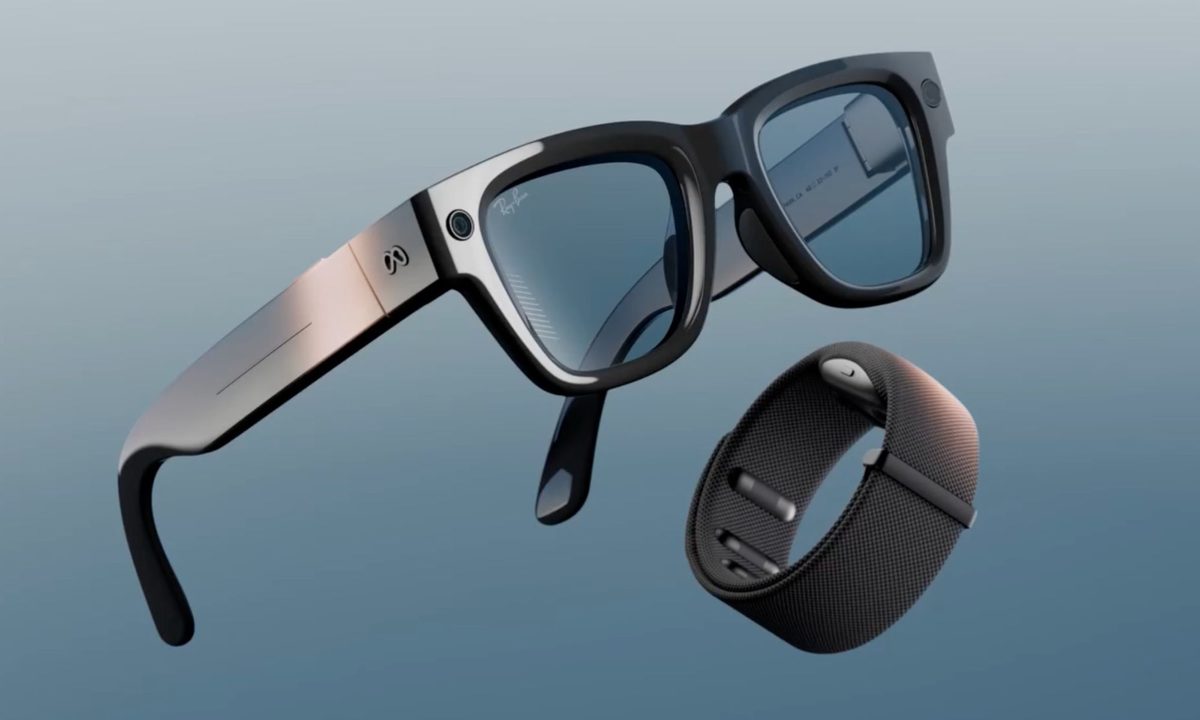
Meta Ray-Ban Display and EMG Band.
Meta

Six months into its life, the Meta Ray-Ban Display is starting to look less like an experiment, thanks to what is arguably the most significant update Meta has ever pushed for the device. 

The headline feature is Neural Handwriting, which is now available to every Ray-Ban Display owner, having spent its early months in limited access for Messenger and WhatsApp users. 

For a power upgrade to your AI glasses, look no further than Ray-Ban Meta Display glasses and the Meta Neural Band, perfect for creators, connectors, and productivity pros. https://t.co/TAfNlHyOhG pic.twitter.com/8Zl0Sk957l

— Meta Newsroom (@MetaNewsroom) May 15, 2026

What is Neural Handwriting?

For those catching up, the feature uses the Neural Band, the sEMG wristband Meta ships in the box with the $799 glasses, to detect subtle finger movements. Then, it translates those movements into typed text on an app. 

Recommended Videos

To use the feature, wear the Ray-Ban Display, and while wearing the Neural Band on your wrist, move your fingers as though you were writing a letter. The glasses can convert your finger movements (in the air) into a message in WhatsApp, Messenger, Instagram, or your phone’s native messaging app. 

The feature works on both Android and iOS. While the feature opens a new use case for the Ray-Ban Meta Display, and it surely is generating quite a lot of headlines, the update also opens the device to third-party web app developers for the first time

What else did Meta update?

To me, that sounds like Meta is treating the glasses as a platform, not just a product it sells to end users. 

This could enable developers to build AI assistants, productivity tools, navigation overlays, accessibility features, and gesture-controlled experiences that could expand the device’s appeal beyond messaging and media capture. 

Beyond the two developments, Meta also brings Display Recording to the glasses, a new mode that captures the lens display output, camera footage, and surrounding audio, into a single video file. 

Walking directions now cover the entire United States, along with major international cities like London, Paris, and Rome. The live captions feature is expanding to WhatsApp, Messenger, and Instagram DM voice messages. Additionally, Muse Spark AI is coming to the glasses this summer.”

Shikhar Mehrotra
For more than five years, Shikhar has consistently simplified developments in the field of consumer tech and presented them…
Asus unveils the 320W ROG Strix Scar 18 with RTX 5090, but it’s the CPU that steals the show
Asus extracting 81% more CPU wattage from the 2026 Strix SCAR 18 while Nvidia keeps the GPU locked at 175W is the most interesting story in this spec sheet.
Computer, Electronics, Laptop

Asus has announced a new gaming laptop, the ROG Strix Scar 18 (2026), with a claim that it’s the most powerful gaming laptop the company has ever built. 

The main highlight of the device is the 320W of total system power: 145W to the Intel Core Ultra 9 290HX Plus and 175W to the Nvidia GeForce RTX 5090 laptop GPU. While the CPU offers a meaningful upgrade over the 2025 model, the GPU has been borrowed unchanged. 

Read more
ChatGPT will now dole out finance tips if you connect your bank account. I won’t.
ChatGPT can now access your bank account to offer spending analysis and financial planning.
chatgpt-personal-finance

ChatGPT already knows a lot about you. OpenAI now wants to add your finances to that list. The company has launched a personal finance feature for ChatGPT, currently in preview for Pro subscribers in the US at $200 a month. OpenAI says it will expand to Plus users after gathering feedback from this early rollout.

It lets you connect your financial accounts through Plaid, a platform that bridges bank apps with third-party services and works with over 12,000 institutions, including Chase, Fidelity, Schwab, American Express, and more.

Read more
CleanShot X is my favorite Mac utility. Here are 8 features that will convince you, too.
Your Mac's built-in screenshot tool has been holding you back. It's time to upgrade.
Mac running CleanShot X

macOS has a built-in screenshot tool that gets the basics right. You can take a screenshot, record your screen, and even annotate your captures. But the moment you want something more, like scrolling capture, advanced annotation tools, or a quick way to share your screenshots via a link, it starts to fall apart.

That's where CleanShot X comes in. It's a powerful screenshot and screen recording app for Mac that replaces the built-in screenshot tool. It feels as if the developers looked at the screenshot features in macOS and added everything that was missing.

Read more