  1. Home
  2. Computing
  3. News

Microsoft Edge is getting rid of sidebar apps as Windows 11 decluttering continues

Edge is losing one of its quirkiest features as Microsoft cleans house

Add as a preferred source on Google
Microsoft Edge on a phone
Zulfugar Karimov / Unsplash

Microsoft Edge is about to lose one of its more quirky features as Microsoft continues to clean up its software experience. The company has confirmed that the sidebar app list in Edge is being “retired” in the near future, starting with Microsoft account users. Microsoft revealed in an announcement that this is a part of an effort to simplify Edge, but there’s still no word on the exact retirement date yet.

What are sidebar apps, and why is it being removed?
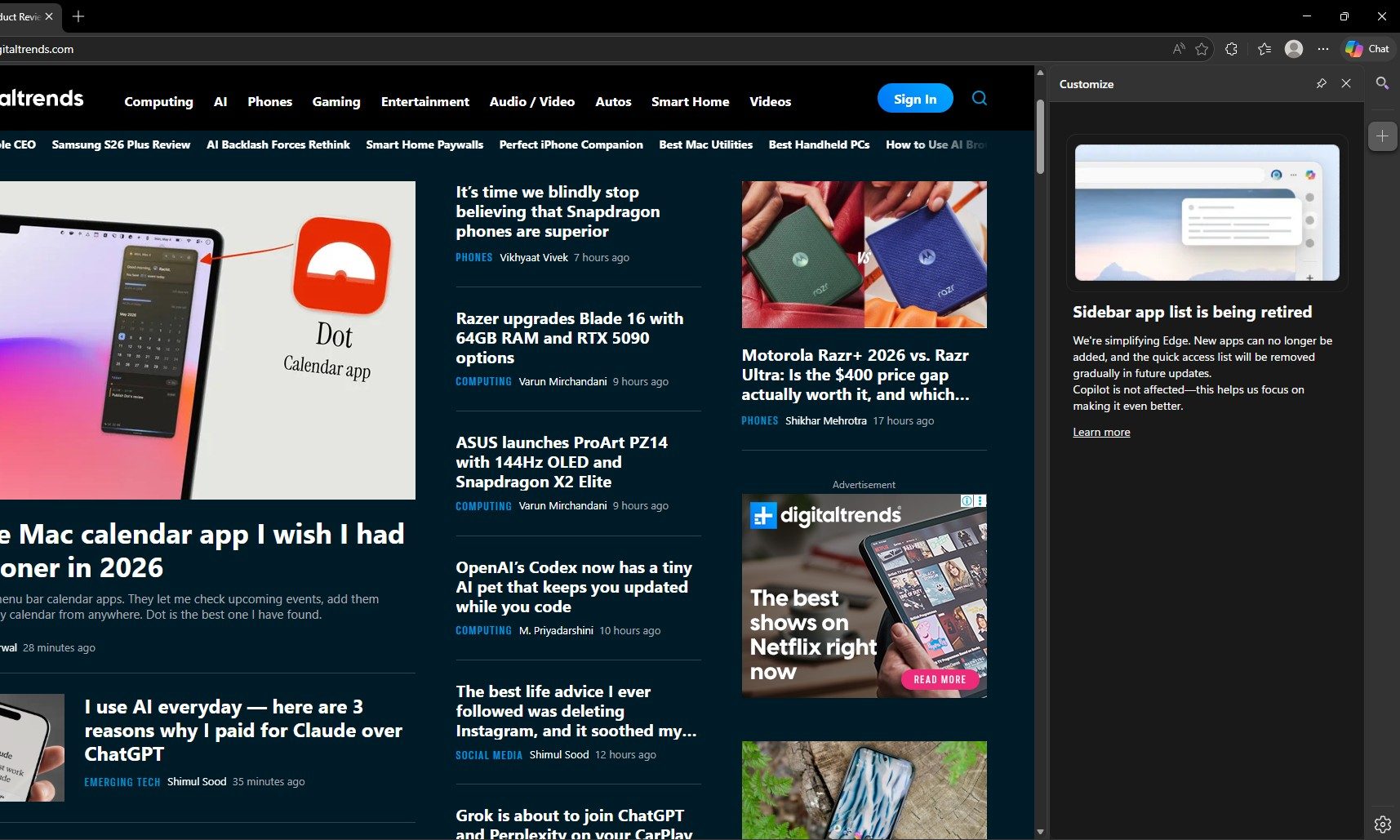
Edge’s sidebar basically lets users pin web apps and sites into a side panel, making it possible to quickly open things like Outlook, shopping tools, search, or other web apps without leaving the current tab. Microsoft’s own support page had described the feature as a way to streamline access to favorite sites and apps.

Recommended Videos

But now, the feature is simply being removed. Microsoft claims that new apps can no longer be added to the sidebar, and apps already pinned in the app tower will be removed in a future update. The change will roll out gradually and will be included in future Edge updates. The browser will share this via notifications to users who use this feature before it fully disappears.

Copilot is staying, of course

If they really do it, I will stop using Edge and shift to @brave. It was my primary browser. I’ve been using @MicrosoftEdge as my primary browser since 2021 because of split screen, sidebar app, and sidebar search, with Microsoft Copilot and many more. pic.twitter.com/KTtZ1Y8tyW

— Mustaque Nadim (@0xmustaquenadim) May 2, 2026

Microsoft’s support page makes it clear that Copilot is not affected by the sidebar app list retirement. The company says it will continue improving and enhancing Copilot inside Edge, which means the browser’s AI assistant survives while third-party or user-pinned sidebar apps are being phased out.

This has irritated some Edge users, especially those who actively use this feature. The sidebar app list was easily one of the features that helped Edge feel distinct from other Chromium-based browsers, as it gave users a quick mini-app setup inside the browser. And for people who actually built workflows around it, Split Screen is not an exact replacement.


Vikhyaat Vivek
Vikhyaat Vivek is a tech journalist and reviewer with seven years of experience covering consumer hardware, with a focus on…
Digital Trends Computex 2026 Publisher Awards
Computex 2026 had some wild tech, and these were the best.
Digital Trends Computex 2026 Publisher Awards Featured Image

Computex is always chaotic, and Computex 2026 kept the same pace. This year’s show had the usual parade of powerful laptops, overbuilt gaming rigs, and the fun, if not strange, prototypes. AI was everywhere, handheld gaming got a serious power boost, and even monitor makers came ready with displays that sound like they were pulled from a wishlist.

That’s why we’ve put together our Computex 2026 Publisher Awards, spotlighting the products that pushed the show forward.

Read more
Google Search can now monitor the web for updates on things you care about
AI Mode on Google search now lets users create search agents
Google Search information agents featured

Google has started rolling out AI Search agents that can monitor the web for users and send updates when relevant information changes. The feature was first announced at Google I/O 2026 as part of Google’s wider AI Mode overhaul, which also included a redesigned search box, Gemini 3.5 Flash, personal intelligence features, and new agentic tools for creating mini apps and dashboards.

The new feature is called information agents. It is designed for searches that do not end with a single answer. Instead of checking the same query again and again, users can ask Google to keep tracking a topic in the background.

Read more
Apple made Liquid Glass adjustable, which says plenty about Liquid Glass
The new slider is useful, welcome, and mildly hilarious after a year of Apple acting like transparent everything was the obvious future.
Text, Document, Business Card

Apple’s big glassy software future now comes with a way to make it less glassy. In iOS 27, users can adjust the translucency of the Liquid Glass effect, while macOS Golden Gate adds its own Liquid Glass controls under System Settings.

Liquid Glass is still alive across Apple’s platforms, still shimmering through menus and panels, still doing the elegant UI trick Apple clearly likes. The big visual bet has already earned a dimmer switch. After a year of treating translucency like the obvious next step, WWDC’s most revealing design update may be the one that lets people dial it back.

Read more