
Tearing occurs when your monitor won’t refresh as quickly as the game’s frame rate. For players who deal with this issue regularly, it can quickly ruin the gameplay experience. There is a way to sync your refresh rate to your GPU rendering, but you’ll need to use FreeSync to do it. This program might be completely unknown to some, but using FreeSync shouldn’t be too complicated. Here’s how to do it.
What is AMD FreeSync?
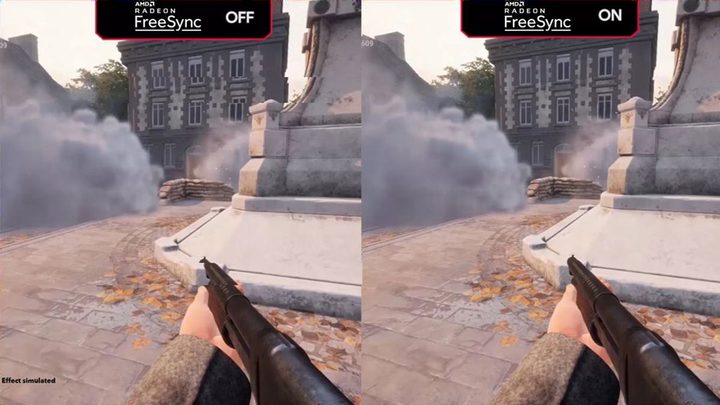
FreeSync allows AMD’s graphics cards and APUs to control the refresh rate of a connected monitor. Most monitors default to 60 refreshes per second (60Hz), but you’ll also see monitors that refresh 75, 120, 144, or even 240 times per second.
Overall, timing is essentially the big screen-tearing issue. The GPU may render frames faster than the display can update the screen, causing the latter to compile “strips” of different frames. The “ripping” artifacts typically surface when the view moves horizontally. Likewise, if the GPU can’t output at the display’s refresh rate, you’ll experience a “stuttering” effect.
With FreeSync enabled, the monitor dynamically refreshes the screen in sync with the current game’s frame rate. If it’s a 60Hz display, then it only supports 60 frames per second. If the GPU’s output drops, the display’s refresh rate drops accordingly.
If you’re playing a relatively simple PC game like the original Half-Life, you probably don’t even need FreeSync. High refresh rates go a long way in eliminating screen tearing, so adaptive sync technologies are largely unneeded if your GPU consistently outputs high frame rates.
But if you’re playing a newer, graphically intensive game like Assassin’s Creed: Odyssey at 4K, even a powerful gaming desktop might only render 40 or 50 frames per second on average, falling below the monitor’s refresh rate. With AMD FreeSync, the monitor’s refresh rate scales up or down to match the frame rate, so the monitor never refreshes in the middle of a frame, and tearing never materializes.
Note: What if you don’t have an AMD GPU? Then FreeSync probably won’t be compatible with your build. Nvidia also has its corresponding syncing technology called G-Sync, which is designed to work with its GPUs and is the primary alternative at this time (a bit more on this below).
What do you need to use FreeSync?

For FreeSync to work, you need a compatible AMD graphics card or an integrated APU, like AMD’s recent Ryzen-branded all-in-one chips. Most modern Radeon cards — from budget offerings up to the super-powerful Radeon VII — support FreeSync. If you’re unsure, check the specifications.
You also need a compatible monitor or TV that supports VESA’s Adaptive-Sync. AMD began supporting this technology as FreeSync via its software suite in 2015. It essentially builds a two-way communication between the Radeon GPU and off-the-shelf scaler boards installed in certified Adaptive-Sync displays. These boards do all the processing, rendering, backlight control, and more.
The DisplayPort 1.2a spec added support for variable refresh rates in 2014, followed by HDMI 2.1 in 2017.
But manufacturers don’t simply slap on AMD’s “FreeSync” branding and move on. According to AMD, these panels endure a “rigorous certification process to ensure a tear-free, low latency experience.” Nvidia does the same thing with its G-Sync certification program.
Typically, FreeSync monitors are cheaper than their G-Sync counterparts. That’s because G-Sync monitors rely on a proprietary module, ditching the off-the-shelf scaler. This module controls everything from the refresh rate to the backlighting. However, Nvidia is currently building a list of FreeSync-class monitors that are now compatible with its G-Sync technology on the PC side.
Despite their lower price, FreeSync monitors provide a broad spectrum of other features to enhance your games, like 4K resolutions, high refresh rates, and HDR. Our favorite gaming displays have many of these technologies, though not all of them are FreeSync compatible. AMD has a list of FreeSync monitors on its FreeSync site.
How to enable FreeSync
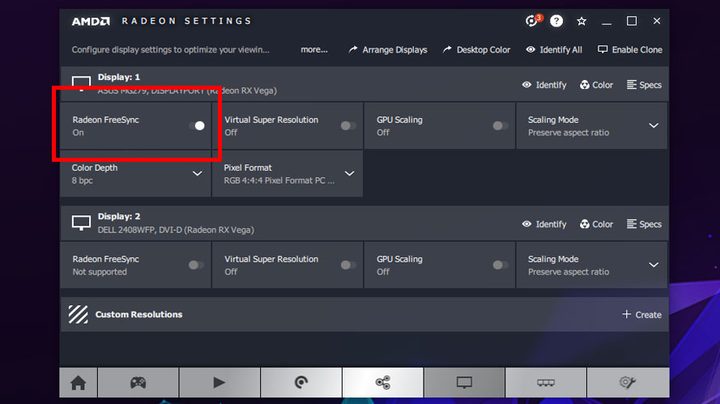
After connecting your computer to a FreeSync-enabled monitor, make sure to download the latest AMD Catalyst drivers from the company’s website. You can manually select your card or APU model with the Manually Select Your Driver tool — just make sure to match your version of Windows. You can also use the auto-detection tool if you’re not sure.
Remember, you don’t need a second driver to enable FreeSync. If you have compatible hardware, it’s included in this download. Install the driver and restart your computer if necessary.
When you’re ready, open the AMD Radeon Settings by right-clicking on your desktop and selecting it from the pop-up menu. Next, select Display from the top menu and toggle on the Radeon FreeSync setting. Depending on your display, you may also need to turn it on in your monitor settings.
Periodic firmware updates are required to keep your GPU and FreeSync operating correctly, so make sure you manage your drivers well and update them as necessary.
Note: Some FreeSync displays only work within a pre-defined frame rate range, so depending on the game, you may need to limit your frame rate to stay within that threshold. If there is a pre-defined range, AMD should indicate it in the FreeSync panel, where you can always check to make sure.
What is FreeSync Premium?

FreeSync, the original service, helps with tearing, flickering, and latency issues. However, there are also more advanced versions of FreeSync technology, and one of them is FreeSync Premium. Devices and content must be certified for FreeSync Premium to offer extra features. With this certification — and a compatible GPU — the Premium version adds important benefits:
- Expanded latency prevention for SDR (Standard Dynamic Range).
- Keeping the refresh rate at 120Hz or higher at the FHD (full HD) resolution.
- Offering LFC, or Low Framerate Compensation, to help stabilize the frame rate when the display is struggling.
These extra features can be useful to gamers concerned about the quality of their gaming, but they aren’t necessary to receive the original benefits of FreeSync.
What about FreeSync Premium Pro?
AMD also offers an expanded certification for FreeSync Premium Pro (previously known as FreeSync 2 HDR but wisely changed to a standardized naming format), which adds even more optimization features for your display. Again, specific certification is required for this setting, but it provides — in addition to the benefits of FreeSync and FreeSync Premium — extras like:
- Low latency support for HDR as well as SDR.
- Support for HDR optimization on supported displays: The panels must test to 400 nits of brightness for HDR 400 certification.
These HDR benefits are a nice benefit for gamers (and you can check Premium Pro supported games here, like Borderlands 3 and Far Cry 6) but aren’t useful for optimizing titles like movies or TV, where it’s best to stick with straightforward HDR support.


