
In competitive gaming, victory isn’t just about who pulls the trigger first—it’s often about whose PC responds the fastest. Identifying your input lag is the first step to eliminating it, and Nvidia Reflex is an excellent tool to help. In some games, it doesn’t just measure latency—it actively works to reduce it.
Once you have a high-performance gaming CPU and a powerful graphics card, the best way to make your PC more suited to competitive play is to shave off a few milliseconds in input lag. Here’s how to use Nvidia Reflex to do just that.
It might even give you a competitive advantage.
What is Nvidia Reflex?
Nvidia Reflex is a suite of GPU, G-Sync display, and software technologies that help in measuring and reducing system latency. By doing so, it allows the PC and the display to respond faster to mouse and keyboard inputs, essentially allowing you to target and kill enemies faster and with greater precision.
Just like Deep Learning Super Sampling, Reflex Low Latency mode is a proprietary technology that requires a Nvidia graphics card. While having a recent GPU like one of the RTX 40-series, ensures the best experience, Reflex can work with any model, including the GTX 900 and above. It works by optimizing the GPU and the game to provide you with the low-latency best performance.
Certain games also offer a Reflex+Boost setting, which increases your GPU’s clock speeds, especially if you are playing games that are CPU intensive, thus preventing any potential bottlenecks.
How does Reflex work?
Reflex can help lower rendering lag by as much as 80% and works best with first-person shooters like Apex Legends, Valorant, Call of Duty, Fortnite, and others. It isn’t designed to affect system performance, but there have been some instances of it having a mild impact on average frame rates. The improved responsiveness that comes from a reduced input lag, however, should be well worth it — especially if you’re playing competitively.
To optimize and reduce your system latency, Reflex uses a combination of SDKs and driver optimizations to effectively remove any bottlenecks between the CPU and GPU. This allows each frame to be rendered by the GPU as soon as the CPU passes it along, with no waiting behind existing rendering jobs. The end result can be a dramatic reduction in put lag. Depending on the kind of hardware and peripherals you have, you can shave tens of milliseconds off your system latency. That can have a real, tangible effect on your gameplay performance.
It’s also possible for game developers to improve the game latency performance through additional optimizations.

There are two primary components of Reflex. First is the Reflex SDK, a set of APIs meant for game developers to reduce and measure rendering latency. Using the SDK, developers can integrate Reflex directly with their games. This allows latency reductions above and beyond existing driver-only techniques like Nvidia’s Ultra Low Latency Mode.
The second one is Reflex Latency Analyzer, which, as the name suggests, is a system latency measurement tool. It is currently available on 360Hz G-Sync Esports displays from Acer, Alienware, Asus, and MSI, as well as esports peripherals from Asus, Logitech, Razer, and SteelSeries. This tech can detect clicks coming from your mouse and then measure the time it takes for the resulting pixels to change on the screen.

How to enable Nvidia Reflex
Nvidia Reflex can be enabled in individual games by heading to your game’s graphics settings. Each game is different, so you might have to search for it, but it should typically be in the options or game settings menu.
Here’s an example of Apex Legends:

Once you open the game, select on the Options (gear symbol) button on the bottom right and then click on Settings.
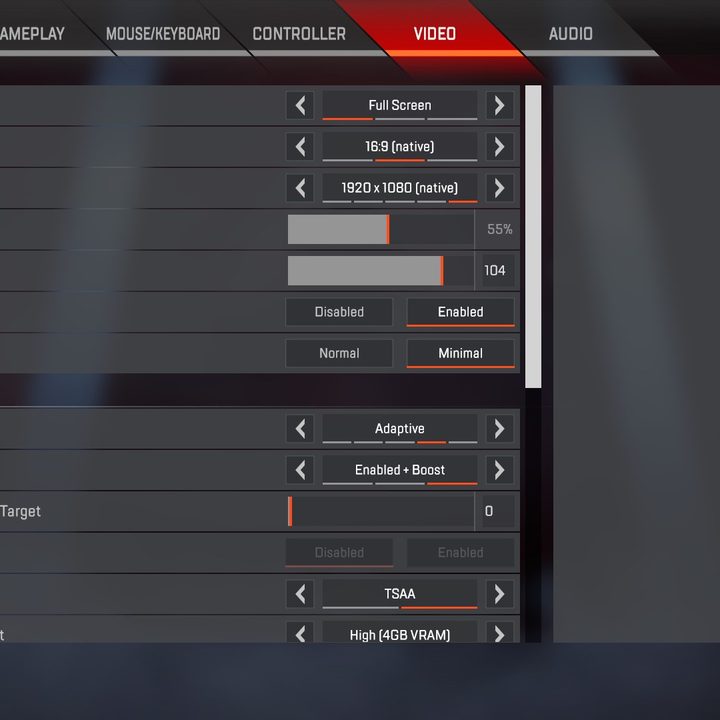
Next, select the Video settings on the top, and under Advanced, you should see the option to enable Nvidia Reflex.
Some games also have a separate option called Nvidia Reflex+Boost. Enabling it can improve GPU performance to further reduce latency.
What games support Nvidia Reflex?
There’s a long list of games that support Nvidia Reflex in some form. Some can only give you latency stats, others offer support for the auto-configured Reflex analyzer, and another bunch support Reflex Low Latency. Some standouts include Apex Legends, Battlefield 2042, Valorant, Hogwarts Legacy, and Counter-Strike 2.
More games are being added all the time, so keep an eye on the full list available on Nvidia’s website for the latest releases, including supported peripherals.
Nvidia Reflex 2
At this year’s CES, Nvidia unveiled its new RTX 50-series graphics card lineup. Along with that, the company announced Reflex 2, the next-generation upgrade to its latency-reduction technology. Building on the success of the original Nvidia Reflex, Reflex 2 will introduce advancements to further minimize system latency by up to 75%, making gaming even more responsive and immersive. With Frame Interpolation and expanded hardware support, Reflex 2 is claimed to enhance both competitive gameplay and general gaming experiences across a broader range of devices.
One of the most significant new features in Reflex 2 is Frame Interpolation, also known as “Frame Warp.” This technology analyzes rendered frames in real-time and inserts additional interpolated frames to reduce perceived latency. By predicting and adjusting for player input, Frame Interpolation is said to create a smoother and more responsive gaming experience, even in graphically intensive scenarios which is more prone to latency spikes. This could particularly be useful for gamers using mid-range or older hardware, as it helps mitigate latency without compromising visual quality or performance.
Reflex 2 also extends its reach to more gaming monitors and peripherals, with increased compatibility for Reflex Latency Analyzer. This expanded hardware ecosystem allows gamers to measure and optimize latency with precision, ensuring that they are getting the most responsive experience possible. During the announcement, Nvidia said that it is collaborating with game developers to bring Reflex 2 support to a growing library of titles, ensuring widespread adoption across popular genres like first-person shooters, MOBAs, and battle royales.
Nvidia will introduce Reflex 2 on The Finals and Valorant, initially launching on RTX 50-series GPUs. Support for other older RTX GPUs is expected to arrive in a future update.


