
Microsoft has announced the latest Windows 10 Insider build, which includes some changes to how a 2-in-1 hybrid laptop will deal with “tablet posture.” When a keyboard is removed from the screen, such as on a Surface Pro, Windows will no longer prompt you to enter tablet mode as it currently does.
In other words, the colorful, square tiles of tablet mode are going away completely. This mode will still be found in the Action Center pull-out in the bottom right corner of the taskbar. However, as confirmed by a Twitter conversation with The Verge’s Tom Warren, the system will no longer prompt you to enter tablet mode when it senses that you’ve disconnected your keyboard.
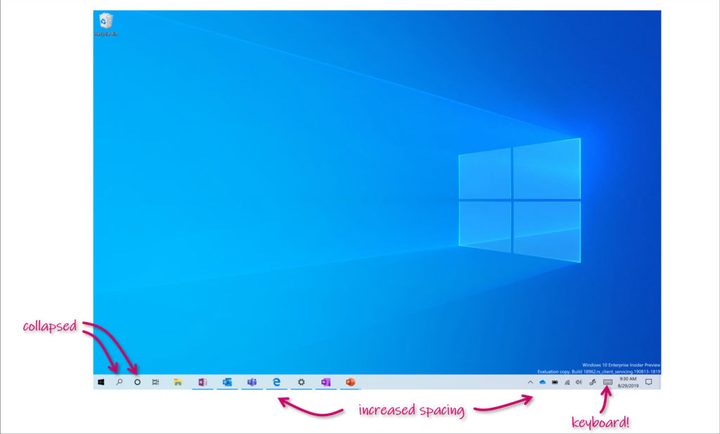
That doesn’t mean there are no changes at all when you remove your keyboard. Spacing is the most obvious example of making the operating system a bit more touch-friendly. The icons in the taskbar are now further apart, making them a bit easier to touch with your finger. File Explorer still switches into the touch-enabled layout as well.
While tablet mode still exists, it does feel like Microsoft has paved the way for getting rid of it entirely. We’ve reached out to Microsoft about what this change means for the future of tablet mode, and we’ll update this post if we hear back.
Windows 10’s tablet mode has traditionally featured an expanded view of the Start menu, showing you big, colorful tiles to launch applications from. It’s a holdover from Windows 8, but hasn’t received much attention since then.
All this comes days after the announcement of an upcoming October Surface hardware event, where Microsoft could launch its rumored dual-screen 2-in-1 device. This new device is expected to run a new operating system called Windows Core OS, which would be more explicitly designed for all-touch interfaces that don’t require a keyboard. Perhaps Microsoft is making room for that new software — or maybe people weren’t using tablet mode all that much anyways.
Build 18970 includes a number of other changes as well, including the continued roll-out of the new Cortana and a “cloud download” option when resetting your PC.
It should be emphasized that the changes come as part of a Windows 10 Insider build, so they could be reversed or heavily modified once they make it to your PC.


