
Yup, you read that right. When you someday go to save, open, or locate a file on your beautiful new Surface Neo, you may encounter one of two filing systems. One is more touch-friendly, and the other is the classic File Explorer you know and love.
Microsoft has good reason for stitching together this Frankenstein monster of an app solution. It’s determined to not repeat the same mistakes of its past. Unfortunately, when it comes to the experience of using the device, it feels jumbled together.
Microsoft’s File Explorer faces a familiar problem
Windows has always been an open platform. It’s part of what made the Windows app ecosystem so rich over the years. It is also what made Microsoft’s leap into the modern world so difficult.
Windows 10X is Microsoft’s latest attempt at moving ahead. This time, it’s taking a more measured approach. Rather than limiting access to older applications, Microsoft is embracing them all — regardless of the platform. Web, Win32, and UWP will all stand on equal footing in 10X.
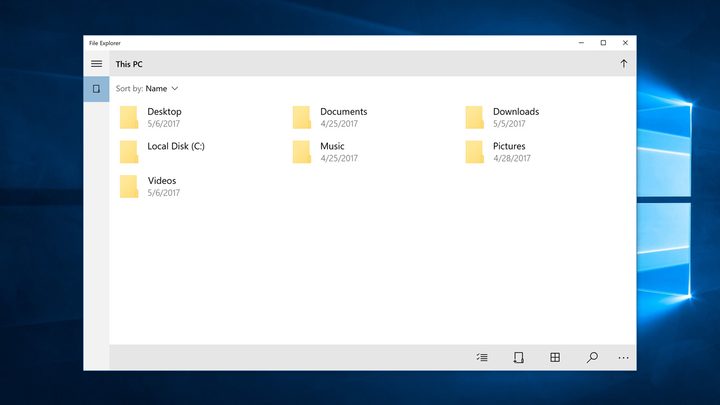
Microsoft has a long and complicated way of making these various ecosystems work together, which brings us to the twin File Explorers. To accommodate Win32 apps, Microsoft needed to keep the old File Explorer to ensure legacy apps play nice with the rest of the operating system. On the other hand, Microsoft wants a modern File Explorer for use with UWP apps.
The compromise is two different File Explorers that work together, but aren’t unified. The classic File Explorer is only called upon when absolutely necessary, thankfully. Microsoft has declined to comment on what other applications and functions might require such a compromise.
It’s the Settings interface all over again
Seeing the old File Explorer next to the new one should seem familiar. It’s not dissimilar to how Windows 10 treats certain settings.
On the surface, Settings looks sleek, modern, and minimal, providing just enough information for users. Dig too deep, though, and your operating system will feel like it time-traveled from the past. At its worse, you’ll find two ways of accomplishing the same thing, such as setting up a VPN.
This strange approach is the safest thing Microsoft could do, as it supports both future and legacy apps. Given the company’s troubled history in this regard, I don’t blame them. Twin File Explorers was the only way to bring in Win32 apps. And users — particularly large companies and organizations — absolutely demand Win32 support.

Google attempted a similar approach, bringing Android apps over to Chromebooks. They work (usually), but it ain’t pretty. The stitches between the worlds of mobile and desktop computing have never been more visible.
Microsoft’s solution seems more elegant, if only because of what it’s learned from the past. Whether it’s Windows RT, Windows 10 S, or the Surface Pro X, all attempts to restrict older applications that aren’t as friendly to modern chip architecture and touchscreens have been failures. Convincing Windows users and developers to drop their beloved Win32 apps was something Microsoft still struggles with today.
So far, Windows 10X feels like Microsoft waving its white flag and calling both sides to a draw. In the end, it might be a necessary step toward some kind of a future. But for now, it could make for a very disjointed experience.


