  1. Home
  2. Computing
  3. News

Digital Trends may earn a commission when you buy through links on our site. Why trust us?

Windows 11 multitasking to get better in an important way

Add as a preferred source on Google

There are already many ways to multitask in Windows 11, with Snap Layouts and Snap Groups being the biggest ones, but one more important multitasking ability could be on the way. That is all according to Rafael Rivera, an advanced Windows Insider, who has managed to enable a new hidden “tabs” feature in the Windows 11 File Explorer.

In 2017, beta versions of Windows 10 had a”Sets” feature that would let you create tabs in core system apps for faster access to your other programs and documents. It was eventually canceled by Microsoft, and this new Windows 11 feature is similar but is only built into File Explorer at the moment. It adds space above the File Explorer title window, and a new “plus” button to open new tabs for different folders like Pictures, Music, Downloads, and network or This PC. Each of these tabbed areas then works independently of each other.
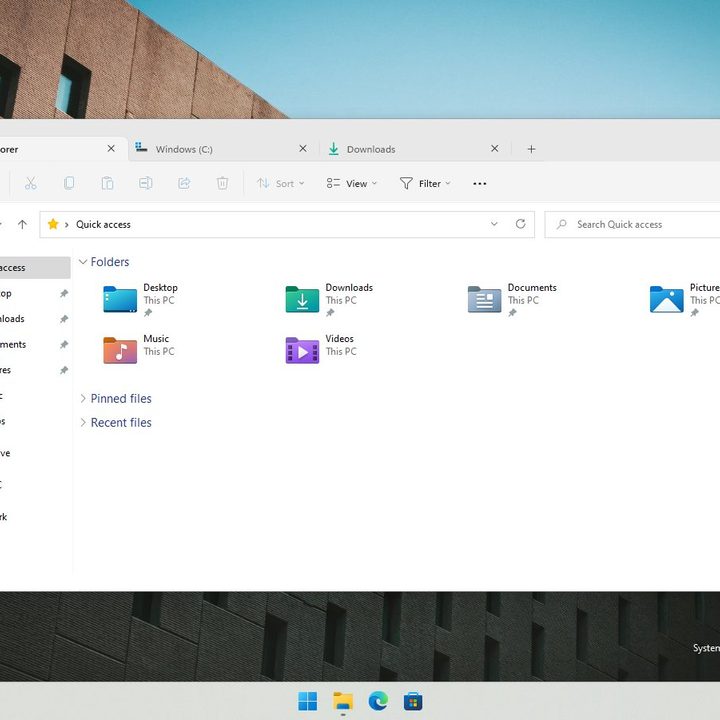
Windows 11's tabs in the File Explorer
Rafael Rivera/ Twitter

The feature is yet to be officially detailed by Microsoft, but several Windows Insider beta testers with PCs enabled in the Dev Channel branch of Windows 11 have already managed to enable it. Based on what we’ve seen, you can use this to save some time and improve your multitasking. You can expect to open more of your files and folders in one instance without having to jump between different windows. There’s even an “overflow” menu that lets you cycle between all the open tabs if things were to get too busy.

Recommended Videos

If this sounds familiar if you’re a MacOS user, then you’re not mistaken. Apple’s operating system also lets you do something similar to open multiple items within an app or in the Finder in a tab, though it’s not usually turned on by default.

Since tabs in the File Explorer is being tested and is hidden in the Dev Channel of Windows 11, this feature isn’t linked to a specific release. That means there’s once again the chance that it might not ever make it to the regular version of Windows 11, and Microsoft could remove the feature from the Dev Channel at any time once it becomes official. Yet third-party programs like the Files app and Stardock’s Groupy are a great solution to get this tabbed experience today in Windows.

Arif Bacchus
Arif Bacchus is a native New Yorker and a fan of all things technology. Arif works as a freelance writer at Digital Trends…
A simple coding mistake is exposing API keys across thousands of websites
Security gaps that are easier to miss than you think
Computer, Electronics, Laptop

After analyzing 10 million webpages, researchers have found thousands of websites accidentally exposing sensitive API credentials, including keys linked to major services like Amazon Web Services, Stripe, and OpenAI.

This is a serious issue because APIs act as the backbone of the apps we use today. They allow websites to connect to services like payments, cloud storage, and AI tools, but they rely on digital keys to stay secure. Once exposed, API keys can allow anyone to interact with those services with malicious intent.

Read more
AMD’s latest Ryzen 9 9950X3D2 pushes X3D to the limit
Dual 3D V-Cache, higher power, and a focus on enthusiast performance
AMD Ryzen 9 9950X3D2 FEatured

AMD has unveiled what might be its most extreme desktop CPU yet, the Ryzen 9 9950X3D2. And it’s going all-in on one thing: cache.

https://twitter.com/jackhuynh/status/2037159705395491033?s=20

Read more
Next-gen AI breakthrough promises chatbots that can read the room better
Researchers are teaching AI chatbots to read between the lines
Generative AI

Have you ever asked a chatbot something and felt like it completely missed your point? You say something with a bit of nuance, and the AI misses the subtlety entirely. That is exactly the problem researchers are trying to solve.

Even though the emotional connection with AI can feel deeper than human conversation for many users, most AI systems today still treat a sentence as a single block of sentiment. If you mix praise and criticism, the nuance often gets lost.

Read more