


“The HP TouchSmart 610 is a tour-de-force for modern touchscreen desktops. It throws everything that one could imagine at the task at hand.”
- Beautiful 1080p display
- Touch input is responsive
- Fast hardware
- Unique hinge works well
- Expensive
- No HDMI out
- Touch input is of questionable use
“Why you can trust Digital Trends – We have a 20-year history of testing, reviewing, and rating products, services and apps to help you make a sound buying decision. Find out more about how we test and score products.“
For all the hype that’s been made of touchscreen technology, it has done a rather poor job migrating into our most traditional — and common — computing spaces. Tablets are great, but they’re a niche market for now. Most of us do our computing on traditional desktop computers and notebooks, and you won’t find many touchscreens on either.
Part of the reason for is that integrating touchscreens in such devices is, well, hard. That’s particularly true of desktop computers. Although those with touchscreen are typically all-in-ones, it’s still not as if you can just pick up the computer and bring it closer when you feel the need. The display is a static entity, resistant to being pushed, pulled or tugged. And that’s a challenge.
The HP TouchSmart 610 tackles the issue with a unique hinge that allows it to drop down closer to horizontal on the desktop, easing arm strain as you tap, swipe and even type on the screen. Throw in a Core i7-2600 processor, 8GB of RAM and a Radeon HD 5570 video card, and the TouchSmart 610 represents one of the most powerful and practical touchscreen PCs we’ve seen so far.
Oddly hinged
Casual observers of the HP TouchSmart 610 will see a standard all-in-one computer. In fact, they may see one that’s starting to look a bit dated, as this computer’s four-inch thick frame is a bit large by the standards of some competitors, such as Sony’s L Series. The visual perception of size seems to be increased somewhat by the design, as well. Clad in black, but sculpted with a curved back, this HP ends up looking a bit thicker to our eyes than it is to our tape measure.
It’d be wrong to say this is an unattractive product, however. It’s passably handsome and entirely inoffensive. That’s important, because like most all-in-ones, the HP is designed to be part of a living room or entertainment room experience. As such, it shouldn’t take attention from the actual entertainment.
 And it never will, unless company comes by and sees the 610 all laid-back. One of this product’s defining features is the unique stand, which is designed to allow users to not only move the display up and down, but also tilt it back as far as sixty degrees. This makes it possible to use the all-in-one comfortably in a greater variety of positions, such as standing up.
This may seem a little silly, but that’s only when thinking about this computer conventionally. Although its design does nothing to preclude it from use as typical, day-to-day PC, it can be used in some unique areas of a home. For instance, the kitchen. A computer like this can be used to store digital recipes for easy access, and once everything is order, you can throw up Netflix for some entertainment, all with just a few taps of a finger.
Tossing out the keyboard
As you might expect, Windows 7 comes installed as standard, and it’s fully functional. The stock interface isn’t really designed for touch input, however, so HP provides its own custom solution. When opened, it completely dominates the traditional Windows interface, providing instead an overlay that is easier to navigate with fingers.
Easier how? Part of it is a size thing. Buttons, thumbnails, scroll bars, and just about everything else is larger to accommodate a meaty finger’s lack of precision compared to a laser mouse. Yet it’s also in how things are laid out. Information – photos, sticky notes, or even websites – can be placed as magnets on the custom desktop, then accessed by touch. You can even write directly on the desktop with the graffiti feature, which feels a bit hokey, but kept us amused for a minute or two.
 When you aren’t dawdling around the screen with your fingers, there’s a perfectly serviceable keyboard and mouse available. Neither is fancy, particularly the keyboard, which lacks special function keys with the exception of a sleep button that hangs out in the upper left hand corner. Yet we found both functional. The keyboard is pleasing to use, and the mouse is both comfortable and accurate. Those who might want to buy this computer as much for its all-in-one-ness as for its touchscreen won’t need to buy new input devices.
Big and bright
Since the display is an important part of this computer’s interface, HP didn’t settle for a cheap panel. Instead, the only display made available is a brilliant, glossy IPS monitor with 1080p resolution. It performed beautifully in our tests, displaying all the black level test images and rendering the gradient test image with nary a break or ripple.
These excellent results carried over to video content, where this computer performs like a small HDTV. Images are crisp, colors are vivid, and dark scenes remain detailed rather than washing out or bleeding into a muddy gray mess.
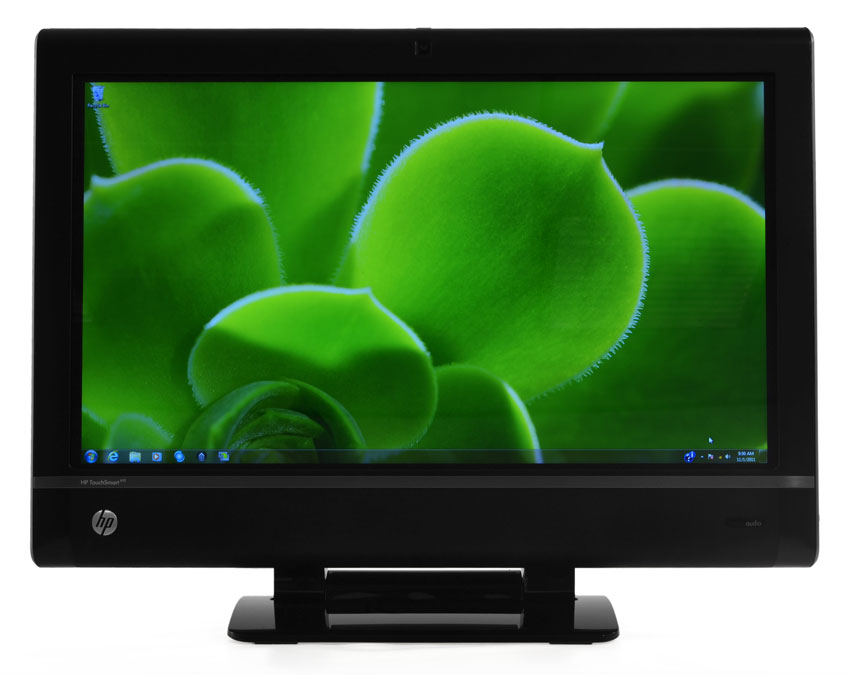 Sound quality is less impressive. This is a Beats Audio branded device, and the attention to audio is noticeable, thanks to a surprising amount of bass and a clear mid-range. With that said, however, we’re not convinced that users will be satisfied with the base audio as their only source of sound. Despite HP’s best efforts, the fact remains that the sound staging is limited, which takes away from both music and movies.
Connection station
The ports and plugs available for use with devices are always important, but they’re particularly crucial in an all-in-one computer. That’s because these computers are more likely to be used as media centers or family computers, and also because there’s not much room for upgrades once you get them home.
 Users looking for a quick connection will mostly use the bank of ports on the left side of this PC. It includes a card reader as well as two USB 2.0 ports and individual headphone and microphone jacks. This is an OK array of connectivity, but no better than average.
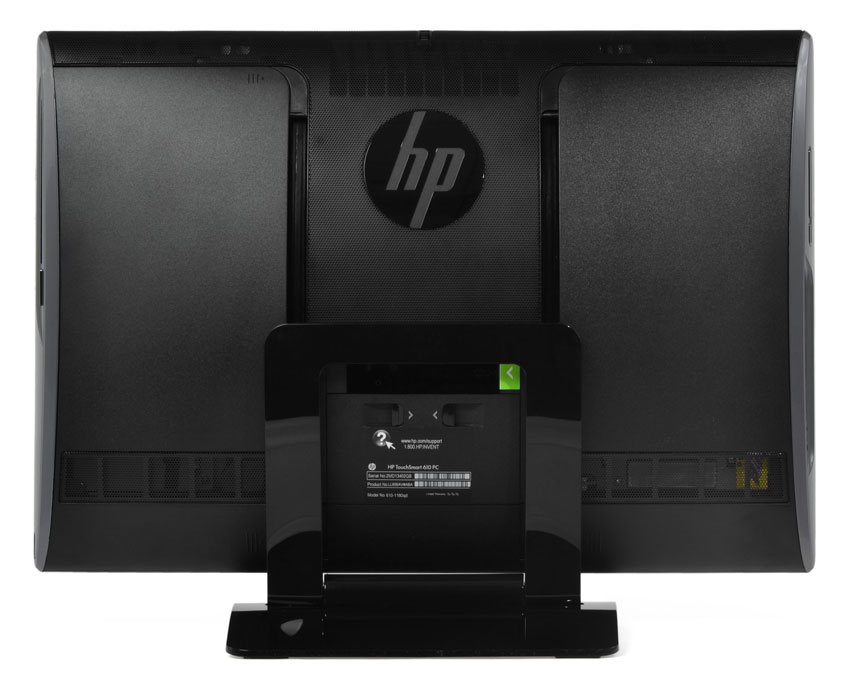 Around back, you’ll find more connections awkwardly crammed together under a drop-down panel on the back. There are four more USB ports and additional A/V inputs, including D-sub and most notably, coax. That jack exists because this computer comes with a standard TV tuner (and remote!) So yes, this computer is in effect a touchscreen TV as well as a computer, a fact that will mean little to some readers and absolutely everything to others.
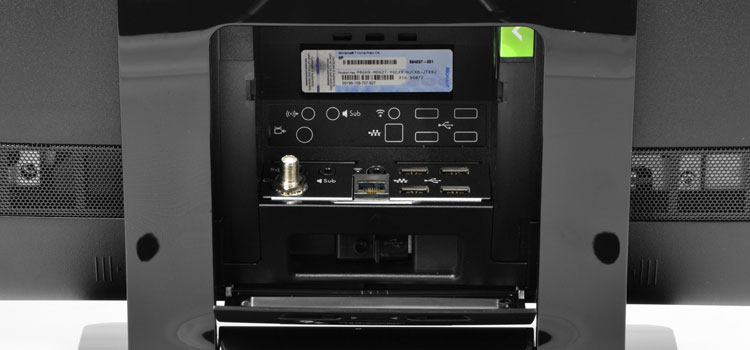
One major oversight is HDMI out. It’s nowhere to be found on the sides or on the back. This computer certainly has the chops to serve as a wonder-boy home theater and family computer, but without HDMI out, a lot of connectivity options are eliminated.
Software extras
HP’s Touchsmart interface, which is one of the most important software enhancements, was already touched on above. There are a few other bits of software installed, however.
Most of it is obvious marketing material. Opening “HP Music” in the touchscreen interface brings up a Rhapsody-powered user interface, which can be used to sign up for the service and listen to music as well as catalog local tracks. Other preinstalled brands include Ebay, Hulu, and Weatherbug, along with the typical Norton anti-virus.
All of these services can be potentially uninstalled, even from the TouchSmart interface, so there’s no huge issue here. It’s just a minor annoyance that may make a few geeks feel a bit hot under the collar.
Full desktop performance
Though an all-in-one designed for entertainment use by the whole family, the HP TouchSmart 610 is no slouch when it comes to hardware. It is, in fact, the company’s flagship touch all-in-one computer.
As a result, all variants come nicely equipped. Intel’s Core-i7 2600 is the only choice, and while the 1.5TB hard drive and eight gigabytes of RAM in our review unit are technically upgrades, they’re the “free” type (basically standard, but listed as an upgrade for marketing purposes). Our review unit also came with Radeon HD 5570 graphics, a no-cost option.
 With all of this hardware available, it’s no surprise that the performance results were excellent. SiSoft Sandra reported a combined score of 93 GOPS, while 7-Zip reported a combined score of 16,142. Both of these relay the fundamental strength of the quad-core Intel processor. In combined testing with PCMark 7, the TouchSmart reported a score of 2,781, while 3DMark 11 returned a surprisingly respectable score of 1,405.
These scores are all solid, and represent a computer with a broad range of powerful hardware that can handle most tasks thrown at it. However, these scores could also easily be beaten by a less expensive computer, such as HP’s own Pavilion desktops. Obviously, you’re paying for the touchscreen and the all-in-one design, so most computers that don’t have those features will easily outrun this computer for hundreds less.
Conclusion
This computer is a tour-de-force for modern touchscreen desktops. It throws everything that one could imagine at the task at hand. It has fast hardware, a brilliant display, a custom touch interface, and a unique hinge that makes it possible to angle the entire touchscreen in numerous ways for easy use.
Even so, there are flaws in this design. The fact remains that, while the touchscreen is cool, it is easily abandoned in favor of the keyboard and mouse, which is simply better to use in many situations. The touch input, for all HP’s effort, still feels like a bit of a gimmick.
The lack of HDMI out is also a big issue. A computer like this would be perfect for an entertainment center, as its touch screen would allow quick navigation of video, and it already comes with a remote. But without HDMI out, the usefulness of this computer for entertainment in some situations is reduced. On the other hand, the built-in TV tuner is nice to have, and will allow this computer to double as a television.
Consumers who are in the market for an all-in-one should check this model out. Despite the issues above, it remains among the best entries in the field. It’s both quick and easy to use, with touch or without, which means it’s a nice choice for a family PC — if you can justify spending the dough.
Highs:
- Beautiful 1080p display
- Touch input is responsive
- Fast hardware
- Unique hinge works well
Lows:
- Expensive
- No HDMI out
- Touch input is of questionable use



