

“Olympus has seriously invested to bring its PEN series up to speed and the E-P3 packs a much more serious punch than its predecessors.”
- Incredibly high speed
- Touchscreen and 3D shooting
- Endless customization options, and new hardware for improved, quicker manual use
- User-friendly in-camera UI
- Stylish look and comfortable feel
- Still no viewfinder
- Price comparable to many DSLRs
- Shooting in low-lighting remains tricky, but improved
“Why you can trust Digital Trends – We have a 20-year history of testing, reviewing, and rating products, services and apps to help you make a sound buying decision. Find out more about how we test and score products.“
 The E-P3 is Olympus’ latest update to its PEN series of Micro-Four-Thirds cameras. At first glance, it looks so similar to its predecessors that you might not even know it’s a new model. But some subtle design differences are no match for the internal upgrades Olympus has made. A faster, more creative, and incredibly customizable experience is packaged within the E-P3. But while it’s incredibly fun to use and produces great results, a price tag footed firmly in DSLR territory should give pause to would-be buyers.
Features and design
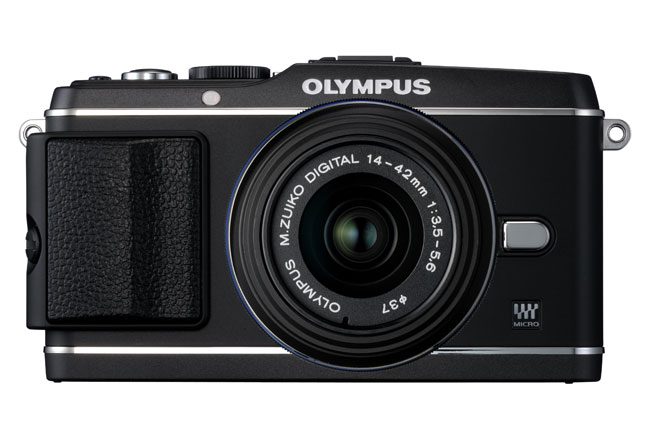
The E-P3 has the same look and feel as the rest of Olympus’ PEN lineup, but the company has made the camera even more customizable this year. An optional faux leather grip can securely be screwed onto the chassis. That might sound cheap, but it feels solid and there’s no noticeable void on the camera if you choose to leave it off. So if you like the vintage-feel of the PEN lineup, then go right ahead and screw the grip on. If you like the gunmetal, all-black body, forget it.
 The EP-3 also has a few other upgrades for this year. The manual flash has been redesigned. Olympus told us that engineers and designers collaborated to keep that slightly sloping line of the series, and this time it’s a bit sleeker. The camera is more compact than the E-PL2, the last PEN series release, but otherwise has an extremely similar feel. In general, the body updates are pretty subtle and will probably only make an impression on true fans of the PEN series. Otherwise, the average consumer will likely see a slightly more compact model. We did, however, get a chance to use the E-PL2 and compare it for sizing purposes, and the E-P3 definitely felt slimmed down.
Other outside upgrades include an additional mode dial on the back of the camera, which just offers one more way to paw through the manual options. Most of the big differences, however, are on the inside. Olympus has outfitted the E-P3 with an upgraded sensor and processor that blow its former models out of the water. Its 12.3-megapixel live MOS sensor may be the same size as other units, but it now features Fine Detail Processing Technology, which means crisper images. While that’s all well and good, the TruePic VI Image processor is the update we’re most excited about. The E-P3 packs two processors: One to improve the camera’s speed while in use, and another to process images more quickly.
 Olympus also bumped up its ISO sensitivity to 12,800. But all those improvements and tweaks seem small compared to the real draw: This is Olympus’ first touchscreen camera. The E-P3 feaures a 3-inch, 614K pixel OLED touchscreen. The screen also has anti-fingerprint technology so that gorgeous glass isn’t completely marred by your hands seconds into use.
What’s in the box
The E-P3 comes in black, white, and silver and includes the kit lens, USB cables, video cable, BLS-1 Li-Ion battery pack, Li-Ion battery charger, shoulder strap, CD-ROM, and user manuals. It will be available August 2011.
Performance and use
Like our other experiences with the PEN series, the Micro-Four-Thirds camera blows point-and-shoots out of the water and can’t quite compare to DSLRs in a couple departments. It still can’t quite compare to DSLRs when it comes to shooting in low light (we compared it to the Canon Rebel Eos XTI), but we’re happy to report some improved specs mean it did perform better than previous units.
First and foremost, the E-P3 is fast. Really fast. It’s speed is comparable to some DSLRs thanks to the new TruePic IV processor, as well as its new AF system, which has gone from 11 target points to 35. Focus locking is also much faster, as is communication between the body and lens in general. Olympus also cut shutter lag in half for its PEN series with the E-P3, which was possibly the most notable speed upgrade. There is also an option for really putting the thing to use and cutting out the blank screen time between playback and your next photo. We tried it out and you could barely blink between takes. Pair that with improved AF and the PEN has some heightened sports and motion possibilities.
Olympus has really pushed the PEN series as highly capable video recording devices, and the E-P3 is no exception. We actually felt that this camera focused better during recording, something that irked us a little when shooting in iAuto with the E-PL2. It shoots in 1080i HD video and stereo AVCHD or AVI formats, and the ability to use the art filters in movie mode is a nice addition.
On that subject, more and more high-end cameras are including some sort of built-in art filters, to varying degrees of success. It’s a difficult to gauge how interested consumers are in this feature: Advanced photographers likely defer to Photoshop or other software for their editing purposes, and many of the users who are attracted to these pre-installed options likely aren’t willing to pay the price tag. But Olympus does it right with the E-P3 by offering a slew of customizations for the art filters. While the PEN series already had a heavy helping of these editors, now you can adjust the white balance, saturation, contrast…the list goes on. During our testing, it made usage a lot more natural, and convinced us stray from manual shooting occasionally.

The E-P3 also now includes a feature users have been asking for since it first introduced its very first PEN camera. Users can now take a picture and the camera will process it in a variety of art filters of your choosing. So if you want that landscape photo in Dramatic, Cross Process, and Sepia, you can do that in just one take.
Using manual was also more intuitive with the E-P3, thanks mainly to the extra mode dial. A common photographer frustration with compact DSLRs or Micro-Four-Thirds is trying to efficiently navigate the camera’s manual settings. But Olympus has rearranged the exterior control layout and redesigned the software user interface to speed the process up. The new rotational dial lets you adjust settings without deferring to the main menu and working your way back. True, this means there are more things to get used to, but the setup simply allows for what seems like endless customization. The learning curve isn’t too steep, but there’s so much to explore when it comes to manual settings that you won’t outgrow this camera too quickly.
Now, the touchscreen. We have mixed feelings: In general, there’s something that just feels wrong about a touchscreen on a DSLR or Micro-Four-Thirds camera. It seems like it’s just for fun and play and should be used for the types of photos you take with point-and-shoots. While we weren’t drawn to using it, however, this is likely to become a more standard option for cameras of all varieties and Olympus deserves a nod for going out on a small but notable limb and implementing the technology. The 3-inch screen is also beautiful and the touchscreen was responsive. The touchscreen also allowed us to choose focus points, which was a surprisingly impressive feature. And in the spirit of getting on board with big steps forward in technology, the E-P3 also features 3D shooting.

The screen held up decently well in bright light, but there were some overcast moments when we found ourselves squinting while trying to capture an image. Which brings us to the still missing feature that purists will continue to be frustrated by: The lack of a viewfinder. Olympus has attachable viewfinders if you want the option, but there are many who aren’t satisfied with an accessory and lobby for the feature in additional to a screen. If that’s you, then continue to hold your breath…we guess. Obviously a built-in viewfinder would be a bonus, but we’re honestly getting used to the lack thereof in everything besides big-bodied DSLRs.
As far as feel goes, the E-P3 was a comfortable camera to sling around our neck and move ably with. We were shooting in Alaska this week, and the E-P3 was anything but cumbersome, in fact it felt even more portable than its predecessors. It’s undeniably fun, not only because of creative options but because we could exercise more advanced photo skills.
Conclusion
Here’s the kicker: The E-P3 is $899.99. That’s a steep price to pay for a Micro-Four-Thirds, which some consider a hobby camera. It’s hard to justify spending this much on anything that you won’t be using as a professional device, but there are a few things that could sway those considering such a purchase. The fact that Olympus has seriously invested to bring its PEN series up to speed — literally — is impressive. Looking at it, you might not think it’s all that different than the rest of the lineup, but the E-P3 packs a serious punch, a much more serious punch than its predecessors.
Highs:
- Incredibly high speed
- Touchscreen and 3D shooting
- Endless customization options, and new hardware for improved, quicker manual use
- User-friendly in-camera UI
- Stylish look and comfortable feel
Lows:
- Still no viewfinder
- Price comparable to many DSLRs
- Shooting in low-lighting remains tricky, but improved


