


The Quest 2 is one of the most popular VR headsets on the market. This is due to its low price, versatility, and ease of use. Unlike nearly every other headset currently on the market, the Quest 2 can be used completely independent of any other hardware, meaning you don't have to have a cable connecting you to a PC or console. For those that do want to boost the power, though, you also have the option to connect yourself to a PC to take advantage of your existing hardware.
As great as the Quest 2 is, there is always room for improvement to make VR more comfortable and accessible to everyone. Whether you're using it primarily for gaming, creating, or exploring the metaverse, here are the top Quest 2 accessories that will make your trips into VR all the better using the Quest 2.



![NexiGo Enhanced Charging Dock with LED Light for Oculus Quest 2, [Support Elite Strap with Battery], Headset Display Stand and Controller Mount, 2 Rechargeable Batteries, Magnetic Cable](https://s3.us-east-2.amazonaws.com/ccp-prd-s3-uploads/2022/10/14/808a20dda635a0b1de2691e74061b15ae456196b.jpeg)
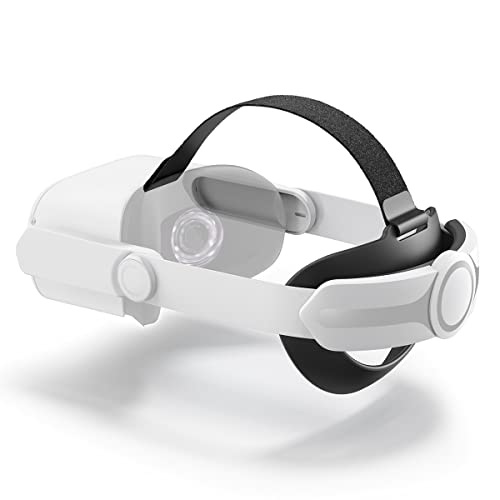
Joyroom Adjustable Head Strap
- Fully adjustable
- Easy to install
- Comfortable
- Velcro not ideal for getting the perfect fit
The biggest hurdle VR had to overcome to become a widespread consumer product was size and comfort. No one wants to put on a bulky, heavy, and uncomfortable headset for any length of time, after all. The Quest 2's default headset design is perfectly good, but it could certainly be better.
This is where the Joyroom Adjustable Head Strap comes in. This strap replacement was specifically designed for the Quest 2 and implements an ergonomic design that evenly distributes the weight of the headset to keep pressure off of your face and ears. The hinge function also makes it easy to simply tilt the headset up if you need to check your surroundings without completely removing the headset itself. The headset is fully adjustable between 17 and 24 inches as well, making it suitable for children and adults.
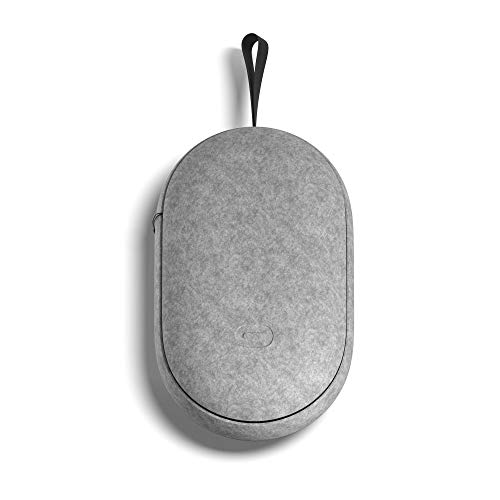
Quest 2 Carrying Case
- Designed to fit all components perfectly
- Tough outer shell prevents damage
- Sleek design
- Pricey
- Carrying strap isn't ideal
Since the Quest 2 is capable of being used as a fully self-contained unit, you're free to use it anywhere. From inside your house to out in your yard or a park, the wireless nature of the headset makes it the most versatile VR headset available. However, this is still an expensive piece of hardware you're carrying around with you, and you want to take care of it.
The Quest 2 Carrying Case is your ideal solution. This compact case lets you slot in your headset, both controllers, a charging cable, a power adapter, and even a custom strap in its protective case. The interior is softly padded and keeps all your components secure to avoid any potential damage from bumps or turbulence, and the outer shell is double-layered to prevent impact damage. Whether it's around the corner or across the country, this is a great case to keep your device safe during transit.
AMVR Touch Controller Grip Cover
- Very affordable
- Easy to install and adjust
- Comfortable
- A little tricky to remove
The headset is obviously a major component of the Quest 2, but we can't forget about the controllers, especially if you're a gamer. We've all seen videos of people accidentally hurling their motion controllers, VR or otherwise, in the heat of the action. At best, this will ruin your game, but at worst, it can damage your equipment or even cause injury.
The AMVR Touch Controller Grip Cover, when used properly, makes using your Quest 2 as safe as possible. It's easy to slip on your controller and use adjustable straps to keep the controller tight to your hands. The rubber texture on the controller itself also helps prevent accidental slipping when your hands get sweaty. With these grips, you can flail around wildly without worrying about your controllers flying loose.
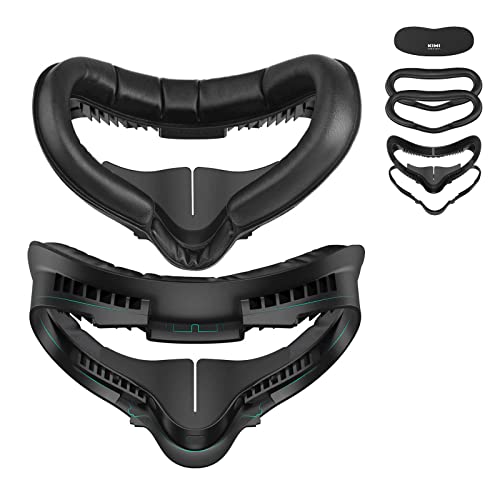
KIWI Design Facial Interface
- Prevents sweat and fogging
- Very comfortable padding
- Glasses-friendly
- Easy to clean
- Can create light bleeding
One often-overlooked aspect of VR is the importance of the material used on the inside of the headset that will be resting against your face. Not only should this material be comfortable, but it should also be clean, ventilated, and not irritate your skin. Unfortunately, the default padding on the Quest 2 doesn't quite hit all these marks.
The KIWI Facial Interface is a major upgrade to your Quest 2. Not only is the cushioning far more comfortable, allowing you to play for longer without the headset irritating your face, but it's also designed with vents to allow increased airflow to prevent sweat and lens fogging. Plus, for anyone who wears glasses, it even comes with a spacer to allow you to play VR comfortably with it on.
Rebuff Reality VR Power 2
- Adds a ton of use time
- Feels secure whien moving
- Counter balances the weight of the headset
- A little expensive
- Makes the headset heavier
As amazing as it is to use the Quest 2 without any wires holding you down, you will still be limited by the battery life. Once you start wanting to dive into VR for longer periods of time, or simply forget to recharge between sessions, the Quest 2's default battery life will quickly become a point of frustration.
There are plenty of external battery packs for the Quest 2, but the Rebuff Reality offers the best bang for your buck. It has a 10,000mAh battery that increases the Quest 2's battery life to around eight hours of use, which is significantly more than the default. While the battery itself is a bit hefty, they did smartly design it to fit as a counterweight to the headset to make it as comfortable as possible.
Lens Cleaning Pen
- Easy to use
- Very affordable
- Safe for all lenses
- Tips eventually need replacing
No matter how careful you are, eventually, the lenses on your Quest 2 will get dirty in some way. It could just be dust, or worse, smudges and fingerprints, but no matter what it is, having any kind of blemish on a screen so close to your eye will immediately take you out of the experience, if not cause motion sickness. Cleaning such delicate hardware is always tricky, and the Quest 2 doesn't come with anything to help make it easier.
This cleaning pen is the perfect tool for safely removing any debris from your Quest 2 lenses. The pen has two ends: a narrow brush wipes all the small cracks and narrow areas, and carbon powder gently scrubs the lens to return it to crystal clear quality. Best of all, it works with any lenses you have that need a touch-up, VR or otherwise.
NexiGo Enhanced Charging Dock
- Very fast charging
- Convenient way to store your entire unit
- LED battery indicators
- Slightly complicated to set up
Finally, battery pack or not, you're eventually going to need to charge your Quest 2. When that time comes, why not do it not only faster but also in style with a custom charger? The default wire will do the trick, but it isn't exactly the most efficient way.
There are plenty of chargers and mounts, but the NexiGo Enhanced Charging Dock combines the two. Not only is it a convenient and neat way to mount your Quest 2 when not using it, but it also speeds up your charge times to around three and a half hours for the headset and about four for your controllers simultaneously. It uses magnetic USB-C cables for the fastest charge possible, plus has an LED indicator to let you know how much charge you've gotten.


