1. Home
  2. Gaming
  3. News

Preload Black Ops 7 on PC today, check your specs, play at midnight

Get the preload timing, system requirements, driver picks, and handheld tips in one quick read.

Add as a preferred source on Google
Call of Duty
Call of Duty

What’s happened? Activision and Beenox just laid out the PC plan for Call of Duty Black Ops 7. You get clear preload timing, unlock windows, hardware targets, and driver picks, so you can install early and avoid day one chaos.

  • According to the Call of Duty team, preload begins November 10 at 9 a.m. PT and includes Campaign Co-op, Multiplayer, and Zombies.
  • On PC, Battle.net and Steam unlock November 13 at 9 p.m. PT which equals midnight on the US East Coast.
  • Global timing examples include London at 5 a.m. GMT and Tokyo at 2 p.m. GMT on November 14.

This is important because: With storage, security, and drivers settled in advance, you skip troubleshooting and go straight to your first match.

  • Plan for an SSD with 116 GB free at launch and keep headroom for patches.
  • Meet security requirements with TPM 2.0 and Secure Boot and enable Resizable Bar if you use Intel Arc.
  • Install driver versions listed by the devs to reduce crashes and shader stutter.
Recommended Videos

Why should I care? This build leans into PC controls, displays, and tools. You get real dials and not vague presets, and it’s a quick way to validate your setup before you queue.

  • More than 800 settings touch graphics, input, HUD, and display support across 1080p, 1440p, 4K, and ultrawide.
  • AMD FSR 4 and other upscalers and frame generation options can lift frames while keeping the image clean.
  • An in-game benchmark helps lock a profile before your first match.
  • Sub-frame mouse polling sharpens aim and Ricochet anti-cheat works alongside TPM 2.0 and Secure Boot.

Okay, so what’s next? Do the groundwork now so launch night is just play. PC or handheld, a quick checklist makes a big difference.

  • Start the download November 10 at 9 a.m. PT and verify files when it finishes.
  • Update GPU drivers, reboot, and toggle Resizable Bar if you run Intel Arc.
  • Check BIOS for TPM 2.0 and Secure Boot to avoid lockouts.
  • Run the in-game benchmark, set a 60 or 120 fps target, and tune your upscaler.
  • On Windows handhelds, try 900p or 720p with medium settings and a frame cap for smooth play.
Paulo Vargas
Paulo Vargas is an English major turned reporter turned technical writer, with a career that has always circled back to…
MSI’s next gaming monitor can morph between three different resolutions and refresh rates
Why buy three monitors when MSI wants you to buy one expensive one?
MSI MPG OLED 322URDX

Gaming monitors have slowly become one of the most aggressively competitive categories in PC hardware. Over the past few years, brands have raced to push refresh rates higher, improve OLED technology, reduce response times, and deliver increasingly brighter displays. But despite all those upgrades, buyers still usually have to pick one side of the experience. You either buy a super-fast esports monitor with lower resolution or a high-resolution OLED display focused more on cinematic gaming.

At Computex 2026, MSI appears to be trying to eliminate that compromise. The company has officially unveiled the MSI MPG OLED 322URDX36, which it describes as the world’s first triple-mode QD-OLED gaming monitor.

Read more
All Stellaris cheats and console commands
Give yourself the edge in galactic conquest with these cheats and commands
Fleet in Stellaris

Running a galactic empire in Stellaris is an arduous task. One bad war, an economic spiral, or one neighbor with a suspiciously large fleet can turn a promising save into a slow-motion disaster. You may want to fix a mistake, or maybe even want to test a build. And sometimes, you just want to see what happens when your empire suddenly has more alloys than sense.

This is where Stellaris console commands come in. These cheats let you add resources, finish research, control empires, spawn ships, trigger events, or bend the galaxy in ways the normal game usually won’t allow.

Read more
Is Rust cross-platform?
Yes, but there's levels to this.
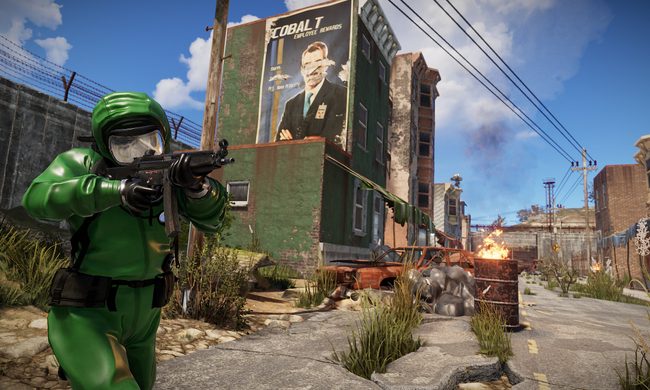
Rust player running by buildings.

Rust is the kind of survival game where choosing the right server matters almost as much as choosing the right weapon. This also reflects on the platform of your choice. If you're you're friends are spread across PC, PlayStation, and Xbox, you’ll want to know exactly who can play together before anyone starts building a base.

The answer to the question is simple in one way and annoying in another. Rust supports crossplay between PlayStation and Xbox players, but PC players cannot play with console players. So yes, there is cross-platform support, but only inside the console version of the game.

Read more