
Podcasting is a fantastic way to get your personality and your ideas out into the world. Though it’s far easier to produce a regular podcast show than, say, a video series or other forms of online content, podcasting still requires more than one might expect, especially if you want to incorporate professional audio. Thankfully, once you’ve overcome the initial time and monetary investments that go into equipment and planning, all you need is a little dedication and free time to get your show on the road.
Below is our straightforward guide to making the best podcast you can. Keep in mind, however, that it’s intended to be more of a jumping off point than a shortcut to any sort of success. We’ll be laying out a few suggestions on how to make your show sound great — both in terms of audio quality and content — get hosted, and, hopefully, get noticed.
Planning and preproduction
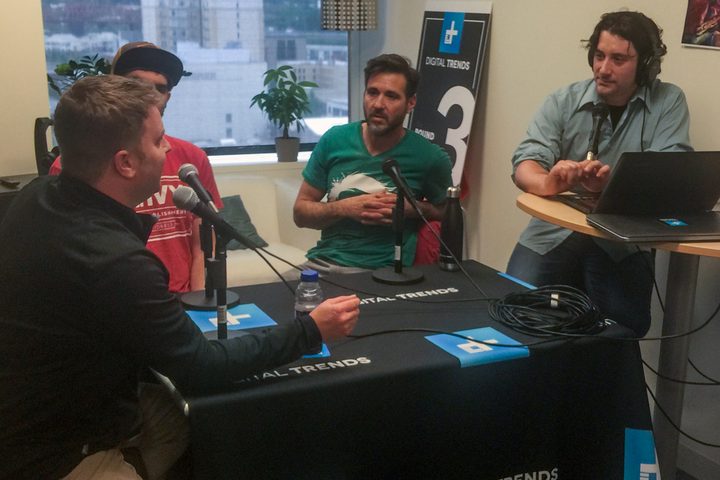
Before you go about recording your first episode, you need to do a fair amount of planning and pre-production. Below are some other factors to consider.
Theme
You can really go any number of directions here. You could go broad and cover a wide variety of topics, or you could go specific and focus on your own niche. Either way, the rule of thumb here is to find a theme that you’re interested in and that will suit the goals of your show. The more passionate and knowledgeable you are about a topic or idea, the more fun you’ll have, which will, in turn, make your show more entertaining to listen to. As time goes on, if you feel like expanding (or shrinking) your topic as your podcast evolves and grows, go for it! But in the early stages, be sure to stick to it, as it will keep you focused. Here are some of the best podcasts of 2019 to get your creative ideas flowing.
Episode length and format
How long do you want your podcast to be? Most podcasts don’t exceed 60 minutes as anything longer typically is a bit much for the average listener. Also, take into account the length of any media you will air — such as songs or a pre-recorded introduction — and run a timer for each segment to ensure the utmost accuracy. Timing doesn’t need to be exact across all episodes, but it should be in the ballpark.
Script
Once you’ve chosen your theme and have a general idea for your show’s format, the next step is to script it. Yes, that’s right, script it. Even if you plan to go off the cuff and improvise your conversations, as most podcasts do, having a general outline to keep yourselves on track is a good idea. This is especially important if you’re going to have multiple segments during your show. Having a script or outline will make transitions between segments feel more natural and elegant, and will ensure you stay within your general time limit.
Scheduling
How often will your podcast air new episodes? Weekly or biweekly tends to be the norm for most shows, though others do air monthly or even less frequently than that.
Podcasting equipment

Equipment is where you’re going to be investing the most money. The creative aspects of the show — i.e. planning, writing, and performing — are only one part of the equation; the other is the technical side. Mics, headphones, a mixer, and recording software are the basics you’ll need, but there are some other extra pieces of equipment that you can include in your setup to enhance your recording experience and ensure the best possible sound quality.
Recording software
While you could opt for high-end recording programs such as Pro Tools , there are several reputable free options out there. The first, Audacity, is an open-source editing and recording program that’s compatible with most operating systems and works well for beginners. Though it dons a rather unflattering exterior, you’ll be able to record live audio directly into the application, or import a variety of different audio files, including MP3 and WAV. The software even touts recovery options in the event that your system crashes. Acoustica Basic Edition is another free option, one that provides audio recording and editing within a well-designed interface. However, you’ll have to pay extra for multitrack editing and other advanced features.
USB microphone(s)
In all reality, podcasters should consider purchasing an external microphone. USB mics, such as the and , plug directly into your computer and interface with your recording software, thus offering superior sound and greater flexibility than your computer’s built-in microphone. Also, be sure to buy the right number of mics for your show, as you’ll want all cast members to be heard loud and clear. And if you’re going to be using a mixer, be sure to buy microphones that can plug into it! Not all mixers support USB mics, and not all mics will work with standard mic plugs.
Mixer
Amateur podcasters don’t necessarily need to purchase a mixer, as any worthwhile piece of recording software allows users to directly record their voice and store it as an audio file. Mixers often offer other benefits you can’t find elsewhere, however, such as greater control and effects. A mixer is valuable, for instance, if you’d like to include music or movie clips in your podcast, or if you’re using multiple mics.
Headphones
These don’t have to be all that fancy; all you need is a decent pair of headphones so you can hear yourself and any guests you might have on the show. If you’re using a mixer, however, these become a requirement, as you will need to have headphones in order to correctly adjust the audio channels. After all, you can only do so much in post-production editing. Thankfully, the best wireless headphones of 2019 have great sound, and are comfortable, too.
Pop filter
Ever heard of the term “popped plosives?” Well, if you haven’t, they’re the annoying pop you often hear in a microphone whenever someone punches their consonants. Thankfully, pop filters are an inexpensive way to decrease explosive sounds that are common among casual vocal delivery. There’s a bevy of offerings out there, from to , each of which is designed to eradicate the sudden burst in air pressure and the bassy response that ensues when you say words chock-full of the letters “P” and “B.”
Recording and editing

Once you’ve obtained the proper gear, you’re ready to begin recording. Afterward, you can move to post-production and editing.
Recording
This is where all your preparation and hard work pays off. If you’re just starting out, don’t worry too much about executing the perfect show right off the bat. As we’ve previously discussed, there’s a lot to consider, both from technical and creative standpoints. If you run into obstacles, don’t panic, and consider the fact that even professionals have to troubleshoot from time to time. And once your first recording is complete — presto! — you’ll have an audio file for your pilot episode. It’s not really a podcast until it’s online and available to the public, though.
Postproduction
Not only applicable to podcasters mixing interfaces to create multitrack recordings, postproduction editing is key to nearly every podcast. Masterful editing takes time to learn, though, so don’t be concerned if you can’t pull off some of the more advanced procedures in the beginning. As far as basics go, you’ll want to ensure your vocal levels are roughly the same for each speaker and work on tightening dead space between phrases. If you have other audio components, such as miscellaneous sound effects and background music, make sure those levels are low enough that you can still hear the speakers. You can also work to trim your file to a specified length, or adjust the bit rate and other audio facets for your desired medium. Editing deserves a tutorial on its own, but for most casual podcasters, most of it can be done without expensive software or substantial time.
Uploading to a host site
There’s really no point in a podcast if you don’t intend to share it with others. To do so, you must host your resulting audio file somewhere online, prior to linking to the file from elsewhere. There are numerous ways to go about hosting your podcast, though some are better than others. Websites like WordPress and Blogger provide a free and simple means for hosting audio files, but they’re limited in terms of flexibility and exhibit a general lack of control. HostGator, though more complicated, offers more advanced features and a domain at a relatively low price point. However, if you do go with WordPress, the site will automatically add the RSS2 enclosure when you add a link to your audio file, which makes it possible to use as a podcast. Uploading your audio file will make the necessary RSS2 enclosure tag and can generate your XML feed.
Indexing
Technically, podcasts are XML files that index the MP3 files and metadata that represent each episode. Be sure to follow Apple’s podcast specifications for the best results. Afterward, once your XML file is online, use an RSS validator like feedvalidator.org to make sure you didn’t make any mistakes before submitting your feed to the iTunes store. Don’t forget to submit your show to other podcast platforms, including Google Music, Stitcher, and SoundCloud.
Distribution

Congratulations! After a little time, and maybe some troubleshooting, Apple will list your podcast in the iTunes Store and Google will add you to its podcast selection. You are now a media entity, so start acting like one!
Social media
Your podcast needs listeners and social media networks provide a great way to connect with them. Post notifications to Facebook, Twitter, Instagram, Snapchat and other networks whenever new podcast episodes become available, expanding the content with additional links and updates if there have been any new developments since your podcast initially aired. Did you recently feature a song from a local artist? Post an update with a link to that song. Really pumped about a guest that will join your next episode? Add an update saying so. Use social media to maintain interest in your brand between episodes.
Website
Your podcast should also have a home beyond its social media presences. The premium Squarespace, along with a host of other platforms, represent just a handful of quality alternatives if you’re looking for a polished presence and one-stop access to all your episodes. No matter which site you decide to utilize, it should provide information about the podcast — what it’s about, who participates — and show notes for all episodes.
Repeat
There you have it. You are now a podcaster. Remember, podcasts are recurring media, so it’s time to get to work on episode two. Before you do, though, consider a debrief with other hosts and with your respective guests. Discuss what worked well and what could be improved. If time allows, make said debriefings a regular part of recording your podcast. Ad-hoc thinking could arise as well, so keep a running list of ideas that you can review when you need to.


